
 資料結構
資料結構 網路
網路 RDBMS
RDBMS 作業系統
作業系統 Java
Java MS Excel
 iOS
iOS HTML
HTML CSS
CSS Android
 Python
 C 程式語言
 C++
C++ C#
C# MongoDB
 MySQL
MySQL Javascript
 PHP
PHP 物理學
物理學 化學
化學 生物
生物 數學
數學 英語
英語 經濟
經濟 心理學
心理學 社會研究
社會研究 時尚研究
時尚研究 法律研究
法律研究jQuery :checkbox 選擇器
jQuery :checkbox 選擇器用於選擇型別為 checkbox 的輸入元素。
語法
語法如下所示 -
$(":checkbox")示例
讓我們看一個示例,在 jQuery 中實現 :checkbox 選擇器 -
<!DOCTYPE html>
<html>
<head>
<script src="https://ajax.googleapis.com/ajax/libs/jquery/3.4.1/jquery.min.js"></script>
<script>
   $(document).ready(function(){
      $(":checkbox").wrap("<span style='border: 2px green dashed'>");
   });
</script>
</head>
<body>
<h2>Fill the form</h2>
<form action="">
ID: <input type="text" name="id"><br>
Rank: <input type="text" name="rank"><br>
Fav. Subjects:
Maths: <input type="checkbox" name="sub" value="maths">
English <input type="checkbox" name="sub" value="english"><br>
<input type="submit" value="Submit"><br>
</form>
</body>
</html>
輸出
這將生成以下輸出 -
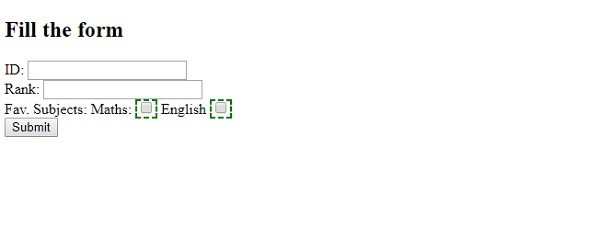
示例
讓我們看另一個示例 -
<!DOCTYPE html>
<html>
<head>
<script src="https://ajax.googleapis.com/ajax/libs/jquery/3.4.1/jquery.min.js"></script>
<script>
   $(document).ready(function(){
      $(":checkbox").wrap("<span style='background-color: orange'>");
   });
</script>
</head>
<body>
<h2>Hobbies</h2>
<form action="">
Player Name: <input type="text" name="name"><br>
Fav Sports
Football: <input type="checkbox" name="sp" value="football">
Cricket <input type="checkbox" name="sp" value="cricket"><br><br>
<input type="submit" value="Submit"><br>
</form>
</body>
</html>
輸出
這將生成以下輸出 -


更新於: 05-11-2019
361 次瀏覽

廣告