
 資料結構
資料結構 網路
網路 關係型資料庫管理系統
 作業系統
作業系統 Java
Java MS Excel
 iOS
iOS HTML
HTML CSS
CSS Android
 Python
 C 程式設計
 C++
C++ C#
C# MongoDB
 MySQL
MySQL JavaScript
 PHP
PHP 物理
物理 化學
化學 生物
生物 數學
數學 英語
英語 經濟學
經濟學 心理學
心理學 社會研究
社會研究 服裝研究
服裝研究 法律研究
法律研究JavaScript lastIndex 屬性
JavaScript 中的 lastIndex 屬性返回匹配發生時的索引位置,並且下一個匹配將僅從該位置重新開始。lastIndex 屬性僅在設定了“g”修飾符時才有效。
以下是 JavaScript 中 lastIndex 屬性的程式碼 -
示例
<!DOCTYPE html>
<html lang="en">
<head>
<meta charset="UTF-8" />
<meta name="viewport" content="width=device-width, initial-scale=1.0" />
<title>Document</title>
<style>
   body {
      font-family: "Segoe UI", Tahoma, Geneva, Verdana, sans-serif;
   }
   .sample,
   .result {
      font-size: 18px;
      font-weight: 500;
      color: red;
   }
</style>
</head>
<body>
<h1>JavaScript lastIndex Property</h1>
<div class="sample">The king bought an expensive ring.</div>
<div style="font-weight: bold; color: black;" class="result"></div>
<button class="Btn">CLICK HERE</button>
<h3>
Click on the above button to find the index of 'ing' in the above string
</h3>
<script>
   let sampleEle = document.querySelector(".sample");
   let resultEle = document.querySelector(".result");
   let regex = new RegExp("ing", "g");
   regex.test(sampleEle.innerHTML);
   document.querySelector(".Btn").addEventListener("click", () => {
      resultEle.innerHTML +='"ing" found Current Index = ' + regex.lastIndex + "<br>";
      regex.test(sampleEle.innerHTML);
      resultEle.innerHTML += '"ing" found Current Index = ' + regex.lastIndex;
   });
</script>
</body>
</html>
輸出
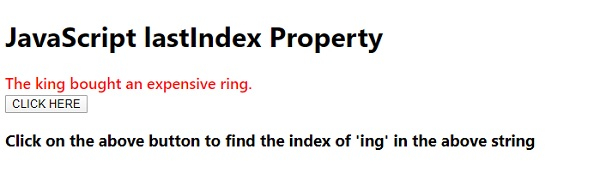
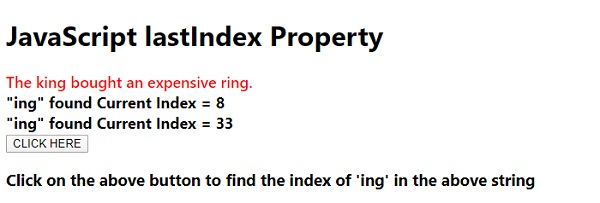
單擊“單擊此處”按鈕時 -

更新於: 2020 年 5 月 11 日
86 次瀏覽

廣告