
 資料結構
資料結構 網路
網路 關係型資料庫管理系統
 作業系統
作業系統 Java
Java MS Excel
 iOS
iOS HTML
HTML CSS
CSS Android
 Python
 C 程式設計
 C++
C++ C#
C# MongoDB
 MySQL
MySQL Javascript
 PHP
PHP 物理學
物理學 化學
化學 生物學
生物學 數學
數學 英語
英語 經濟學
經濟學 心理學
心理學 社會研究
社會研究 時裝研究
時裝研究 法律研究
法律研究JavaScript 陣列中的 splice() 方法
JavaScript 中的 splice() 方法用於新增或刪除專案。它返回被刪除的專案。
語法如下 -
array.splice(index, num, item1, ....., itemX)
此處,index 是指定在哪個位置新增或刪除專案的整數,num 是要刪除的專案數量,item1…itemX 是要新增到陣列的專案。
現在讓我們在 JavaScript 中實現 splice() 方法 -
示例
<!DOCTYPE html>
<html>
<body>
<h2>Products</h2>
<p>Click to display the updated product list...</p>
<button onclick="display()">Result</button>
<p id="test"></p>
<script>
   var products = ["Electronics", "Books", "Accessories"];
   document.getElementById("test").innerHTML = products;
   function display() {
      products.splice(1, 2, "Pet Supplies", "Footwear");
      document.getElementById("test").innerHTML = products;
   }
</script>
</body>
</html>
輸出

點選上方的“結果”按鈕 -

示例
<!DOCTYPE html>
<html>
<body>
<h2>Products</h2>
<p>Click to display the updated product list...</p>
<button onclick="display()">Result</button>
<p id="test"></p>
<script>
   var products = ["Electronics", "Books", "Accessories"];
   document.getElementById("test").innerHTML = products;
   function display() {
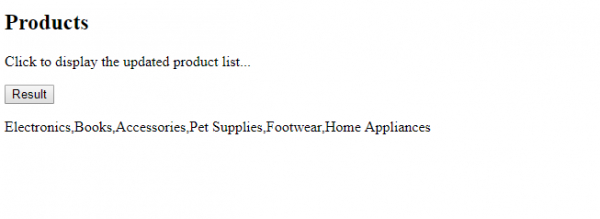
      products.splice(3, 1, "Pet Supplies", "Footwear", "Home Appliances");
      document.getElementById("test").innerHTML = products;
   }
</script>
</body>
</html>
輸出

點選“結果”按鈕 -

更新於: 2019 年 12 月 17 日
156 次瀏覽

廣告