
 資料結構
資料結構 網路
網路 關係型資料庫管理系統
 作業系統
作業系統 Java
Java MS Excel
 iOS
iOS HTML
HTML CSS
CSS Android
 Python
 C 程式設計
 C++
C++ C#
C# MongoDB
 MySQL
MySQL Javascript
 PHP
PHP 物理
物理 化學
化學 生物
生物 數學
數學 英語
英語 經濟
經濟 心理學
心理學 社會學
社會學 時尚研究
時尚研究 法律研究
法律研究JavaFX 示例,在單選按鈕中新增工具提示
單選按鈕
單選按鈕是一種按鈕,形狀為圓形。它有兩個狀態,選中和未選中。通常,單選按鈕使用切換組進行分組,您只能選擇其中一個。您可以透過建立javafx.scene.control.RadioButton類來在 JavaFX 中建立單選按鈕。
工具提示
只要在應用程式中將滑鼠指標懸停在某個元素(例如,按鈕、標籤等)上,工具提示就會顯示有關該元素的提示。在 JavaFX 中,工具提示由javafx.scene.control.Tooltip類表示,您可以透過建立它來建立一個工具提示。
在建立類時,需要將文字傳遞到其建構函式作為引數(或使用 setText() 方法設定文字)。
示例
import javafx.application.Application;
import javafx.geometry.Insets;
import javafx.scene.Group;
import javafx.scene.Scene;
import javafx.scene.control.Label;
import javafx.scene.control.RadioButton;
import javafx.scene.control.ToggleGroup;
import javafx.scene.control.Tooltip;
import javafx.scene.layout.VBox;
import javafx.scene.paint.Color;
import javafx.scene.text.Font;
import javafx.stage.Stage;
public class Tooltip_ApplicationData extends Application {
   public void start(Stage stage) {
      //Creating a label
      Label label = new Label("Select Fries for Burger Meal:");
      label.setFont(new Font("Britannic Bold", 15));
      //Creating the Radio buttons
      RadioButton rb1 = new RadioButton("Regular Fries");
      RadioButton rb2 = new RadioButton("King Fries");
      RadioButton rb3 = new RadioButton("Medium Peri Peri Fries");
      RadioButton rb4 = new RadioButton("Creamy Italian Fries");
      //Adding the buttons to the toggle group
      ToggleGroup group = new ToggleGroup();
      group.getToggles().addAll(rb1, rb2, rb3, rb4);
      //Creating tool tips
      Tooltip toolTip1 = new Tooltip("70 ₹");
      Tooltip toolTip2 = new Tooltip("90 ₹");
      Tooltip toolTip3 = new Tooltip("100 ₹");
      Tooltip toolTip4 = new Tooltip("120 ₹");
      //Adding tool tips to the radio buttons
      rb1.setTooltip(toolTip1);
      rb2.setTooltip(toolTip2);
      rb3.setTooltip(toolTip3);
      rb4.setTooltip(toolTip4);
      //Adding the toggle button to the pane
      VBox vBox = new VBox(10);
      vBox.setPadding(new Insets(15, 5, 5, 100));
      vBox.getChildren().addAll(label, rb1, rb2, rb3, rb4 );
      //Setting the stage
      Scene scene = new Scene(new Group(vBox), 595, 170, Color.BEIGE);
      stage.setTitle("Tooltip Example");
      stage.setScene(scene);
      stage.show();
   }
   public static void main(String args[]){
      launch(args);
   }
}
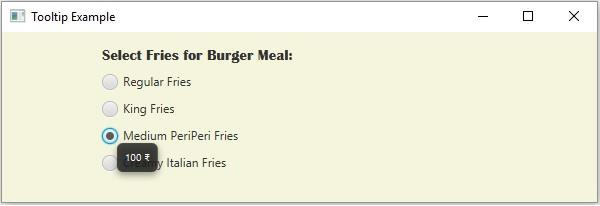
輸出

更新於:2020 年 5 月 20 日
297 次瀏覽

廣告