
 資料結構
資料結構 網路
網路 RDBMS
RDBMS 作業系統
作業系統 Java
Java MS Excel
 iOS
iOS HTML
HTML CSS
CSS Android
 Python
 C 程式設計
 C++
C++ C#
C# MongoDB
 MySQL
MySQL Javascript
 PHP
PHP 物理學
物理學 化學
化學 生物學
生物學 數學
數學 英語
英語 經濟學
經濟學 心理學
心理學 社會科學
社會科學 時裝研究
時裝研究 法律研究
法律研究C++ 中的線索二叉樹的中序遍歷
這裡我們將瞭解線索二叉樹資料結構。我們知道二叉樹節點最多有兩個子節點。但如果它們只有一個子節點或沒有子節點,那麼在連結串列表示中,連結部分將保持為 null。使用線索二叉樹表示時,我們可以透過建立一些執行緒來重用這些空連結。
如果某個節點有一些空閒的左或右子節點區域,那將用作執行緒。線索二叉樹有兩種型別:單線索樹或全線索二叉樹。
對於全線索二叉樹,每個節點都有五個欄位。三個欄位與正常二叉樹節點類似,另外兩個欄位用於儲存布林值,以表示該側的連結是實際連結還是執行緒。
| 左執行緒標誌 | 左連結 | 資料 | 右連結 | 右執行緒標誌 |
這是全線索二叉樹
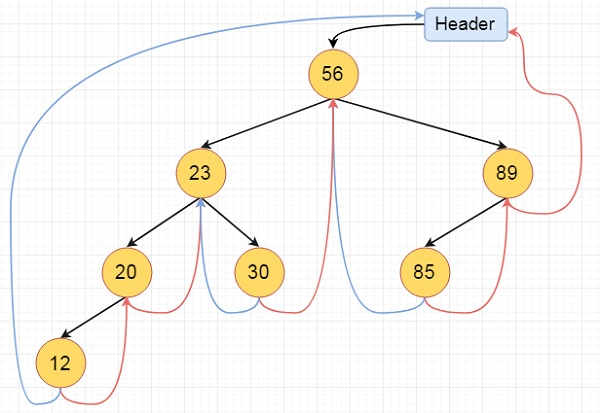
演算法
inorder():
Begin
   temp := root
   repeat infinitely, do
   p := temp
   temp = right of temp
   if right flag of p is false, then
      while left flag of temp is not null, do
         temp := left of temp
      done
   end if
   if temp and root are same, then
      break
   end if
      print key of temp
   done
End
示例
#include <iostream>
#define MAX_VALUE 65536
using namespace std;
class N { //node declaration
   public:
      int k;
      N *l, *r;
      bool leftTh, rightTh;
};
class ThreadedBinaryTree {
   private:
   N *root;
   public:
   ThreadedBinaryTree() { //constructor to initialize the variables
      root= new N();
      root->r= root->l= root;
      root->leftTh = true;
      root->k = MAX_VALUE;
   }
   void insert(int key) {
      N *p = root;
      for (;;) {
      if (p->k< key) { //move to right thread
         if (p->rightTh)
            break;
         p = p->r;
      }
      else if (p->k > key) { // move to left thread
         if (p->leftTh)
            break;
         p = p->l;
      }
      else {
         return;
      }
   }
   N *temp = new N();
   temp->k = key;
   temp->rightTh= temp->leftTh= true;
   if (p->k < key) {
      temp->r = p->r;
      temp->l= p;
      p->r = temp;
      p->rightTh= false;
   }
   else {
      temp->r = p;
      temp->l = p->l;
      p->l = temp;
      p->leftTh = false;
   }
}
void inorder() { //print the tree
   N *temp = root, *p;
   for (;;) {
      p = temp;
      temp = temp->r;
      if (!p->rightTh) {
         while (!temp->leftTh) {
            temp = temp->l;
         }
      }
      if (temp == root)
         break;
         cout<<temp->k<<" ";
      }
      cout<<endl;
   }
};
int main() {
   ThreadedBinaryTree tbt;
   cout<<"Threaded Binary Tree\n";
   tbt.insert(56);
   tbt.insert(23);
   tbt.insert(89);
   tbt.insert(85);
   tbt.insert(20);
   tbt.insert(30);
   tbt.insert(12);
   tbt.inorder();
   cout<<"\n";
}
輸出
Threaded Binary Tree
12 20 23 30 56 85 89

更新於:10-8-2020
4K+ 瀏覽量

廣告