
 資料結構
資料結構 網路
網路 RDBMS
RDBMS 作業系統
作業系統 Java
Java MS Excel
 iOS
iOS HTML
HTML CSS
CSS Android
 Python
 C 程式設計
 C++
C++ C#
C# MongoDB
 MySQL
MySQL Javascript
 PHP
PHP 物理
物理 化學
化學 生物
生物 數學
數學 英語
英語 經濟
經濟 心理學
心理學 社會研究
社會研究 時尚研究
時尚研究 法律研究
法律研究HTML Window alert() 方法
HTML window alert() 方法以 HTML 文件中定義的訊息和一個確定按鈕的形式顯示一個警報框。
語法
以下是語法 −
alert(“message”);
讓我們看一個 HTML window alert() 方法的示例 −
示例
<!DOCTYPE html>
<html>
<head>
<style>
   body {
      color: #000;
      height: 100vh;
      background: linear-gradient(62deg, #FBAB7E 0%, #F7CE68 100%) no-repeat;
      text-align: center;
      padding: 20px;
   }
   .btn {
      background: #db133a;
      border: none;
      height: 2rem;
      border-radius: 2px;
      width: 40%;
      display: block;
      color: #fff;
      outline: none;
      cursor: pointer;
      margin: 1rem auto;
   }
</style>
</head>
<body>
<h1>HTML Window alert() Method</h1>
<button class='btn' onclick="add()">Click me to open an alert box</button>
<script>
   function add() {
      alert("Hello! I'm an alert box");
   }
</script>
</body>
</html>
輸出
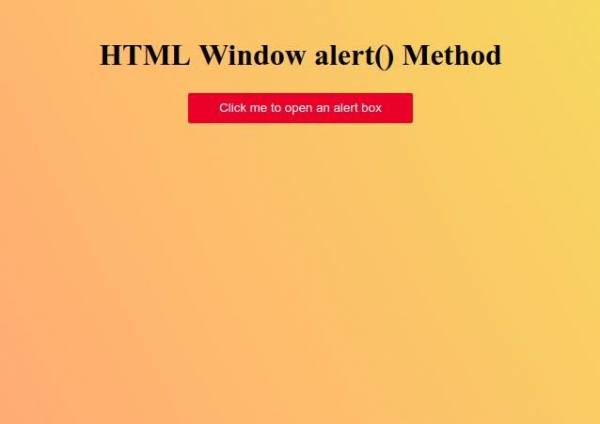
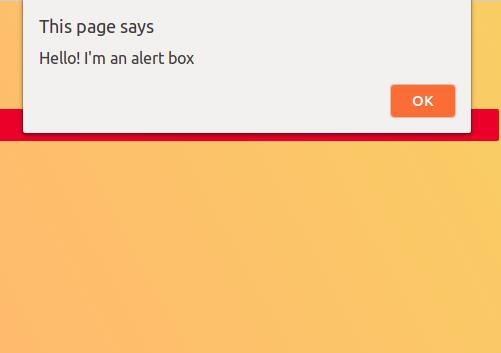
點選“建立我以開啟警告框”按鈕以開啟一個警告框。

更新於: 26-Sep-2019
777 次瀏覽

廣告