
 資料結構
資料結構 網路
網路 RDBMS
RDBMS 作業系統
作業系統 Java
Java MS Excel
 iOS
iOS HTML
HTML CSS
CSS Android
 Python
 C 程式設計
 C++
C++ C#
C# MongoDB
 MySQL
MySQL Javascript
 PHP
PHP 物理學
物理學 化學
化學 生物
生物 數學
數學 英語
英語 經濟學
經濟學 心理學
心理學 社會科學
社會科學 時尚研究
時尚研究 法律研究
法律研究HTML DOM 表 deleteTHead()方法
HTML DOM table deleteTHead() 方法可從 HTML 文件中的表格中刪除 <thead> 元素。
語法
以下是語法 −
object.deleteTHead()
讓我們看一個 HTML DOM table deleteTHead() 方法的示例 −
示例
<!DOCTYPE html>
<html>
<style>
   body {
      color: #000;
      background: lightblue;
      height: 100vh;
      text-align: center;
   }
   table {
      margin: 2rem auto;
   }
   caption {
      color: #db133a;
   }
   .btn {
      background: #db133a;
      border: none;
      height: 2rem;
      border-radius: 2px;
      width: 40%;
      display: block;
      color: #fff;
      outline: none;
      cursor: pointer;
      margin: 1rem auto;
   }
   .show {
      font-size: 1.2rem;
   }
</style>
<body>
<h1>DOM Table deleteTHead() Method Demo</h1>
<table border="2">
<thead>
<tr>
<th>Name</th>
<th>Roll No.</th>
</tr>
<thead>
<tbody>
<tr>
<td>John</td>
<td>071717</td>
</tr>
<tr>
<td>Jane</td>
<td>031717</td>
</tr>
</tbody>
</table>
<button onclick="remove()" class="btn">Remove Header</button>
<script>
   function remove() {
      var tableFooter = document.querySelector('table').deleteTHead();
   }
</script>
</body>
</html>
輸出
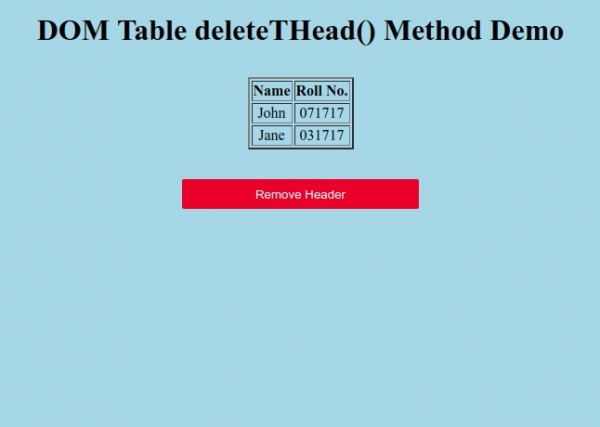
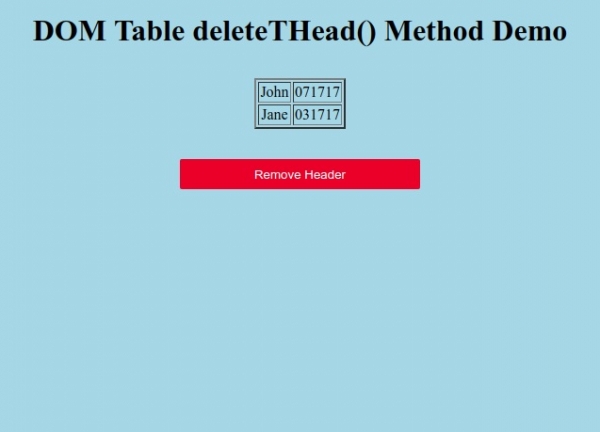
單擊“刪除表頭”按鈕可從表格中刪除表頭。

更新於:20-Sep-2019
69 次瀏覽

廣告