
 資料結構
資料結構 網路
網路 RDBMS
RDBMS 作業系統
作業系統 Java
Java MS Excel
 iOS
iOS HTML
HTML CSS
CSS Android
 Python
 C 程式設計
 C++
C++ C#
C# MongoDB
 MySQL
MySQL Javascript
 PHP
PHP 物理學
物理學 化學
化學 生物學
生物學 數學
數學 英語
英語 經濟學
經濟學 心理學
心理學 社會學
社會學 時裝學
時裝學 法律學
法律學HTML DOM Input 周 max 屬性
HTML DOM Input 周 max 屬性返回/設定 Input 周的 max 特性。
語法
語法如下所示 −
- 返回 string 值
inputWeekObject.max
- 將 max 設定為 string 值
inputWeekObject.max = YYYY-Www
String 值
此處,“YYYY-Www”可以為以下形式 −
| stringValue | 詳情 |
|---|---|
| YYYY | 表示年份(例如:2017) |
| W | 它是年份和周的分隔符 |
| ww | 它表示周(例如:52) |
例項
我們來看一個 Input 周 max 屬性的例項 −
<!DOCTYPE html>
<html>
<head>
<title>Input Week max</title>
<style>
   form {
      width:70%;
      margin: 0 auto;
      text-align: center;
   }
   * {
      padding: 2px;
      margin:5px;
   }
   input[type="button"] {
      border-radius: 10px;
   }
</style>
</head>
<body>
<form>
<fieldset>
<legend>Week-max</legend>
<label for="WeekSelect">Ongoing Week:
<input type="week" id="WeekSelect" value="2020-W01" max="2019-W52" disabled>
</label>
<input type="button" onclick="renewInsurance()" value="Renew Insurance">
<div id="divDisplay"></div>
</fieldset>
</form>
<script>
   var divDisplay = document.getElementById("divDisplay");
   var inputWeek = document.getElementById("WeekSelect");
   divDisplay.textContent = 'Insurance Expired as of: Week'+inputWeek.max.split("-W")[1];
   divDisplay.textContent += ' ,'+inputWeek.max.split("-W")[0];
   function renewInsurance() {
      inputWeek.max = '2029-W52';
      divDisplay.textContent = 'Insurance Renewed till: Week'+inputWeek.max.split("-W")[1];
      divDisplay.textContent += ' ,'+inputWeek.max.split("-W")[0];
   }
</script>
</body>
</html>
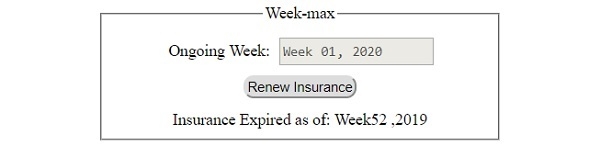
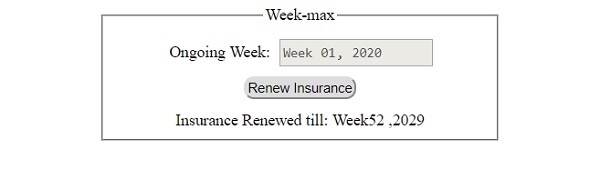
輸出
將生成如下輸出 −
在點選 ‘續期保險’ 按鈕之前 −
在點選 ‘續期保險’ 按鈕之後 −

更新於: 2019-07-30
94 瀏覽次數

廣告