
 Data Structure
 Networking
 RDBMS
RDBMS Operating System
 Java
Java MS Excel
 iOS
iOS HTML
HTML CSS
CSS Android
 Python
 C Programming
 C++
C++ C#
C# MongoDB
 MySQL
MySQL Javascript
 PHP
PHP Physics
 Chemistry
 Biology
 Mathematics
 English
 Economics
 Psychology
 Social Studies
 Fashion Studies
 Legal Studies
HTML DOM 輸入 Email placeholder 屬性
HTML DOM Input Email placeholder 屬性設定/返回一字串,通常用於向用戶提示輸入文字的外觀。
語法
以下是語法 −
- 返回字串值
inputEmailObject.placeholder
- 設定placeholder為 stringValue
inputEmailObject.placeholder = stringValue
示例
讓我們看一個輸入電子郵件 placeholder 的示例 −
<!DOCTYPE html>
<html>
<head>
<title>Input Email placeholder</title>
<style>
   form {
      width:70%;
      margin: 0 auto;
      text-align: center;
   }
   * {
      padding: 2px;
      margin:5px;
   }
   input[type="button"] {
      border-radius: 10px;
   }
</style>
</head>
<body>
<form>
<fieldset>
<legend>Email-placeholder</legend>
<label for="EmailSelect">Employee ID :
<input type="email" id="EmailSelect">
</label>
<input type="button" value="What details should be entered?" onclick="setPlaceholder()">
<div id="divDisplay"></div>
</fieldset>
</form>
<script>
   var divDisplay = document.getElementById("divDisplay");
   var inputEmail = document.getElementById("EmailSelect");
   function setPlaceholder() {
      inputEmail.placeholder = 'Name-ID@MNC.com';
      divDisplay.textContent = inputEmail.placeholder+' --> Replace Name & ID by details provided.';
   }
</script>
</body>
</html>
輸出
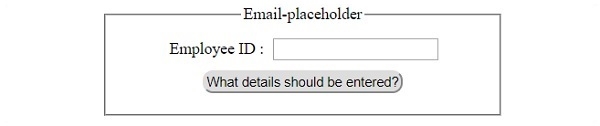
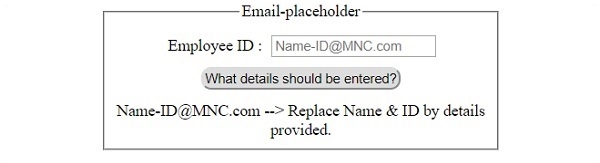
它將產生以下輸出 −
在點選“應該輸入哪些詳細資訊?” 按鈕之前 −
在點選“應該輸入哪些詳細資訊?” 按鈕之後 −

更新於: 2019-07-30
93 次瀏覽

廣告