
 資料結構
資料結構 網路
網路 關係資料庫管理系統
 作業系統
作業系統 Java
Java MS Excel
 iOS
iOS HTML
HTML CSS
CSS Android
 Python
 C 程式設計
 C++
C++ C#
C# MongoDB
 MySQL
MySQL Javascript
 PHP
PHP 物理
物理 化學
化學 生物
生物 數學
數學 英語
英語 經濟學
經濟學 心理學
心理學 社會學
社會學 時尚研究
時尚研究 法律研究
法律研究HTML DOM 地理位置座標屬性
HTML DOM 地理位置座標屬性用於獲取使用者裝置在地球上的位置和海拔高度。在使用此屬性之前,使用者必須同意提供座標資訊。這樣做是為了保護使用者的隱私。這可用於跟蹤各種裝置的位置。
屬性
以下是座標屬性:
注意 - 所有這些屬性都是隻讀的,並且它們的返回型別為雙精度浮點數。
| 序號 | 屬性及描述 |
|---|---|
| 1 | coordinates.latitude 返回裝置位置的緯度,以十進位制度表示。 |
| 2 | coordinates.longitude 返回裝置位置的經度,以十進位制度表示。 |
| 3 | coordinates.altitude 返回位置的海拔高度,以米為單位,相對於海平面。如果裝置沒有 GPS,則可能返回 null。 |
| 4 | coordinates.accuracy 返回緯度和經度屬性的精度,以米為單位。 |
| 5 | coordinates.altitudeAccuracy 返回海拔屬性的精度,以米為單位。 |
| 6 | coordinates.heading 返回裝置行駛的方向。此值以度為單位,指示裝置偏離正北方向的角度。0 度表示正北方向,方向按順時針方向確定(東為 90 度,西為 270 度)。如果速度為 0,則方向為 NaN。如果裝置無法提供方向資訊,則此值為 null。 |
| 7 | coordinates.speed 返回裝置的速度,以米/秒為單位。此值可能為 null。 |
語法
以下是 GeoLocation 座標屬性的語法:
coordinates.property
“property”可以是表格中提到的任何上述屬性。
示例
讓我們來看一個 GeoLocation 座標屬性的示例:
<!DOCTYPE html>
<html>
<body>
<h1>Geolocation coordinates property</h1>
<p>Get you coordinates by clicking the below button</p>
<button onclick="getCoords()">COORDINATES</button>
<p id="Sample">Your coordinates are:</p>
<script>
   var p = document.getElementById("Sample");
   function getCoords() {
      if (navigator.geolocation) {
         navigator.geolocation.getCurrentPosition(showCoords);
      } else {
         p.innerHTML ="This browser doesn't support geolocation.";
      }
   }
   function showCoords(position) {
      p.innerHTML = "Longitude:" + position.coords.longitude + "<br>Latitude: " + position.coords.latitude+"<br>Accuracy: "+ position.coords.accuracy;
   }
</script>
</body>
</html>
輸出
這將產生以下輸出:
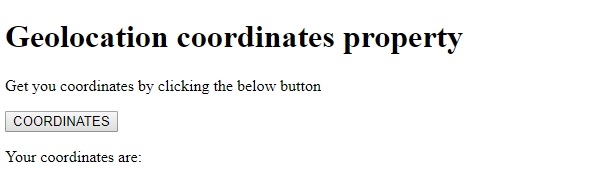
單擊“COORDINATES”按鈕並在“瞭解您的位置”彈出視窗中單擊“允許”後:
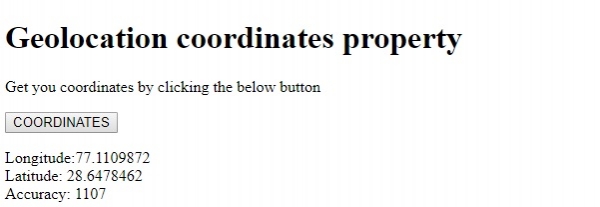
在以上示例中:
我們首先建立了一個名為“COORDINATES”的按鈕,當用戶單擊時,它將執行 getCoords() 方法。
<button onclick="getCoords()">COORDINATES</button>
getCoords() 函式獲取 navigator 物件的 geolocation 屬性以檢查瀏覽器是否支援地理位置。如果瀏覽器支援地理位置,它將返回一個 Geolocation 物件。使用 navigator geolocation 屬性的 getCurrentPosition() 方法,我們可以獲取裝置的當前位置。getCurrentPosition() 方法是一個回撥函式,它將函式作為物件作為其引數,因為在 JavaScript 中每個函式都是一個物件。
在這裡,我們將 showCoords() 方法傳遞給它。showCoords() 方法將位置介面作為引數,並使用它在 id 為“Sample”的段落中顯示經度、緯度和精度。它使用段落的 innerHTML 屬性向其中追加文字。
function getCoords() {
   if (navigator.geolocation) {
      navigator.geolocation.getCurrentPosition(showCoords);
   } else {
      p.innerHTML ="This browser doesn't support geolocation.";
   }
}
function showCoords(position) {
   p.innerHTML = "Longitude:" + position.coords.longitude + "<br>Latitude: " + position.coords.latitude+"<br>Accuracy: "+ position.coords.accuracy;
}

更新於: 2019年8月20日
121 次瀏覽

廣告