
 資料結構
資料結構 網路
網路 關係型資料庫管理系統
 作業系統
作業系統 Java
Java MS Excel
 iOS
iOS HTML
HTML CSS
CSS Android
 Python
 C 語言程式設計
 C++
C++ C#
C# MongoDB
 MySQL
MySQL Javascript
 PHP
PHP 物理學
物理學 化學
化學 生物學
生物學 數學
數學 英語
英語 經濟學
經濟學 心理學
心理學 社會學
社會學 服裝設計
服裝設計 法律研究
法律研究HTML標籤
HTML 中的 area 標籤用於在影像地圖中設定區域。
以下是屬性:
| 屬性 | 值 | 描述 |
|---|---|---|
| alt | 文字 | 指定區域的替代文字。 |
| coords | 如果 shape = "rect",則 coords = "left, top, right, bottom" 如果 shape = "circ",則 coords = "centerx, centery, radius" 如果 shape = "poly",則 coords = "x1, y1, x2, y2,..,xn, yn" | 指定與 shape 屬性相對應的座標,以定義影像地圖中影像的區域。 |
| download | 檔名 | 指定當使用者點選超連結時下載的目標。 |
| href | URL | 指定連結指向的頁面 URL 或錨點的名稱。 |
| hreflang | 語言程式碼 | 指定目標 URL 的語言。 |
| media | 媒體查詢 | 指定目標 URL 最佳化的媒體/裝置。 |
| nohref | true/false | 從影像地圖中排除區域 |
| rel | alternate author bookmark help license next nofollow noreferrer prefetch prev search tag | 指定當前文件與目標 URL 之間的關係 |
| shape | rect 矩形 circ 圓形 poly 多邊形 | 指定影像地圖的形狀 |
| target | _blank _parent _self _top | 在何處開啟目標 URL。 _blank - 目標 URL 將在新視窗中開啟 _self - 目標 URL 將在單擊它的同一框架中開啟 _parent - 目標 URL 將在父框架集中開啟 _top - 目標 URL 將在視窗的整個主體中開啟 |
| type | mime_type | 指定目標 URL 的 MIME(多用途網際網路郵件擴充套件)型別。 |
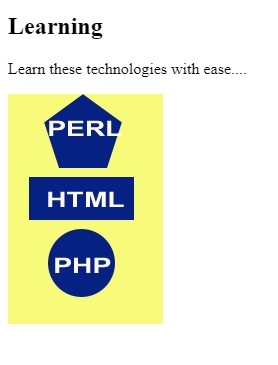
現在讓我們看一個實現 <area> 標籤的示例:
示例
<!DOCTYPE html>
<html>
<body>
<h2>Learning</h2>
<p>Learn these technologies with ease....</p>
<img src = /images/usemap.gif alt = "usemap" border = "0" usemap = "#tutorials"/>
<map name = "tutorials">
   <area shape = "poly" coords = "74,0,113,29,98,72,52,72,38,27"
      href = "/perl/index.htm" alt = "Perl Tutorial" target = "_blank" />
   <area shape = "rect" coords = "22,83,126,125" alt = "HTML Tutorial"
      href = "/html/index.htm" target = "_blank" />
   <area shape = "circle" coords = "73,168,32" alt = "PHP Tutorial"
      href = "/php/index.htm" target = "_blank" />
</map>
</body>
</html>
輸出

更新於:2020-06-29
74 次檢視

廣告