
 資料結構
資料結構 網路
網路 關係資料庫管理系統 (RDBMS)
 作業系統
作業系統 Java
Java MS Excel
 iOS
iOS HTML
HTML CSS
CSS Android
 Python
 C語言程式設計
 C++
C++ C#
C# MongoDB
 MySQL
MySQL Javascript
 PHP
PHP 物理學
物理學 化學
化學 生物學
生物學 數學
數學 英語
英語 經濟學
經濟學 心理學
心理學 社會學
社會學 服裝設計
服裝設計 法學
法學如何在 Selenium 定位器中使用正則表示式?
我們可以在 Selenium webdriver 的定位器中使用正則表示式。這可以在我們使用 xpath 或 css 定位器識別元素時實現。讓我們看一下元素在其 html 程式碼中的 class 屬性。class 屬性值為 **gsc-input**。
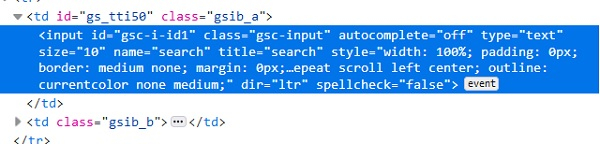
在這裡,使用 css 表示式,我們可以使用 * 並對 class 屬性值執行部分匹配。css 值應為 **input[class*='input']**。這意味著子文字 **input** 存在於實際文字 **gsc-input** 中。我們還可以使用 ^ 並對 class 執行匹配。css 值應為 **input[class^='gsc']**。這意味著實際文字 **gsc-input** 以子文字 gsc 開頭。我們還可以使用 $ 並對 class 執行匹配。css 值應為 **input[class$='put']**。這意味著實際文字 **gsc-input** 以子文字 **put** 結尾。
在這裡,使用 xpath 表示式,我們可以使用 **contains()** 方法並對 class 執行部分匹配。xpath 值應為 **//*[contains(@class, 'input')]**。這意味著子文字 **input** 存在於實際文字 **gsc-input** 中。我們還可以使用 **starts-with()** 並對 class 執行匹配。css 值應為 **//*[starts-with(@class, 'gsc')]**。這意味著實際文字 **gsc-input** 以子文字 **gsc** 開頭。我們還可以使用 **ends-with()** 並對 class 執行匹配。css 值應為 **//*[ends-with(@class, 'put')]**。這意味著實際文字 **gsc-input** 以子文字 **put** 結尾。
示例
程式碼實現。
import org.openqa.selenium.WebDriver;
import org.openqa.selenium.chrome.ChromeDriver;
import org.openqa.selenium.WebElement;
import org.openqa.selenium.By;
public class RegexLocator{
   public static void main(String[] args) {
      System.setProperty("webdriver.chrome.driver", "C:\Users\ghs6kor\Desktop\Java\chromedriver.exe");
      WebDriver driver = new ChromeDriver();
      driver.get("https://tutorialspoint.tw/about/about_careers.htm");
      // identify element with partial class match with * in css
      WebElement l=driver.findElement(By.cssSelector("input[class*='input']"));
      l.sendKeys("Selenium");
      // obtain the value entered with getAttribute method
      System.out.println("Using * expression: " +l.getAttribute("value"));
      l.clear();
      // identify element with partial class match with ^ in css
      WebElement m=driver.findElement(By.cssSelector("input[class^='gsc']"));
      m.sendKeys("Java");
      // obtain the value entered with getAttribute method
      System.out.println("Using ^ expression: " +m.getAttribute("value"));
      m.clear();
      // identify element with partial class match with $ in css
      WebElement n = driver.findElement(By.cssSelector("input[class$='put']"));
      n.sendKeys("Python");
      // obtain the value entered with getAttribute method
      System.out.println("Using $ expression: " +n.getAttribute("value"));
      n.clear();
      // identify element with partial class match with contains in xpath
      WebElement o= driver.findElement(By.xpath("//input[contains(@class,'input')]"));
      o.sendKeys("Selenium");
      // obtain the value entered with getAttribute method
      System.out.println("Using contains: " +o.getAttribute("value"));
      o.clear();
      // identify element with partial class match with starts-with in xpath
      WebElement p= driver.findElement(By.xpath("//input[starts-with(@class,'gsc')]"));
      p.sendKeys("Java");
      // obtain the value entered with getAttribute method
      System.out.println("Using starts-with: " +p.getAttribute("value"));
      p.clear();
      driver.close();
   }
}
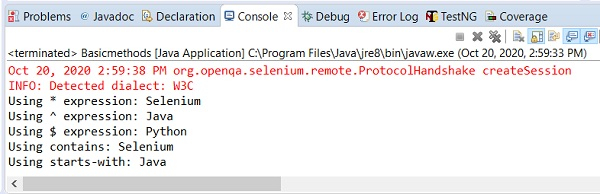
輸出

7K+ 次瀏覽
