
 資料結構
資料結構 網路
網路 RDBMS
RDBMS 作業系統
作業系統 Java
Java MS Excel
 iOS
iOS HTML
HTML CSS
CSS Android
 Python
 C 程式設計
 C++
C++ C#
C# MongoDB
 MySQL
MySQL Javascript
 PHP
PHP 物理學
物理學 化學
化學 生物學
生物學 數學
數學 英語
英語 經濟學
經濟學 心理學
心理學 社會學
社會學 時尚研究
時尚研究 法律研究
法律研究如何在 Arduino 中使用 isControl()?
isControl() 函式用於判斷一個字元是否是控制字元。控制字元或不可列印字元 (NPC) 是字元集中的程式碼點(一個數字),不表示書面符號。ASCII 表中程式碼 32 以下的所有條目都是這種型別的。其中包括 '
'、'\t' 等字元。
語法
isControl 函式的語法如下 −
isControl(myChar)
其中 myChar 是要評估的字元。如果它是控制字元,此函式將返回 True,否則返回 False。
示例
以下示例說明如何使用此功能 −
void setup() {
   Serial.begin(9600);
   Serial.println();
   char c1 = 'a';
   char c2 = '
';
   if (isControl(c1)) {
      Serial.println("c1 is a control char");
   } else {
      Serial.println("c1 is NOT a control char");
   }
   if (isControl(c2)) {
      Serial.println("c2 is a control char");
   } else {
      Serial.println("c2 is NOT a control char");
   }
}
void loop() {
}
輸出
序列監視器輸出如下所示 −
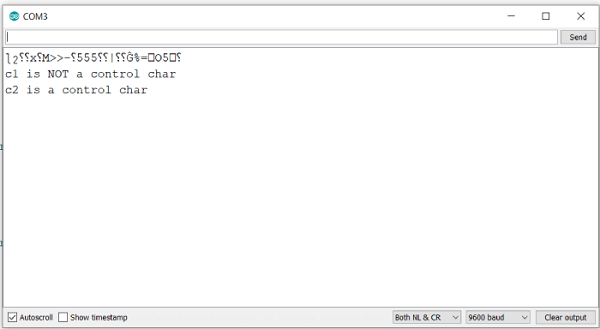

更新於: 24-Jul-2021
564 次瀏覽

廣告