
 資料結構
資料結構 網路
網路 關係資料庫管理系統 (RDBMS)
 作業系統
作業系統 Java
Java MS Excel
 iOS
iOS HTML
HTML CSS
CSS Android
 Python
 C語言程式設計
 C++
C++ C#
C# MongoDB
 MySQL
MySQL Javascript
 PHP
PHP 物理學
物理學 化學
化學 生物學
生物學 數學
數學 英語
英語 經濟學
經濟學 心理學
心理學 社會學
社會學 服裝設計
服裝設計 法學
法學使用JDBC的不同行方法獲取表中行數的方法?
在這個資料驅動型世界中,與資料庫互動的能力是許多軟體程式的重要要求。Java是一種多功能且強大的程式語言,它提供了**Java資料庫連線**(JDBC),這是一種有效的機制,可以實現與不同資料庫系統的流暢互動。
**JDBC**是一個API,它為Java應用程式提供了一個標準化的介面,用於與資料庫通訊。我們可以使用它作為Java應用程式和資料庫之間的**橋樑**來執行**查詢、插入、更新和刪除**資料等**操作**。
本文將幫助我們深入瞭解Java的JDBC API的世界,使我們能夠利用其功能執行高效的資料庫操作。
JDBC的重要關鍵元件是:
**JDBC驅動程式**: JDBC驅動程式負責連線到資料庫並將JDBC請求轉換為特定於資料庫的命令。確保為您的資料庫系統選擇正確的驅動程式,因為不同的資料庫需要不同型別的驅動程式。
**JDBC API**: JDBC API由類和介面組成,這些類和介面指定用於執行資料庫操作的方法和功能。它包含用於連線資料庫、執行SQL查詢、獲取和修改資料以及管理事務的類。
**JDBC URL**: JDBC URL是一個唯一的字串識別符號,包含建立資料庫連線的關鍵資訊。此資訊包含資料庫型別、主機、埠、資料庫名稱和登入憑據等內容。
為了獲取表中的行數,首先讓我們在MySQL資料庫中建立一個表,或者您可以使用任何您熟悉的資料庫。
讓我們建立一個表:
開啟MySQL資料庫,現在我們將建立一個新資料庫並使用它。
create database Test;
use Test;
現在讓我們建立一個名為Employee的表,其中包含emp_id、emp_name和emo_email欄位。
查詢
create table Employee(emp_id int primary key,emp_name varchar(20), emp_email varchar(20));
desc Employee;
輸出
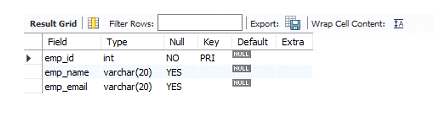
向Employee表中插入一些記錄:
insert into Employee values(1,"Hari","hari123@gmail.com");
insert into Employee values(2,"Syam","syam98@gmail.com");
insert into Employee values(3,"Revanth","Revanth53@gmail.com");
讓我們檢查資料是否已插入到表中:
查詢
select *from Employee;
輸出
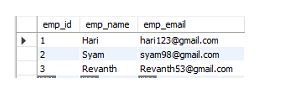
現在我們準備好了資料。讓我們建立一個Java應用程式,並藉助Eclipse IDE嘗試連線到此資料庫。建立Java應用程式後,我們需要使用JDBC驅動程式才能從我們在MySQL中建立的表中獲取行數,此過程主要包括四個步驟:
建立連線。
建立Statement物件。
執行SQL語句。
關閉連線。
在建立與資料庫的連線之前,我們需要載入JDBC驅動程式或從Maven倉庫新增建立連線所需的MySQL依賴項,驅動程式類名將根據我們使用的資料庫而有所不同。
Class.forName("com.mysql.jdbc.Driver");
或者
依賴項
<dependency>
   <groupId>mysql</groupId>
   <artifactId>mysql-connector-java</artifactId>
   <version>8.0.27</version>
</dependency>
現在,我們將使用JDBC URL、使用者名稱和密碼建立與資料庫的連線。
Connection con = DriverManager.getConnection( "jdbc:mysql://:3306/Test","root", "root");
一旦建立連線,我們就可以使用Statement或PreparedStatement類執行SQL語句。
主要有兩種方法可以從表中獲取行數,最常見的一種方法是大多數人使用的方法:
select count(*) from Employee;
但這是一種效率較低的方法,我們還有另一種方法可以獲取行數:
select count(1) from Employee;
此查詢使用第一列計算行數。由於主鍵通常是第一列,因為主鍵不為空並且始終是唯一的。
示例1
在這個例子中,我們使用count(1)來獲取表中總記錄數,方法是使用JDBC。
import java.net.ConnectException;
import java.sql.Connection;
import java.sql.DriverManager;
import java.sql.ResultSet;
import java.sql.Statement;

public class App {


   public static void main(String[] args) throws Exception
   {
      String url = "jdbc:mysql://:3306/Test";
      String user ="root";
      String password = "root";
      Connection myConn = null;
      ResultSet result = null;
      try {
         //We will provide the url,username and the password to establish the connection
         myConn = DriverManager.getConnection(url,user,password);

         //creating a statement
         Statement myStmt = myConn.createStatement();

         //Total Rows is nothing but Alias name
         //and we will specify the query which we need to execute inside executeQuery()
         result= myStmt.executeQuery("select count(1) as TotalRows from Employee");

         //result.next() will executes the query
         result.next();
         //displaying the result i.e  we will display number of rows in the table in console
         System.out.println("Employee Table contains "+ result.getInt("TotalRows") + " rows");

      }
      catch(Exception e){
         // this catch block is used to handle the exceptions
         e.printStackTrace();
      }

      finally {
         //close the connection
         myConn=null;
         result=null;
      }

   }
}
輸出
Employee Table contains 3 rows
示例2
我們還有另一種方法可以使用resultSet.getRow()方法來獲取行數。
import java.net.ConnectException;
import java.sql.Connection;
import java.sql.DriverManager;
import java.sql.ResultSet;
import java.sql.Statement;

public class App {


   public static void main(String[] args) throws Exception
   {
      String url = "jdbc:mysql://:3306/Test";
      String user ="root";
      String password = "root";
      Connection myConn = null;
      ResultSet result = null;
      try {
         //We will provide the url,username and the password to establish the connection
         myConn = DriverManager.getConnection(url,user,password);

         //creating a statement
         //TYPE_SCROLL_SENSITIVE helps to move the cursor in forward or backward direction
         //CONCUR_READ_ONLY means we cannot the update the resultSet only read is possible
         Statement myStmt = myConn.createStatement(ResultSet.TYPE_SCROLL_SENSITIVE,ResultSet.CONCUR_READ_ONLY);
         //Total Rows is nothing but Alias name
         //and we will specify the query which we need to execute inside executeQuery()
         result= myStmt.executeQuery("select * from Employee");

         //result.next() will executes the query
         result.last();
         //displaying the result i.e  we will display number of rows in the table in console
         System.out.println("Employee Table contains " +result.getRow()+ " rows");

      }
      catch(Exception e){
         // this catch block is used to handle the exceptions
         e.printStackTrace();
      }

      finally {
         //close the connection
         myConn=null;
         result=null;
      }

   }
}
輸出
Employee Table contains 3 rows
結論
在本文中,我們研究瞭如何使用JDBC獲取表中總行數的方法和實現,並且我們還看到了JDBC的關鍵元件,這些元件能夠與不同的資料庫系統進行流暢的互動。

91次瀏覽
