
 資料結構
資料結構 網路
網路 關係型資料庫管理系統
 作業系統
作業系統 Java
Java MS Excel
 iOS
iOS HTML
HTML CSS
CSS Android
 Python
 C 程式設計
 C++
C++ C#
C# MongoDB
 MySQL
MySQL Javascript
 PHP
PHP 物理學
物理學 化學
化學 生物學
生物學 數學
數學 英語
英語 經濟學
經濟學 心理學
心理學 社會學
社會學 時尚學
時尚學 法律學
法律學如何在 Cypress 中上傳檔案?
我們可以在 Cypress 中上傳檔案。要在 Cypress 中執行檔案上傳任務,我們必須首先使用命令安裝一個外掛 −
npm ins tall –dev cypress-file-upload

安裝完成後,我們必須在 command.js 檔案中新增語句 import 'cypress-fileupload' ,該檔案位於 Cypress 專案的 support 資料夾中。此外,我們還應在 fixtures 資料夾(Picture.png 檔案)中新增我們要上傳的檔案。
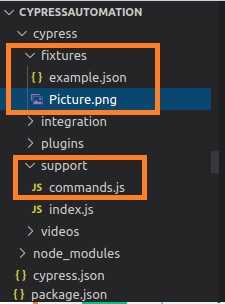
要上傳檔案,我們必須使用 Cypress 命令 attachFile,並將要上傳的檔案的路徑作為引數傳遞給它。
示例
實現
describe('Tutorialspoint Test', function () {

   // test case
   it('Test Case6', function (){

      //file to be uploaded path in project folder
      const p = 'Picture.png'

      // launch URL
      cy.visit("https://the-internet.herokuapp.com/upload")

      //upload file with attachFile
      cy.get('#file-upload').attachFile(p)

      //click on upload
      cy.get('#file-submit').click()

      //verify uploaded file
      cy.get('#uploaded-files').contains('Picture')
   });
});
執行結果
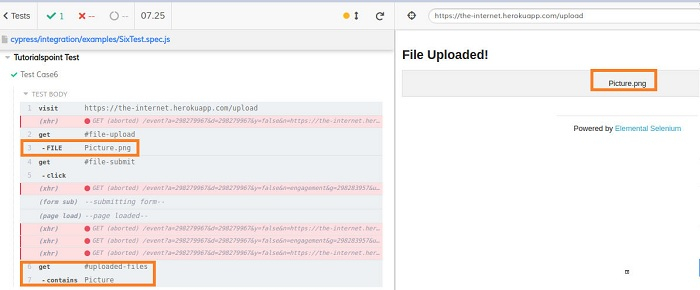
執行日誌顯示檔案 Picture.png 已上傳,並且檔名已反映在頁面上。

更新時間: 19-11-2021
6000 多次瀏覽

廣告