
 資料結構
資料結構 網路
網路 關係資料庫管理系統 (RDBMS)
 作業系統
作業系統 Java
Java MS Excel
 iOS
iOS HTML
HTML CSS
CSS Android
 Python
 C語言程式設計
 C++
C++ C#
C# MongoDB
 MySQL
MySQL Javascript
 PHP
PHP 物理學
物理學 化學
化學 生物學
生物學 數學
數學 英語
英語 經濟學
經濟學 心理學
心理學 社會學
社會學 服裝設計
服裝設計 法律學
法律學Python檔案上傳示例
使用Python上傳檔案通常有兩種方法。一種是透過使用Web伺服器和**CGI環境**(也稱為自動化檔案上傳系統)的**雲端儲存服務**。在本教程中,我們將重點介紹使用CGI(通用閘道器介面)環境上傳檔案。
此過程涉及生成用於檔案上傳的HTML表單和用於管理檔案儲存和上傳到伺服器的Python指令碼。使用Python上傳檔案的步驟如下:
-
建立用於檔案上傳的HTML表單
-
設定支援CGI的Web伺服器。
-
透過Web瀏覽器訪問表單並提交檔案
-
Python指令碼處理檔案上傳
建立用於檔案上傳的HTML表單
透過建立帶有**<input type="file">**的輸入欄位,使用者可以選擇要上傳的檔案。**<input type="submit">**將用於建立一個提交按鈕,該按鈕將把資料表單傳送到伺服器。
示例
<!DOCTYPE html>
<html>
<body>
   <form enctype="multipart/form-data" action="save_file.py" method="post">
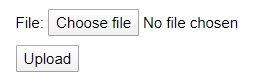
      <p>File: <input type="file" name="filename" /></p>
      <p><input type="submit" value="Upload" /></p>
   </form>
</body>
</html>
輸出
Python指令碼處理檔案上傳
以下是將所選檔案上傳到伺服器的Python程式。在這裡,我們為上面HTML程式碼中的按鈕(**選擇檔案**和**上傳**)編寫了操作。
- **cgitb.enable()**將啟用一個異常處理程式,該處理程式將顯示錯誤訊息。
- **cgi.FieldStorage()**提供表單資料的儲存。
示例
如果未上傳檔案,則執行以下程式碼將生成錯誤訊息;如果檔案上傳成功,則列印成功訊息。
#importing required modules
import cgi
import os
import cgitb

# Enable CGI error reporting
cgitb.enable()

# Create instance of FieldStorage
form = cgi.FieldStorage()

# Get the file item from the form
fileitem = form['filename']

# Test if the file was uploaded
if fileitem.filename:
   # Strip leading path from file name to avoid directory traversal attacks
   fn = os.path.basename(fileitem.filename)

   # Open the file and write its contents to the server
   with open('/tmp/' + fn, 'wb') as f:
       f.write(fileitem.file.read())

   # Success message
   message = f'The file "{fn}" was uploaded successfully'
else:
   # Error message
   message = 'No file was uploaded'

# Print the HTTP headers and HTML content
print(f"""\
Content-Type: text/html\n
<html>
<body>
   <p>{message}</p>
</body>
</html>
""")
輸出
如果檔案上傳成功,則伺服器將響應如下:
The file "Text.txt" was uploaded successfully
如果未上傳檔案,則伺服器將響應如下:
No file was uploaded

更新於:2024年9月23日
瀏覽量 9K+

廣告