
 資料結構
資料結構 網路
網路 RDBMS
RDBMS 作業系統
作業系統 Java
Java MS Excel
 iOS
iOS HTML
HTML CSS
CSS Android
 Python
 C 程式設計
 C++
C++ C#
C# MongoDB
 MySQL
MySQL Javascript
 PHP
PHP 物理學
物理學 化學
化學 生物學
生物學 數學
數學 英語
英語 經濟學
經濟學 心理學
心理學 社會學
社會學 時尚研究
時尚研究 法律學習
法律學習如何在 Java 中設定方向和沿著 x 軸分割元件?
首先,讓我們建立要分割的元件。在此,我們有兩個標籤——
JComponent one = new JLabel("Label One");
one.setBorder(BorderFactory.createLineBorder(Color.red));
JComponent two = new JLabel("Label Two");
two.setBorder(BorderFactory.createLineBorder(Color.blue));
接下來,使用 HORIZONTAL_SPLIT 設定方向和沿 x 軸分割——
JSplitPane split = new JSplitPane(JSplitPane.HORIZONTAL_SPLIT);
split.setLeftComponent(one);
split.setRightComponent(two);
以下是 Java 中設定方向和沿 x 軸分割元件的示例——
示例
package my;
import java.awt.BorderLayout;
import java.awt.Color;
import javax.swing.BorderFactory;
import javax.swing.JComponent;
import javax.swing.JFrame;
import javax.swing.JLabel;
import javax.swing.JSplitPane;
public class SwingDemo {
   public static void main(String[] a) {
      JFrame frame = new JFrame();
      frame.setDefaultCloseOperation(JFrame.EXIT_ON_CLOSE);
      JComponent one = new JLabel("Label One");
      one.setBorder(BorderFactory.createLineBorder(Color.red));
      JComponent two = new JLabel("Label Two");
      two.setBorder(BorderFactory.createLineBorder(Color.blue));
      JSplitPane split = new JSplitPane(JSplitPane.HORIZONTAL_SPLIT);
      split.setLeftComponent(one);
      split.setRightComponent(two);
      frame.add(split, BorderLayout.NORTH);
      frame.setSize(550, 250);
      frame.setVisible(true);
   }
}
這將生成以下輸出——
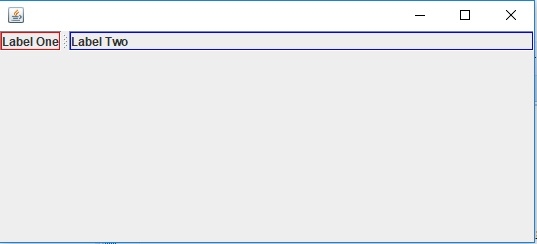

更新於:30-Jul-2019
114 次瀏覽

廣告