
 資料結構
資料結構 網路
網路 關係型資料庫管理系統
 作業系統
作業系統 Java
Java MS Excel
 iOS
iOS HTML
HTML CSS
CSS Android
 Python
 C 程式設計
 C++
C++ C#
C# MongoDB
 MySQL
MySQL Javascript
 PHP
PHP 物理
物理 化學
化學 生物
生物 數學
數學 英語
英語 經濟學
經濟學 心理學
心理學 社會學
社會學 時尚
時尚 法律
法律如何在 Java 中為 Swing 元件設定不同的外觀和感覺?
Java Swing 使我們能夠透過改變外觀和感覺 (L&F)來定製 GUI。外觀定義元件的一般外觀,而感覺定義它們的行為。L&F 是LookAndFeel類的子類,每個 L&F 都由其完全限定類名來標識。預設情況下,L&F 設定為Swing L&F (Metal L&F)
要以程式設計方式設定 L&F,我們可以呼叫UIManager類的setLookAndFeel () 方法。setLookAndFeel 的呼叫必須在例項化任何 Java Swing 類之前執行,否則將載入預設的 Swing L&F。
語法
public static void setLookAndFeel(LookAndFeel newLookAndFeel) throws UnsupportedLookAndFeelException
示例
import java.awt.*;
import java.awt.event.*;
import javax.swing.*;
public class LookAndFeelTest extends JFrame implements ActionListener {
   private JRadioButton windows, metal, motif, ;
   private ButtonGroup bg;
   public LookAndFeelTest() {
      setTitle("Look And Feels");
      windows = new JRadioButton("Windows");
      windows.addActionListener(this);
      metal = new JRadioButton("Metal");
      metal.addActionListener(this);
      motif = new JRadioButton("Motif");
      motif.addActionListener(this);
      bg = new ButtonGroup();
      bg.add(windows);
      bg.add(metal);
      bg.add(motif);
      setLayout(new FlowLayout());
      add(windows);
      add(metal);
      add(motif);
      setSize(400, 300);
      setDefaultCloseOperation(JFrame.EXIT_ON_CLOSE);
      setLocationRelativeTo(null);
      setVisible(true);
   }
   @Override
   public void actionPerformed(ActionEvent ae) {
      String LAF;
      if(ae.getSource() == windows)
         LAF = "com.sun.java.swing.plaf.windows.WindowsLookAndFeel";
      else if(ae.getSource() == metal)
         LAF = "javax.swing.plaf.metal.MetalLookAndFeel";
      else
         LAF = "com.sun.java.swing.plaf.motif.MotifLookAndFeel";
      try {
         UIManager.setLookAndFeel(LAF);
         SwingUtilities.updateComponentTreeUI(this);
      } catch (Exception e) {
         System.out.println("Error setting the LAF..." + e);
      }
   }
   public static void main(String args[]) {
      new LookAndFeelTest();
   }
}
輸出
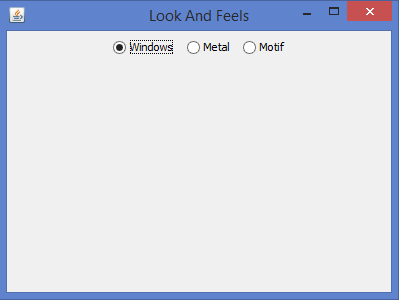
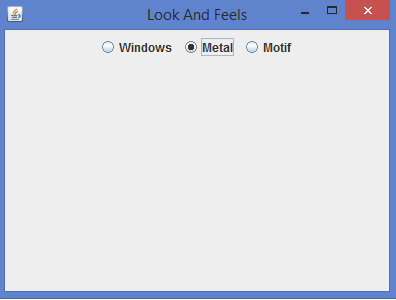
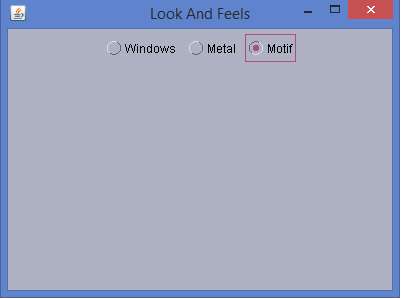

更新於: 03-Jul-2020
2K+ 瀏覽量

廣告