
 資料結構
資料結構 網路
網路 關係型資料庫管理系統
 作業系統
作業系統 Java
Java MS Excel
 iOS
iOS HTML
HTML CSS
CSS 安卓
安卓 Python
 C 程式設計
 C++
C++ C#
C# MongoDB
 MySQL
MySQL Javascript
 PHP
PHP 物理
物理 化學
化學 生物
生物 數學
數學 英語
英語 經濟學
經濟學 心理學
心理學 社會學
社會學 時尚研究
時尚研究 法律研究
法律研究如何在 iOS 中設定導航欄的背景呢?
為了設定導航欄的背景顏色,我們可以程式設計或者透過情節提要來實現,如果是在情節提要中。
方法 1
我們透過情節提要編輯器來改變導航欄的背景顏色。
建立一個新專案,選擇它的檢視控制器並嵌入到導航控制器。
選擇導航欄並進入它的屬性檢查器。
下面是它在 Xcode 10 中的顯示方式。你可以在那裡選擇色調,並將其改變成導航控制器。
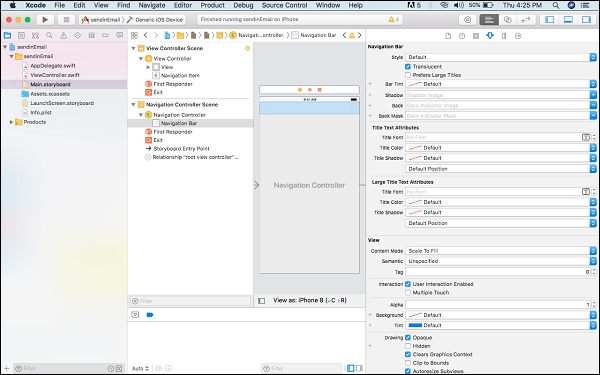
方法 2
透過程式設計改變導航背景。
要透過程式設計改變它,進入檢視控制器並在裡面,ViewDidLoad 或 ViewWillAppear 中寫出下列程式碼
self.navigationController?.navigationBar.barTintColor = #colorLiteral(red: 0, green: 0, blue: 0, alpha: 1)
要改變其它屬性,比如文字顏色、色調或者透明度,你可以使用
UINavigationBar.appearance().barTintColor = .black
UINavigationBar.appearance().tintColor = .white
UINavigationBar.appearance().titleTextAttributes = [NSAttributedStringKey.foregroundColor: UIColor.white]
UINavigationBar.appearance().isTranslucent = false

更新時間: 30-7-2019
1K+ 瀏覽次數

廣告