
 資料結構
資料結構 網路
網路 RDBMS
RDBMS 作業系統
作業系統 Java
Java MS Excel
 iOS
iOS HTML
HTML CSS
CSS Android
 Python
 C 程式設計
 C++
C++ C#
C# MongoDB
 MySQL
MySQL Javascript
 PHP
PHP 物理學
物理學 化學
化學 生物學
生物學 數學
數學 英語
英語 經濟學
經濟學 心理學
心理學 社會學
社會學 時尚學
時尚學 法學
法學如何獲取 iOS 中的導航欄高度?
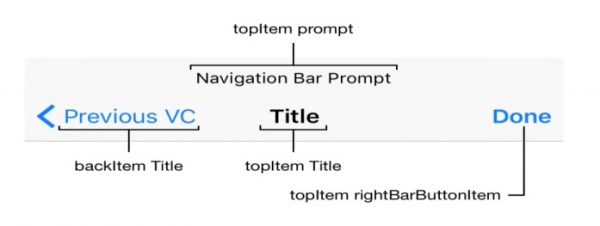
導航欄出現在應用螢幕頂部。要了解有關它的更多資訊
https://developer.apple.com/design
https://developer.apple.com/documentation
獲取導航欄的高度變得很重要,如果你有多個具有不同 UI 和需求的檢視控制器。如果你不知道如何獲取導航欄的高度或根據需要進行修改,這會變得很麻煩。讓我們來看看如何獲取導航欄的高度。
import UIKit
class ViewController: UIViewController {
   override func viewDidLoad() {
      super.viewDidLoad()
      let navBarHeight = UIApplication.shared.statusBarFrame.size.height +
         (navigationController?.navigationBar.frame.height ?? 0.0)
      print(navBarHeight)
   }
}

更新於: 30-Jul-2019
3 千次瀏覽量

廣告