
 資料結構
資料結構 網路
網路 關係資料庫管理系統 (RDBMS)
 作業系統
作業系統 Java
Java MS Excel
 iOS
iOS HTML
HTML CSS
CSS Android
 Python
 C語言程式設計
 C++
C++ C#
C# MongoDB
 MySQL
MySQL Javascript
 PHP
PHP 物理學
物理學 化學
化學 生物學
生物學 數學
數學 英語
英語 經濟學
經濟學 心理學
心理學 社會學
社會學 服裝設計
服裝設計 法學
法學如何使用Python移動包含子資料夾的資料夾列表?
移動包含子資料夾的資料夾列表是處理大型檔案或組織資料時的一項常見任務。Python 提供了幾種方法來處理此任務,每種方法都有其自身的優缺點。
在本文中,我們將學習如何使用 Python 移動包含子資料夾的資料夾列表。我們將瞭解不同的方法以及它們的語法和示例,用於使用 Python 移動包含子資料夾的資料夾列表。
Python 如何幫助移動包含子資料夾的資料夾列表?
Python 是一種流行的程式語言,它提供各種內建函式和模組來處理不同型別的資料,包括列表和資料夾。在移動包含子資料夾的資料夾列表的上下文中,Python 的內建 os 和 shutil 模組非常有用。
os 模組提供了一種與作業系統功能(包括檔案和目錄操作)進行互動的與平臺無關的方法。另一方面,shutil 模組提供更高級別的檔案操作,比 os 模組更容易使用。
要移動包含子資料夾的資料夾列表,可以使用 os 模組的 listdir() 函式獲取源目錄中所有檔案和目錄的列表。然後,可以使用 for 迴圈迭代列表中的每個專案,並使用 shutil 模組的 move() 函式將資料夾移動到目標目錄。
值得注意的是,當移動包含子資料夾的資料夾時,還需要遞迴地移動所有子資料夾及其內容。這可以使用遞迴函式來實現,該函式為每個子目錄呼叫自身。
方法
使用 Python 移動包含子資料夾的資料夾列表有不同的方法,讓我們看看一些常用的方法。
方法 1:使用 shutil.move()
shutil 模組提供了一個用於處理檔案操作的高階介面。shutil 的 move() 方法可用於將檔案或資料夾從一個位置移動到另一個位置。該方法接受兩個引數:源和目標。源引數是要移動的檔案或資料夾的路徑,而目標引數是要將檔案或資料夾移動到的路徑。
語法
以下語法定義了 shutil.move() 的用法。
import shutil
shutil.move(src, dst)
示例
在給定的示例中,我們首先匯入 shutil 和 os 模組。然後,我們將 source_folder 和 destination_folder 變數定義為原始檔夾和目標資料夾的路徑。
接下來,我們使用 os.listdir() 獲取 source_folder 中所有檔案和目錄的列表。然後,我們使用列表推導式過濾掉僅使用 os.path.isdir() 的目錄。然後,我們使用 os.path.join() 建立每個目錄的完整路徑。
最後,我們遍歷 subdirs 列表並使用 shutil.move() 將每個子目錄移動到 destination_folder。
#import the required modules
import shutil
import os

#define the source folder and destination folder paths
my_source_folder = 'C:/Users/username/Documents/my_source_folder'
my_destination_folder = 'C:/Users/username/Documents/my_destination_folder'

# Get a list of all subdirectories in the source folder
my_subdirs = [os.path.join(my_source_folder, o) for o in os.listdir(my_source_folder) if os.path.isdir(os.path.join(my_source_folder, o))]

# Moving each subdirectory to the destination folder
for subdir in my_subdirs:
    shutil.move(subdir, my_destination_folder)
輸出
之前
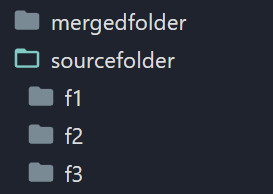
之後
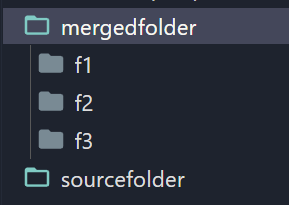
方法 2:使用 os.rename()
os 模組為檔案操作提供了一個較低級別的介面。os 的 rename() 方法可用於重新命名檔案或資料夾,但也可以透過將其重新命名為新路徑來移動檔案或資料夾。
語法
以下語法定義了 os.rename() 的用法。
import os
os.rename(src, dst)
示例
在給定的示例中,我們首先匯入 os 模組。然後,我們將 source_folder 和 destination_folder 變數定義為原始檔夾和目標資料夾的路徑。
接下來,我們使用 os.listdir() 獲取 source_folder 中所有檔案和目錄的列表。然後,我們使用列表推導式過濾掉僅使用 os.path.isdir() 的目錄。然後,我們使用 os.path.join() 建立每個目錄的完整路徑。
最後,我們遍歷 subdirs 列表並使用 os.rename() 將每個子目錄移動到 destination_folder。我們使用 os.path.join() 和 os.path.basename() 建立 destination_folder 中子目錄的新路徑。
#import the required modules
import shutil
import os

#define the source folder and destination folder paths
my_source_folder = 'C:/Users/username/Documents/my_source_folder'
my_destination_folder = 'C:/Users/username/Documents/my_destination_folder'

# Get a list of all subdirectories in the source folder
my_subdirs = [os.path.join(my_source_folder, o) for o in os.listdir(my_source_folder) if os.path.isdir(os.path.join(my_source_folder, o))]

# Moving each subdirectory to the destination folder
for subdir in my_subdirs:
    new_path = os.path.join(my_destination_folder, os.path.basename(subdir))
    os.rename(subdir, new_path)
輸出
之前
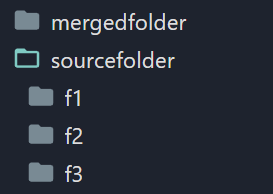
之後
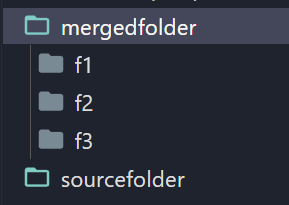
方法 3:使用 shutil.copytree() 和 shutil.rmtree()
shutil 模組提供了另外兩種方法:copytree() 和 rmtree()。copytree() 可用於將整個目錄樹從一個位置複製到另一個位置,而 rmtree() 可用於刪除整個目錄樹。
語法
以下語法定義了 shutil.copytree() 和 shutil.rmtree() 的用法。
import shutil
shutil.copytree(src, dst)
shutil.rmtree(path)
示例
在給定的示例中,我們首先匯入 shutil 和 os 模組。然後,我們將 source_folder 和 destination_folder 變數定義為原始檔夾和目標資料夾的路徑。
接下來,我們使用 os.listdir() 獲取 source_folder 中所有檔案和目錄的列表。然後,我們使用列表推導式過濾掉僅使用 os.path.isdir() 的目錄。然後,我們使用 os.path.join() 建立每個目錄的完整路徑。
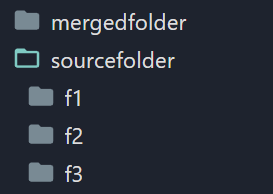
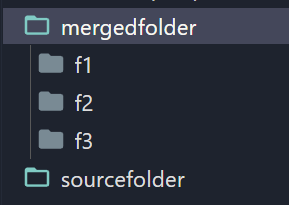
最後,我們遍歷 subdirs 列表並使用 shutil.copytree() 將每個子目錄複製到 destination_folder。我們建立 destination_folder 中子目錄的新路徑。
#import the required modules
import shutil
import os

#define the source folder and destination folder paths
my_source_folder = 'C:/Users/username/Documents/my_source_folder'
my_destination_folder = 'C:/Users/username/Documents/my_destination_folder'

# Get a list of all subdirectories in the source folder
my_subdirs = [os.path.join(my_source_folder, o) for o in os.listdir(my_source_folder) if os.path.isdir(os.path.join(my_source_folder, o))]

# Copy each subdirectory to the destination folder
for subdir in my_subdirs:
    my_new_path = os.path.join(my_destination_folder, os.path.basename(subdir))
    shutil.copytree(subdir, my_new_path)

    # Removing the original subdirectory
    shutil.rmtree(subdir)
輸出
之前
之後
結論
移動包含子資料夾的資料夾列表在處理大型檔案或組織資料時是一項重要任務,Python 提供了幾種方法來處理它。在本文中,我們討論了三種最常用的方法:使用 shutil.move()、os.rename() 以及 shutil.copytree() 和 shutil.rmtree()。每種方法都有其自身的優缺點,最佳方法取決於具體的用例。因此,選擇最符合手頭任務要求的方法至關重要。

492 次瀏覽
