
 資料結構
資料結構 網路
網路 RDBMS
RDBMS 作業系統
作業系統 Java
Java MS Excel
 iOS
iOS HTML
HTML CSS
CSS Android
 Python
 C 程式設計
 C++
C++ C#
C# MongoDB
 MySQL
MySQL Javascript
 PHP
PHP 物理
物理 化學
化學 生物
生物 數學
數學 英語
英語 經濟學
經濟學 心理學
心理學 社會研究
社會研究 時尚研究
時尚研究 法律研究
法律研究如何使用 jQuery 獲取未隱藏的第一個複選框中的值?
要獲取未隱藏的第一個複選框中的值,請使用 :visible 選擇器。以下為程式碼:−
示例
<!DOCTYPE html>
<html lang="en">
<head>
<meta charset="UTF-8">
<meta name="viewport" content="width=device-width, initialscale=1.0">
<title>>Document</title>
<link rel="stylesheet"
href="//code.jquery.com/ui/1.12.1/themes/base/jquery-ui.css">
<style>
   .notShown {
      display: none;
}
</style>
<script src="https://code.jquery.com/jquery-1.12.4.js"></script>
<script src="https://code.jquery.com/ui/1.12.1/jquery-ui.js"></script>
</head>
<body>
<div class='form'>
<input class="demo notShown" type="checkbox" value="first"
checked="checked" />
<br />
<input class="demo" type="checkbox" value="second"
checked="checked"/>
<br />
<input class="demo" type="checkbox" value="third" />
<br />
<input class="demo " type="checkbox" value="fourth"
checked="checked" />
</div>
<script>
   var v=$('input:checkbox:checked:visible:first').val();
   console.log(v);
</script>
</body>
</html>
要執行以上程式,儲存檔名“anyName.html(index.html)”並右擊檔案。在 VS Code 編輯器中選擇“使用 Live Server 開啟”選項。
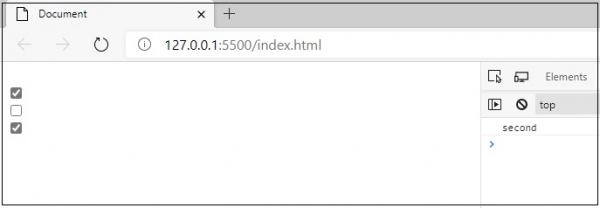
這將產生以下輸出,在控制檯中顯示可見值“second”−

更新於:01-Sep-2020
741 瀏覽量

廣告