
 資料結構
資料結構 網路
網路 關係資料庫管理系統
 作業系統
作業系統 Java
Java MS Excel
 iOS
iOS HTML
HTML CSS
CSS Android
 Python
 C 語言程式設計
 C++
C++ C#
C# MongoDB
 MySQL
MySQL Javascript
 PHP
PHP 物理學
物理學 化學
化學 生物學
生物學 數學
數學 英語
英語 經濟學
經濟學 心理學
心理學 社會學
社會學 時尚研究
時尚研究 法律研究
法律研究如何使用 Python 和 Selenium 獲取表格中特定行的資料?
我們可以使用 Selenium 獲取表格中特定行的資料。表格的行在 HTML 程式碼中由 <tr> 標籤表示。每一行中的資料都包含在 HTML 中的 <td> 標籤內。因此,<td> 標籤的父元素始終是 <tr> 標籤。
邏輯是獲取所有行,我們將使用定位器 xpath,然後使用 **find_elements_by_xpath** 方法。將返回行列表。接下來,我們需要使用 len 方法計算列表的大小。
表格的第一行通常不包含 <td> 標籤。在 <td> 標籤的位置,使用 <th> 標籤。
語法
driver.find_elements_by_xpath("//table/tbody/tr[2]/td")表格標題的 HTML 程式碼片段如下所示:
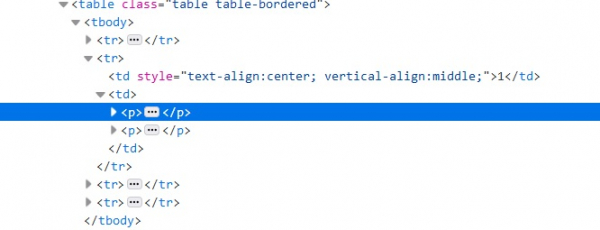
示例
獲取第二行資料的編碼實現。
from selenium import webdriver
#browser exposes an executable file
#Through Selenium test we will invoke the executable file which will then
#invoke actual browser
driver = webdriver.Chrome(executable_path="C:\chromedriver.exe")
# to maximize the browser window
driver.maximize_window()
#get method to launch the URL
driver.get("https://tutorialspoint.tw/plsql/plsql_basic_syntax.htm")
#to refresh the browser
driver.refresh()
# identifying the from row2 having <td> tag
rwdata = driver.find_elements_by_xpath("//table/tbody/tr[2]/td")
# len method is used to get the size of that list
print(len(rwdata))
for r in rwdata:
   print(r.text)
#to close the browser
driver.close()

更新於: 2020-07-29
3K+ 閱讀量

廣告