
 資料結構
資料結構 網路
網路 RDBMS
RDBMS 作業系統
作業系統 Java
Java MS Excel
 iOS
iOS HTML
HTML CSS
CSS Android
 Python
 C 程式設計
 C++
C++ C#
C# MongoDB
 MySQL
MySQL Javascript
 PHP
PHP 物理
物理 化學
化學 生物
生物 數學
數學 英語
英語 經濟
經濟 心理學
心理學 社會研究
社會研究 時尚研究
時尚研究 法律研究
法律研究如何使用 Python 中的 Selenium 統計表格中的行數?
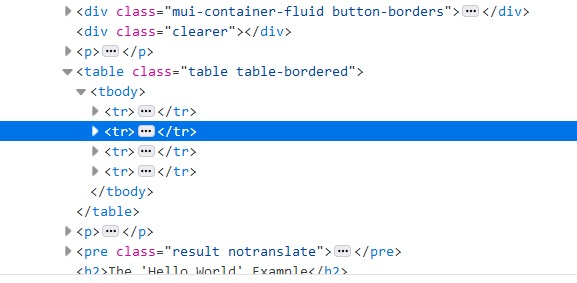
我們可以在 Selenium 中統計表格中的總行數。表格中的行由 html 程式碼中的 <tr> 標記表示。要獲取所有行,我們將使用定位器 xpath,然後使用 find_elements_by_xpath 方法。系統會返回行列表。接下來,我們需要藉助 len 方法計算該列表的大小。
以下是表格行計數的 html 程式碼段描述−
語法
driver.find_elements_by_xpath("//table/tbody/tr")示例
獲取行計數的程式碼實現。
from selenium import webdriver
#browser exposes an executable file
#Through Selenium test we will invoke the executable file which will then
#invoke actual browser
driver = webdriver.Chrome(executable_path="C:\chromedriver.exe")
# to maximize the browser window
driver.maximize_window()
#get method to launch the URL
driver.get("https://tutorialspoint.tw/plsql/plsql_basic_syntax.htm")
#to refresh the browser
driver.refresh()
# identifying the number of rows having <tr> tag
rows = driver.find_elements_by_xpath("//table/tbody/tr")
# len method is used to get the size of that list
print(len(rows))
#to close the browser
driver.close()

更新於: 2020 年 7 月 29 日
11K+ 次瀏覽

廣告