
 資料結構
資料結構 網路
網路 關係資料庫管理系統 (RDBMS)
 作業系統
作業系統 Java
Java MS Excel
 iOS
iOS HTML
HTML CSS
CSS Android
 Python
 C 程式設計
 C++
C++ C#
C# MongoDB
 MySQL
MySQL Javascript
 PHP
PHP 物理
物理 化學
化學 生物
生物 數學
數學 英語
英語 經濟學
經濟學 心理學
心理學 社會學
社會學 服裝設計
服裝設計 法學
法學如何在 Tkinter 文字框中獲取新的 API 響應?
API 在應用程式中實現服務或功能方面非常有用。API 有助於建立伺服器和客戶端之間的連線,因此,每當客戶端使用 API 方法之一向伺服器傳送請求時,伺服器都會向客戶端返回狀態程式碼(201 表示成功響應)。
您可以使用其中一種方法(GET、POST、PUT 或 DELETE)向任何您想要的 API 發出請求。但是,如果您想建立一個需要使用公共可用 API(例如,**貓事實 API**)向伺服器發出請求的應用程式,那麼您可以使用 Python 庫中的 **requests** 模組。
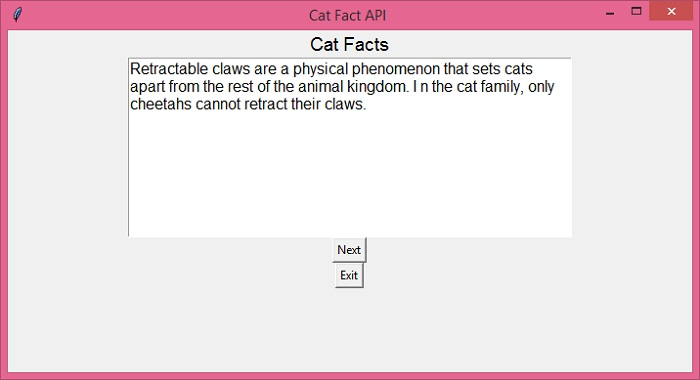
在下面的應用程式中,我們將建立一個文字框,該文字框將顯示使用貓事實 API 之一從伺服器檢索到的響應 **(文字)**。您還需要確保您已在您的環境中安裝了 **requests** 模組。要安裝 **requests** 模組,您可以使用以下命令:
pip install requests
成功安裝 requests 模組後,您可以按照以下步驟建立應用程式:
匯入所有必需的庫。
在應用程式中建立一個文字小部件,以顯示從伺服器檢索到的所有響應(GET 請求)。
建立一個 **var** 來儲存 API URL。
定義一個函式來呼叫 API 並透過從響應正文中提取 **“fact”** 屬性來檢索 JSON 響應。
透過刪除現有事實並插入新事實來更新 **text** 小部件中的響應。
建立一個按鈕(下一步和退出)以無縫載入隨機貓事實。
示例
# Import the required libraries
from tkinter import *
import requests
import json

# Create an instance of tkinter frame
win = Tk()
win.geometry("700x350")
win.title("Cat Fact API ")

# Create a text box to display the response body
text = Text(win, height=10, width=50, wrap="word")
text.config(font="Arial, 12")

# Create a label widget
label = Label(win, text="Cat Facts")
label.config(font="Calibri, 14")

# Add the API URL
api_url = "https://catfact.ninja/fact"

# Define a function to retrieve the response
# and text attribute from the JSON response
def get_zen():
   response = requests.get(api_url).text
   response_info = json.loads(response)
   Fact = response_info["fact"]
   text.delete('1.0', END)
   text.insert(END, Fact)

# Create Next and Exit Button
b1 = Button(win, text="Next", command=get_zen)
b2 = Button(win, text="Exit", command=win.destroy)

label.pack()
text.pack()
b1.pack()
b2.pack()

get_zen()

win.mainloop()
輸出
單擊“**下一步**”按鈕以獲取下一個隨機貓事實。您也可以單擊“**退出**”按鈕以退出 tkinter 應用程式視窗。

更新於:2021年12月16日
瀏覽量:1K+

廣告