
 資料結構
資料結構 網路
網路 關係資料庫管理系統
 作業系統
作業系統 Java
Java MS Excel
 iOS
iOS HTML
HTML CSS
CSS Android
 Python
 C 程式設計
 C++
C++ C#
C# MongoDB
 MySQL
MySQL Javascript
 PHP
PHP 物理學
物理學 化學
化學 生物學
生物學 數學
數學 英語
英語 經濟學
經濟學 心理學
心理學 社會學
社會學 服裝設計
服裝設計 法律研究
法律研究如何使用 OpenCV Java 在影像中可能的物體周圍擬合橢圓?
您可以使用 org.opencv.imgproc.Imgproc 類的 fitEllipse() 方法在形狀上擬合橢圓。此方法接受一個 MatOfPoint2f 類的物件,計算適合給定點集的橢圓,並返回一個 RotatedRect 物件。
使用它,您可以圍繞影像中可能的物體繪製橢圓。為此,
使用 Imgproc 類的 imread() 方法讀取影像。
使用 Imgproc 類的 cvtColor() 方法將其轉換為灰度影像。
使用 Imgproc 類的 threshold() 方法將灰度影像轉換為二值影像。
使用 Imgproc 類的 findContours() 方法查詢影像中的輪廓。
現在,透過將每個輪廓值作為 MatOfPoint2f 傳遞給 fitEllipse() 方法,獲取可能的輪廓的 RotatedRect 物件。
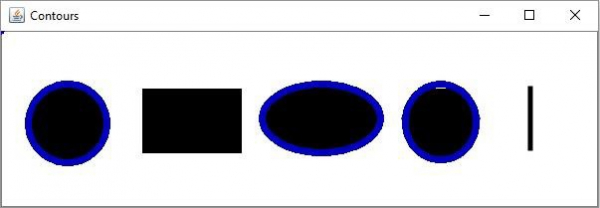
最後,使用 ellipse() 方法圍繞可能的形狀繪製橢圓。
注意 - 要擬合橢圓,物件應至少包含五個點。
示例
import java.util.ArrayList;
import java.util.List;
import org.opencv.core.Core;
import org.opencv.core.Mat;
import org.opencv.core.MatOfPoint;
import org.opencv.core.MatOfPoint2f;
import org.opencv.core.RotatedRect;
import org.opencv.core.Scalar;
import org.opencv.highgui.HighGui;
import org.opencv.imgcodecs.Imgcodecs;
import org.opencv.imgproc.Imgproc;
public class FitEllipseExample {
   public static void main(String args[]) throws Exception {
      //Loading the OpenCV core library
      System.loadLibrary( Core.NATIVE_LIBRARY_NAME );
      //Reading the contents of the image
      String file ="D:\Images\javafx_graphical.jpg";
      Mat src = Imgcodecs.imread(file);
      //Converting the source image to binary
      Mat gray = new Mat(src.rows(), src.cols(), src.type());
      Imgproc.cvtColor(src, gray, Imgproc.COLOR_BGR2GRAY);
      Mat binary = new Mat(src.rows(), src.cols(), src.type(), new Scalar(0));
      Imgproc.threshold(gray, binary, 100, 255, Imgproc.THRESH_BINARY_INV);
      //Finding Contours
      List<MatOfPoint> contours = new ArrayList<>();
      Mat hierarchey = new Mat();
      Imgproc.findContours(binary, contours, hierarchey, Imgproc.RETR_TREE,
      Imgproc.CHAIN_APPROX_SIMPLE);
      //Empty rectangle
      RotatedRect[] rec = new RotatedRect[contours.size()];
      for (int i = 0; i < contours.size(); i++) {
         rec[i] = new RotatedRect();
         if (contours.get(i).rows() > 5) {
            rec[i] = Imgproc.fitEllipse(new MatOfPoint2f(contours.get(i).toArray()));
         }
         Scalar color_elli = new Scalar(190, 0, 0);
         Imgproc.ellipse(src, rec[i], color_elli, 5);
      }
      HighGui.imshow("Contours operation", src);
      HighGui.waitKey();
   }
}
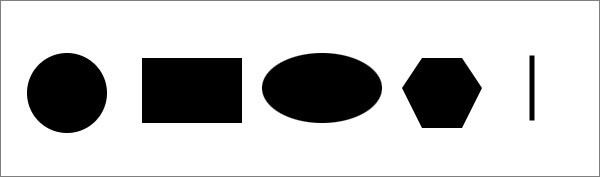
輸入影像
輸出

更新於: 2020年4月13日
226 次檢視

廣告