
 資料結構
資料結構 網路
網路 關係資料庫管理系統
 作業系統
作業系統 Java
Java MS Excel
 iOS
iOS HTML
HTML CSS
CSS Android
 Python
 C 程式設計
 C++
C++ C#
C# MongoDB
 MySQL
MySQL Javascript
 PHP
PHP 物理學
物理學 化學
化學 生物學
生物學 數學
數學 英語
英語 經濟學
經濟學 心理學
心理學 社會學
社會學 時尚研究
時尚研究 法律研究
法律研究如何在 PyTorch 中找到影像通道的平均值?
RGB 影像有三個通道:紅色、綠色和藍色。我們需要計算這些影像通道上影像畫素值的平均值。為此,我們使用 torch.mean() 方法。但是此方法的輸入引數是 PyTorch 張量。因此,我們首先將影像轉換為 PyTorch 張量,然後應用此方法。它返回張量中所有元素的平均值。要查詢影像通道的平均值,我們將引數 dim 設定為 [1,2]。
步驟
匯入所需的庫。在以下所有 Python 示例中,所需的 Python 庫是 torch、torchvision、Pillow 和 OpenCV。確保您已安裝它們。
使用 image.open() 讀取輸入影像並將其分配給變數 “img”。
定義一個轉換,將 PIL 影像轉換為 PyTorch 張量。
使用上面定義的轉換將影像 “img” 轉換為 PyTorch 張量,並將此張量分配給 “imgTensor”。
計算 torch.mean(imgTensor, dim = [1,2])。它返回一個包含三個值的張量。這三個值是三個通道 RGB 的平均值。您可以將這三個平均值分別分配給三個新變數 “R_mean”、“G_mean” 和 “B_mean”。
列印影像畫素的三個平均值 “R_mean”、“G_mean” 和 “B_mean”。
輸入影像
我們將在兩個示例中都使用以下影像作為輸入。
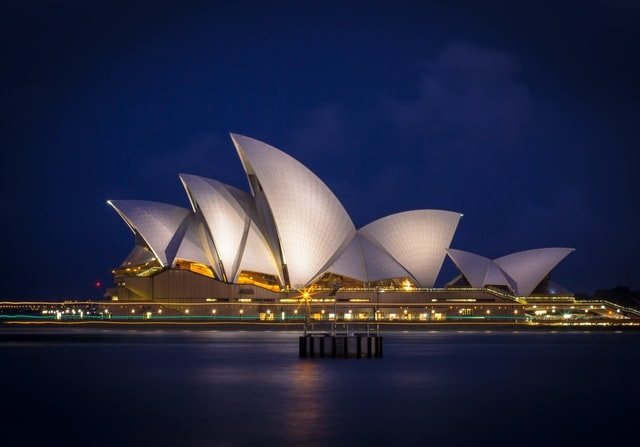
示例 1
# Python program to find mean across the image channels
# import necessary libraries
import torch
from PIL import Image
import torchvision.transforms as transforms

# Read the input image
img = Image.open('opera.jpg')

# Define transform to convert the image to PyTorch Tensor
transform = transforms.ToTensor()

# Convert image to PyTorch Tensor (Image Tensor)
imgTensor = transform(img)
print("Shape of Image Tensor:\n", imgTensor.shape)

# Compute mean of the Image Tensor across image channels RGB
R_mean, G_mean ,B_mean = torch.mean(imgTensor, dim = [1,2])

# print mean across image channel RGB
print("Mean across Read channel:", R_mean)
print("Mean across Green channel:", G_mean)
print("Mean across Blue channel:", B_mean)
輸出
Shape of Image Tensor:
   torch.Size([3, 447, 640])
Mean across Read channel: tensor(0.1487)
Mean across Green channel: tensor(0.1607)
Mean across Blue channel: tensor(0.2521)
示例 2
我們還可以使用 OpenCV 讀取影像。使用 OpenCV 讀取的影像型別為 numpy.ndarray。在這裡,在這個示例中,我們使用了一種不同的方法來計算平均值。我們使用 imgTensor.mean(),這是張量上的基本運算。請檢視以下示例。
# Python program to find mean across the image channels
# import necessary libraries
import torch
import cv2
import torchvision.transforms as transforms

# Read the input image either using cv2 or PIL
img = cv2.imread('opera.jpg')
img = cv2.cvtColor(img, cv2.COLOR_BGR2RGB)

# Define transform to convert the image to PyTorch Tensor
transform = transforms.ToTensor()

# Convert image to PyTorch Tensor (Image Tensor)
imgTensor = transform(img)
print("Shape of Image Tensor:\n", imgTensor.shape)

# compute mean of the Image Tensor across image channels RGB
# The other way to compute the mean
R_mean, G_mean ,B_mean = imgTensor.mean(dim = [1,2])

# print mean across image channel RGB
print("Mean across Read channel:", R_mean)
print("Mean across Green channel:", G_mean)
print("Mean across Blue channel:", B_mean)
輸出
Shape of Image Tensor:
   torch.Size([3, 447, 640])
Mean across Read channel: tensor(0.1487)
Mean across Green channel: tensor(0.1607)
Mean across Blue channel: tensor(0.2521)

更新於: 2021 年 11 月 6 日
2K+ 瀏覽量

廣告