
 資料結構
資料結構 網路化
網路化 RDBMS
RDBMS 作業系統
作業系統 Java
Java MS Excel
 iOS
iOS HTML
HTML CSS
CSS Android
 Python
 C 程式語言
 C++
C++ C#
C# MongoDB
 MySQL
MySQL Javascript
 PHP
PHP 物理學
物理學 化學
化學 生物學
生物學 數學
數學 英語
英語 經濟學
經濟學 心理學
心理學 社會學
社會學 時尚研究
時尚研究 法律研究
法律研究如何使用 Python Turtle 庫繪製不同的形狀?
在該程式中,我們將使用 Python 中的Turtle 庫繪製不同的形狀。Turtle 是一個類似於繪圖板的 Python 功能,它允許你命令烏龜在上面任意繪製。我們要繪製的不同形狀包括正方形、矩形、圓形和六邊形。
演算法
步驟 1:輸入不同形狀的邊的長度作為輸入。
步驟 2:使用不同的 Turtle 方法(如 forward() 和 left())繪製不同的形狀。
示例程式碼
import turtle
t = turtle.Turtle()

#SQUARE
side = int(input("Length of side: "))
for i in range(4):
   t.forward(side)
   t.left(90)

#RECTANGLE
side_a = int(input("Length of side a: "))
side_b = int(input("Length of side b: "))
t.forward(side_a)
t.left(90)
t.forward(side_b)
t.left(90)
t.forward(side_a)
t.left(90)
t.forward(side_b)
t.left(90)

#CIRCLE
radius = int(input("Radius of circle: "))
t.circle(radius)

#HEXAGON
for i in range(6):
   t.forward(side)
   t.left(300)
輸出
SQUARE: Length of side: 100RECTANGLE: Length of side a: 100 Length of side b: 20
CIRCLE: Radius of circle: 60
HEXAGON:Length of side: 100
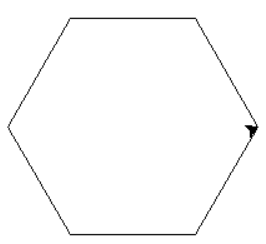

更新於: 16-Mar-2021
3K+ 瀏覽

廣告