
 資料結構
資料結構 聯網
聯網 RDBMS
RDBMS 作業系統
作業系統 Java
Java MS Excel
 iOS
iOS HTML
HTML CSS
CSS Android
 Python
 C 程式設計
 C++
C++ C#
C# MongoDB
 MySQL
MySQL Javascript
 PHP
PHP 物理學
物理學 化學
化學 生物學
生物學 數學
數學 英語
英語 經濟學
經濟學 心理學
心理學 社會學
社會學 時尚研究
時尚研究 法律研究
法律研究如何使用 C++ 在 OpenCV 中繪製矩形?
繪製矩形需要四個點。觀察下圖。
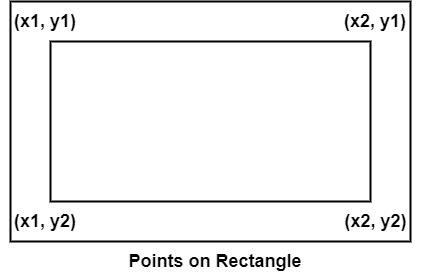
圖中有四個點 x1、x2、y1 和 y2。這四個點構成了四個座標。要使用 OpenCV 來繪製矩形,我們必須定義這些點並使用一個矩陣顯示所需矩形。我們必須宣告其他相關值,比如線條顏色和線條寬度。
此方法的基本語法如下
語法
rectangle(whiteMatrix, starting, ending, line_Color, thickness);
以下程式說明了如何在 OpenCV 中繪製矩形。
示例
#include<iostream>
#include<opencv2/highgui/highgui.hpp>
#include<opencv2/imgproc/imgproc.hpp>
using namespace cv;
using namespace std;
int main() {
   Mat whiteMatrix(200, 200, CV_8UC3, Scalar(255, 255, 255));// Declaring a white matrix//
   Point starting(40, 40);//Declaring the starting coordinate//
   Point ending(160, 100);//Declaring the ending coordinate
   Scalar line_Color(0, 0, 0);//Color of the rectangle//
   int thickness = 2;//thickens of the line//
   namedWindow("whiteMatrix");//Declaring a window to show the rectangle//
   rectangle(whiteMatrix, starting, ending, line_Color, thickness);//Drawing the rectangle//
   imshow("WhiteMatrix", whiteMatrix);//Showing the rectangle//
   waitKey(0);//Waiting for Keystroke
   return 0;
}
輸出
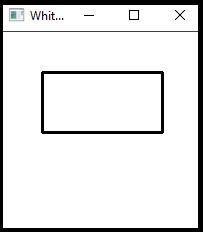

更新於: 2021-03-10
1 千+

廣告