
 資料結構
資料結構 網路
網路 RDBMS
RDBMS 作業系統
作業系統 Java
Java MS Excel
 iOS
iOS HTML
HTML CSS
CSS Android
 Python
 C 程式設計
 C++
C++ C#
C# MongoDB
 MySQL
MySQL Javascript
 PHP
PHP 物理
物理 化學
化學 生物
生物 數學
數學 英語
英語 經濟學
經濟學 心理學
心理學 社會研究
社會研究 時尚研究
時尚研究 法律研究
法律研究如何使用 Selenium 在 specflow api 中進行資料驅動測試?
我們可以在 SpecFlow 中使用/不使用 Examples 關鍵字來進行資料驅動測試。如果我們不使用 Examples 關鍵字,則我們必須從 Feature 檔案中的步驟(用 '' 括起)傳送資料。
特性檔案實現
Feature: Launching application
Scenario: Launch URL
Given User hits URL 'https://tutorialspoint.tw/index.htm'
示例
步驟定義檔案實現
using System;
using TechTalk.SpecFlow;
namespace SpecFlowProject1.Features{
   [Binding]
   public class LaunchingApplicationSteps{
      [Given(@"User hits URL '(.*)'")]
      public void GivenUserHitsURL(string url){
         Console.WriteLine(url);
      }
   }
}
輸出
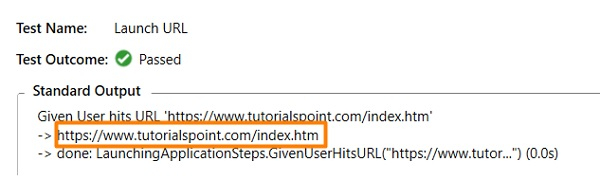
接下來,我們將使用 Examples 關鍵字來執行資料驅動測試。在這裡,在 Scenario Outline 關鍵字中定義了場景。透過這種方法,我們可以在多個數據集上執行相同的場景。
資料集以行的形式在 Examples 部分下面宣告。此外,每個資料都用 | 符號分隔。如果有兩行資料,則表示同一個場景將使用兩個不同的資料集執行兩次。特性檔案中的步驟應包含用 <> 括起 Examples 表格的標題。
特性檔案實現
Feature: User credential
Scenario Outline: Login module
Given user types <username> and <password>
Examples:
| username       | password |
| tutorialspoint1|    pwd   |
| tutorialspoint2|    pwd1  |
示例
步驟定義檔案實現
using System;
using TechTalk.SpecFlow;
namespace SpecFlowProject1.Features{
   [Binding]
   public class UserCredentialSteps{
      [Given(@"user types (.*) and (.*)")]
      public void GivenUserTypesUserAndPwds(string username, string password){
         Console.WriteLine(username);
         Console.WriteLine(password);
      }
   }
}
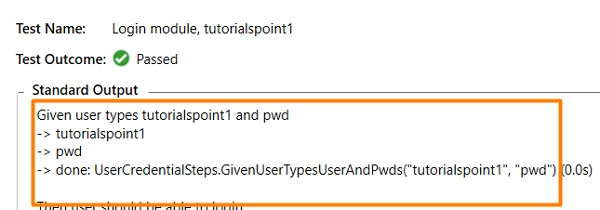
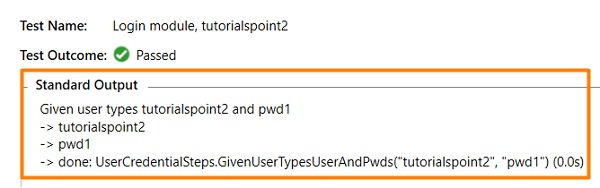
輸出
使用第一個資料集 −
使用第二個資料集 −

更新於: 07-Apr-2021
211 瀏覽

廣告