
 資料結構
資料結構 網路
網路 RDBMS
RDBMS 作業系統
作業系統 Java
Java MS Excel
 iOS
iOS HTML
HTML CSS
CSS Android
 Python
 C 程式設計
 C++
C++ C#
C# MongoDB
 MySQL
MySQL Javascript
 PHP
PHP 物理
物理 化學
化學 生物
生物 數學
數學 英語
英語 經濟學
經濟學 心理學
心理學 社會研究
社會研究 時裝研究
時裝研究 法律研究
法律研究如何在 Java 中顯示 JComboBox 內的不同字型項?
JComboBox 是 JComponent 類的子類,它是由一個文字欄位 和一個使用者可以選擇值的下拉列表組成的。當用戶對組合框執行操作時,JComboBox 可以生成ActionListener、ChangeListener 和 ItemListener 介面。我們可以透過實現ListCellRenderer 介面在 JComboBox 中顯示不同的字型樣式
示例
import java.awt.*;
import javax.swing.*;
public class JComboBoxFontTest extends JFrame {
   private JComboBox fontComboBox;
   private String fontName[];
   private Integer array[];
   public JComboBoxFontTest() {
      setDefaultCloseOperation(JFrame.EXIT_ON_CLOSE);
      GraphicsEnvironment ge = GraphicsEnvironment.getLocalGraphicsEnvironment();
      fontName = ge.getAvailableFontFamilyNames();
      array = new Integer[fontName.length];
      for(int i=1;i<=fontName.length;i++) {
         array[i-1] = i;
      }
      fontComboBox = new JComboBox(array);
      ComboBoxRenderar renderar = new ComboBoxRenderar();
      fontComboBox.setRenderer(renderar);
      setLayout(new FlowLayout());
      add(fontComboBox);
      setSize(400, 300);
      setDefaultCloseOperation(JFrame.EXIT_ON_CLOSE);
      setLocationRelativeTo(null);
      setVisible(true);
   }
   private class ComboBoxRenderar extends JLabel implements ListCellRenderer {
      @Override
      public Component getListCellRendererComponent(JList list, Object value, int index, boolean           isSelected, boolean cellHasFocus) {
         int offset = ((Integer)value).intValue() - 1;
         String name = fontName[offset];
         setText(name);
         setFont(new Font(name,Font.PLAIN,20));
         return this;
      }
   }
   public static void main(String args[]) {
      new JComboBoxFontTest();
   }
}
輸出
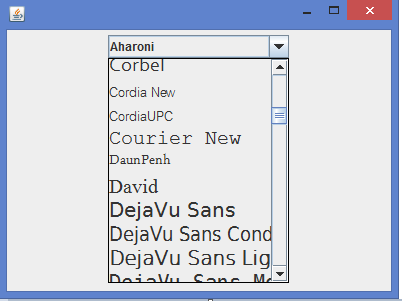

更新時間:2020 年 2 月 10 日
402 次瀏覽

廣告