
 資料結構
資料結構 網路
網路 RDBMS
RDBMS 作業系統
作業系統 Java
Java MS Excel
 iOS
iOS HTML
HTML CSS
CSS 安卓
安卓 Python
 C 程式設計
 C++
C++ C#
C# MongoDB
 MySQL
MySQL JavaScript
 PHP
PHP 物理
物理 化學
化學 生物
生物 數學
數學 英語
英語 經濟學
經濟學 心理學
心理學 社會科學
社會科學 時尚研究
時尚研究 法律研究
法律研究如何在沒有 Google API 的情況下在安卓系統上開發語音識別器?
此示例演示瞭如何在沒有 Google API 的情況下在安卓系統上開發語言識別器。
步驟 1 − 在 Android Studio 中建立一個新專案,轉到檔案 ⇒ 新專案,然後填寫所有必要資訊以建立一個新專案。
步驟 2 − 將以下程式碼新增到 res/layout/activity_main.xml。
<?xml version="1.0" encoding="utf-8"?>
<RelativeLayout
   xmlns:android="http://schemas.android.com/apk/res/android"
   android:layout_width="match_parent"
   android:layout_height="match_parent"
   android:orientation="vertical" >
   <ImageView
      android:id="@+id/imageView1"
      android:layout_width="200dp"
      android:layout_height="200dp"
      android:layout_centerInParent="true"
      android:src="@drawable/ic_mic" />
   <ProgressBar
      android:id="@+id/progressBar1" style="?android:attr/progressBarStyleHorizontal"
      android:layout_width="match_parent"
      android:layout_height="wrap_content"
      android:layout_alignParentLeft="true"
      android:layout_below="@+id/toggleButton1"
      android:layout_marginTop="28dp"
      android:paddingLeft="10dp"
      android:paddingRight="10dp" />
   <TextView
      android:id="@+id/textView1"
      android:layout_width="wrap_content"
      android:layout_height="wrap_content"
      android:layout_below="@+id/progressBar1"
      android:layout_centerHorizontal="true"
      android:layout_marginTop="47dp" />
   <ToggleButton
      android:id="@+id/toggleButton1"
      android:layout_width="wrap_content"
      android:layout_height="wrap_content"
      android:layout_alignParentTop="true"
      android:layout_centerHorizontal="true"
      android:layout_marginTop="26dp"
      android:text="ToggleButton" />
</RelativeLayout>
步驟 3 − 將以下程式碼新增到 src/MainActivity.java
package app.com.sample;
import android.Manifest;
import android.content.Intent;
import android.content.pm.PackageManager;
import android.os.Bundle;
import android.speech.RecognitionListener;
import android.speech.RecognizerIntent;
import android.speech.SpeechRecognizer;
import android.support.annotation.NonNull;
import android.support.v4.app.ActivityCompat;
import android.support.v7.app.AppCompatActivity;
import android.util.Log;
import android.view.View;
import android.widget.CompoundButton;
import android.widget.ProgressBar;
import android.widget.TextView;
import android.widget.Toast;
import android.widget.ToggleButton;
import java.util.ArrayList;
public class MainActivity extends AppCompatActivity implements
RecognitionListener {
   private static final int REQUEST_RECORD_PERMISSION = 100;
   private TextView returnedText;
   private ToggleButton toggleButton;
   private ProgressBar progressBar;
   private SpeechRecognizer speech = null;
   private Intent recognizerIntent;
   private String LOG_TAG = "VoiceRecognitionActivity";
   @Override
   protected void onCreate(Bundle savedInstanceState) {
      super.onCreate(savedInstanceState);
      setContentView(R.layout.activity_main);
      returnedText = findViewById(R.id.textView1);
      progressBar = findViewById(R.id.progressBar1);
      toggleButton = findViewById(R.id.toggleButton1);
      progressBar.setVisibility(View.INVISIBLE);
      speech = SpeechRecognizer.createSpeechRecognizer(this);
      Log.i(LOG_TAG, "isRecognitionAvailable: " + SpeechRecognizer.isRecognitionAvailable(this));
      speech.setRecognitionListener(this);
      recognizerIntent = new Intent(RecognizerIntent.ACTION_RECOGNIZE_SPEECH);
      recognizerIntent.putExtra(RecognizerIntent.EXTRA_LANGUAGE_PREFERENCE,"US-en");
      recognizerIntent.putExtra(RecognizerIntent.EXTRA_LANGUAGE_MODEL, RecognizerIntent.LANGUAGE_MODEL_FREE_FORM);
      recognizerIntent.putExtra(RecognizerIntent.EXTRA_MAX_RESULTS, 3);
      toggleButton.setOnCheckedChangeListener(new CompoundButton.OnCheckedChangeListener() {
         @Override
         public void onCheckedChanged(CompoundButton buttonView, boolean isChecked) {
            if (isChecked) {
               progressBar.setVisibility(View.VISIBLE);
               progressBar.setIndeterminate(true);
               ActivityCompat.requestPermissions (MainActivity.this, new String[]{Manifest.permission.RECORD_AUDIO},
               REQUEST_RECORD_PERMISSION);
            } else {
               progressBar.setIndeterminate(false);
               progressBar.setVisibility(View.INVISIBLE);
               speech.stopListening();
            }
         }
      });
   }
   @Override
   public void onRequestPermissionsResult(int requestCode, @NonNull String[] permissions, @NonNull int[] grantResults) {
      super.onRequestPermissionsResult(requestCode, permissions, grantResults);
      switch (requestCode) {
         case REQUEST_RECORD_PERMISSION:
         if (grantResults.length > 0 && grantResults[0]== PackageManager.PERMISSION_GRANTED) {
            speech.startListening(recognizerIntent);
         } else {
            Toast.makeText(MainActivity.this, "Permission Denied!", Toast .LENGTH_SHORT).show();
         }
      }
   }
   @Override
   public void onResume() {
      super.onResume();
   }
   @Override
   protected void onPause() {
      super.onPause();
   }
   @Override
   protected void onStop() {
      super.onStop();
      if (speech != null) {
         speech.destroy();
         Log.i(LOG_TAG, "destroy");
      }
   }
   @Override
   public void onBeginningOfSpeech() {
      Log.i(LOG_TAG, "onBeginningOfSpeech");
      progressBar.setIndeterminate(false);
      progressBar.setMax(10);
   }
   @Override
   public void onBufferReceived(byte[] buffer) {
      Log.i(LOG_TAG, "onBufferReceived: " + buffer);
   }
   @Override
   public void onEndOfSpeech() {
      Log.i(LOG_TAG, "onEndOfSpeech");
      progressBar.setIndeterminate(true);
      toggleButton.setChecked(false);
   }
   @Override
   public void onError(int errorCode) {
      String errorMessage = getErrorText(errorCode);
      Log.d(LOG_TAG, "FAILED " + errorMessage);
      returnedText.setText(errorMessage);
      toggleButton.setChecked(false);
   }
   @Override
   public void onEvent(int arg0, Bundle arg1) {
      Log.i(LOG_TAG, "onEvent");
   }
   @Override
   public void onPartialResults(Bundle arg0) {
      Log.i(LOG_TAG, "onPartialResults");
   }
   @Override
   public void onReadyForSpeech(Bundle arg0) {
      Log.i(LOG_TAG, "onReadyForSpeech");
   }
   @Override
   public void onResults(Bundle results) {
      Log.i(LOG_TAG, "onResults");
      ArrayList<String> matches = results .getStringArrayList(SpeechRecognizer.RESULTS_RECOGNITION);
      String text = "";
      for (String result : matches)
         text = result + "
";
      returnedText.setText(text);
   }
   @Override
   public void onRmsChanged(float rmsdB) {
      Log.i(LOG_TAG, "onRmsChanged: " + rmsdB);
      progressBar.setProgress((int) rmsdB);
   }
   public static String getErrorText(int errorCode) {
      String message;
      switch (errorCode) {
         case SpeechRecognizer.ERROR_AUDIO:
            message = "Audio recording error";
            break;
         case SpeechRecognizer.ERROR_CLIENT:
            message = "Client side error";
            break;
         case
            SpeechRecognizer.ERROR_INSUFFICIENT_PERMISSIONS:
            message = "Insufficient permissions";
            break;
         case SpeechRecognizer.ERROR_NETWORK:
            message = "Network error";
            break;
         case SpeechRecognizer.ERROR_NETWORK_TIMEOUT:
            message = "Network timeout";
            break;
         case SpeechRecognizer.ERROR_NO_MATCH:
            message = "No match";
            break;
         case SpeechRecognizer.ERROR_RECOGNIZER_BUSY:
            message = "RecognitionService busy";
            break;
         case SpeechRecognizer.ERROR_SERVER:
            message = "error from server";
            break;
         case SpeechRecognizer.ERROR_SPEECH_TIMEOUT:
            message = "No speech input";
            break;
         default:
            message = "Didn't understand, please try
            again.";
            break;
      }
      return message;
   }
}
步驟 4 − 將以下程式碼新增到 androidManifest.xml
<?xml version="1.0" encoding="utf-8"?>
<manifest xmlns:android="http://schemas.android.com/apk/res/android" package="app.com.sample">
   <uses-permission android:name="android.permission.RECORD_AUDIO"/>
   <uses-permission android:name="android.permission.INTERNET" />
   <application
      android:allowBackup="true"
      android:icon="@mipmap/ic_launcher"
      android:label="@string/app_name"
      android:roundIcon="@mipmap/ic_launcher_round"
      android:supportsRtl="true"
      android:theme="@style/AppTheme">
      <activity android:name=".MainActivity">
         <intent-filter>
            <action android:name="android.intent.action.MAIN" />
            <category android:name="android.intent.category.LAUNCHER" />
         </intent-filter>
      </activity>
   </application>
</manifest>
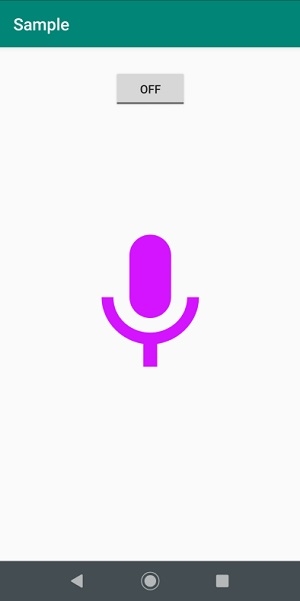
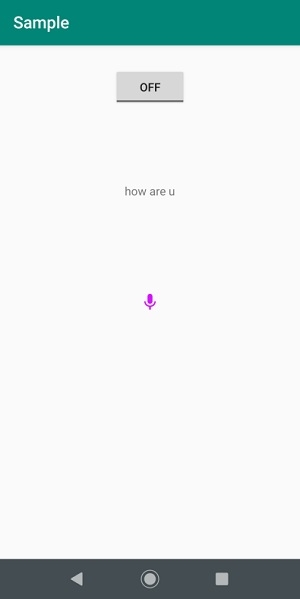
讓我們嘗試執行你的應用程式。我認為你已將你的實際安卓移動裝置與計算機連線。要從安卓工作室執行該應用程式,請開啟你的一個專案活動檔案並單擊工具欄中的執行  圖示。選擇你的移動裝置作為選項,然後檢查將顯示你的預設螢幕的移動裝置 −
單擊此處下載專案程式碼。

更新於: 2019 年 8 月 5 日
3 千餘次瀏覽

廣告