
 資料結構
資料結構 網路
網路 RDBMS
RDBMS 作業系統
作業系統 Java
Java MS Excel
 iOS
iOS HTML
HTML CSS
CSS Android
 Python
 C 程式設計
 C++
C++ C#
C# MongoDB
 MySQL
MySQL Javascript
 PHP
PHP 物理
物理 化學
化學 生物
生物 數學
數學 英語
英語 經濟學
經濟學 心理學
心理學 社會
社會 時尚
時尚 法律
法律如何在 JavaFX 中建立路徑元素三次曲線?
這個類表示路徑元素三次曲線。它可以幫助你從當前座標繪製一個三次曲線方程到指定的(新)座標。
要建立一個線條路徑元素,-
例項化CubicCurve 類。
使用 setter 方法或透過建構函式繞過它們來設定此類的屬性值。
例項化 Path 類。
使用 getElements() 方法獲取以上建立的 Path 的可觀察列表物件。
使用 add() 方法將上面建立的 CubicCurve 物件新增到可觀察列表中。
最後,將路徑新增到組物件。
示例
import javafx.application.Application;
import javafx.scene.Group;
import javafx.scene.Scene;
import javafx.scene.paint.Color;
import javafx.stage.Stage;
import javafx.scene.shape.CubicCurveTo;
import javafx.scene.shape.LineTo;
import javafx.scene.shape.MoveTo;
import javafx.scene.shape.Path;
import javafx.scene.shape.VLineTo;
public class CubicCurveExample extends Application {
   public void start(Stage stage) {
      //Creating PathElement objects
      MoveTo moveTo = new MoveTo(15, 15);
      LineTo line1 = new LineTo(100, 150);
      //Instantiating the class CubicCurve
      CubicCurveTo cubicCurveTo = new CubicCurveTo();
      //Setting properties of the class CubicCurve
      cubicCurveTo.setControlX1(400.0f);
      cubicCurveTo.setControlY1(40.0f);
      cubicCurveTo.setControlX2(175.0f);
      cubicCurveTo.setControlY2(250.0f);
      cubicCurveTo.setX(500.0f);
      cubicCurveTo.setY(150.0f);
      //Creating the HLineTo object
      VLineTo vLine = new VLineTo();
      vLine.setY(80);
      //Creating a Path
      Path path = new Path();
      path.getElements().addAll(moveTo, line1, cubicCurveTo, vLine);
      //Setting other properties
      path.setStrokeWidth(8.0);
      path.setStroke(Color.DARKSLATEGREY);
      //Preparing the Stage object
      Group root = new Group(path);
      Scene scene = new Scene(root, 595, 300, Color.BEIGE);
      stage.setTitle("JavaFX Example");
      stage.setScene(scene);
      stage.show();
   }
   public static void main(String args[]){
      launch(args);
   }
}
輸出
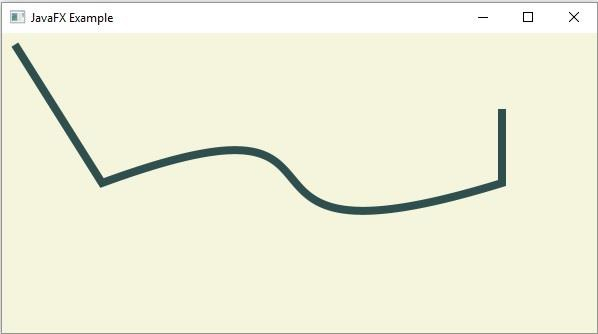

更新於: 2020 年 4 月 13 日
202 次瀏覽

廣告