
 資料結構
資料結構 網路
網路 關係型資料庫管理系統
 作業系統
作業系統 Java
Java MS Excel
 iOS
iOS HTML
HTML CSS
CSS Android
 Python
 C 程式設計
 C++
C++ C#
C# MongoDB
 MySQL
MySQL Javascript
 PHP
PHP 物理學
物理學 化學
化學 生物學
生物學 數學
數學 英語
英語 經濟學
經濟學 心理學
心理學 社會學
社會學 時尚研究
時尚研究 法律研究
法律研究如何在 HTML 中建立合併邊框?
我們使用 border-collapse 屬性在 HTML 中建立合併邊框。border-collapse 是一個 CSS 屬性,用於設定表格邊框在 HTML 中是合併成單個邊框還是保持分離。
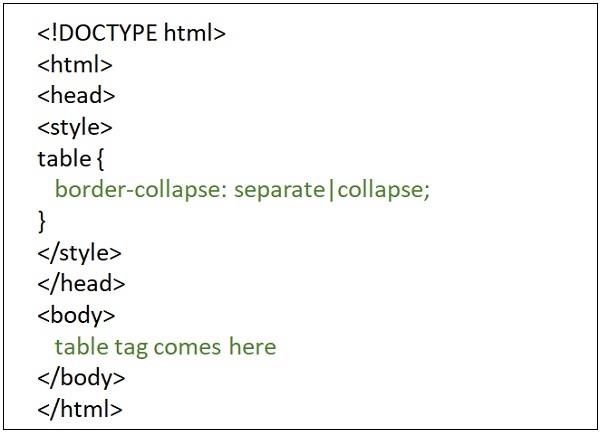
Border-collapse 屬性有四個值:separate、collapse、initial、inherit。
使用 collapse 值
如果將 collapse 作為 border-collapse 屬性的值傳遞,則表格的邊框將簡單地合併成單個邊框。以下是建立 HTML 中合併邊框的語法。
border-collapse: collapse;
示例 1
在下面給出的示例中,我們嘗試在 HTML 中建立一個合併邊框 -
<!DOCTYPE html>
<html>
<head>
   <meta charset="UTF-8">
   <meta http-equiv="X-UA-Compatible" content="IE=edge">
   <meta name="viewport" content="width=device-width, initial-scale=1.0">
   <style>
      table,
      tr,
      th,
      td {
         border: 1px solid black;
         border-collapse: collapse;
      }
   </style>
</head>
<body>
   <h2>Tables in HTML</h2>
   <table style="width: 100%">
   <tr>
      <th>First Name </th>
      <th>Job role</th>
   </tr>
   <tr>
      <td>Tharun</td>
      <td>Content writer</td>
   </tr>
   <tr>
      <td>Akshaj</td>
      <td>Content writer</td>
   </tr>
   </table>
</body>
</html>
以下是上面示例程式的輸出。
示例 2
讓我們再看一個使用 collapse 作為 border-collapse 屬性值的示例 -
<!DOCTYPE html>
<html>
<head>
   <style>
      table {border-collapse: collapse; }
      table, td, th { border: 1px solid blue; }
   </style>
</head>
<body>
   <h1>Technologies</h1>
   <table>
      <tr>
         <th>IDE</th>
         <th>Database</th>
      </tr>
      <tr>
         <td>NetBeans IDE</td>
         <td>MySQL</td>
      </tr>
   </table>
</body>
</html>
使用 separate 作為值
如果我們透過將 **separate** 作為 **border-collapse 屬性**的值來建立合併邊框,則各個單元格將被包裹在單獨的邊框中。
border-collapse:separate;
示例 1
在下面給出的示例中,我們嘗試在 HTML 中建立一個單獨的合併邊框。
<!DOCTYPE html>
<html>
<head>
   <meta charset="UTF-8">
   <meta http-equiv="X-UA-Compatible" content="IE=edge">
   <meta name="viewport" content="width=device-width, initial-scale=1.0">
   <style>
      table,tr,th,td {
         border:1px solid black;
         border-collapse:separate;
      }
   </style>
</head>
<body>
   <h2>Tables in HTML</h2>
   <table style="width: 100%">
      <tr>
         <th >First Name </th>
         <th>Job role</th>
      </tr>
      <tr>
         <td >Tharun</td>
         <td >Content writer</td>
      </tr>
      <tr>
         <td >Akshaj</td>
         <td >Content writer</td>
      </tr>
      </table>
</body>
</html>
以下是上面示例程式的輸出。
示例 2
讓我們再看一個使用 separate 作為 border-collapse 屬性值的示例 -
<!DOCTYPE html>
<html>
<head>
   <style>
      table {
         border-collapse: separate;
      }
      table,
      td,
      th {
         border: 1px solid blue;
      }
   </style>
</head>
<body>
   <h1>Technologies</h1>
   <table>
   <tr>
      <th>IDE</th>
      <th>Database</th>
   </tr>
   <tr>
      <td>NetBeans IDE</td>
      <td>MySQL</td>
   </tr>
   </table>
</body>
</html>
使用 initial 作為值
如果將 **initial** 作為 border-collapse 屬性的值傳遞,則將其設定為其預設值,即 separate。以下是使用 HTML 中 border-collapse 屬性的 initial 屬性的語法。
border-collapse:initial;
示例
下面給出一個示例,它在 HTML 中使用了 border-collapse 屬性的 initial 屬性。
<!DOCTYPE html>
<html>
<head>
   <meta charset="UTF-8">
   <meta http-equiv="X-UA-Compatible" content="IE=edge">
   <meta name="viewport" content="width=device-width, initial-scale=1.0">
   <style>
      table,tr,th,td {
         border:1px solid black;
         border-collapse:initial;
      }
   </style>
</head>
<body>
   <h2>Tables in HTML</h2>
   <table style="width: 100%">
      <tr>
         <th >First Name </th>
         <th>Job role</th>
      </tr>
      <tr>
         <td >Tharun</td>
         <td >Content writer</td>
      </tr>
      <tr>
         <td >Akshaj</td>
         <td >Content writer</td>
      </tr>
   </table>
</body>
</html>

更新於: 2022年10月18日
15K+ 瀏覽量

廣告