
 資料結構
資料結構 網路
網路 關係資料庫管理系統
 作業系統
作業系統 Java
Java MS Excel
 iOS
iOS HTML
HTML CSS
CSS Android
 Python
 C 語言程式設計
 C++
C++ C#
C# MongoDB
 MySQL
MySQL Javascript
 PHP
PHP 物理學
物理學 化學
化學 生物學
生物學 數學
數學 英語
英語 經濟學
經濟學 心理學
心理學 社會學
社會學 時尚研究
時尚研究 法律研究
法律研究如何使用 MATLAB 統計給定數字影像中的圓圈數量?
在本文中,我們將學習實現 MATLAB 程式碼來統計數字影像中的圓圈數量。影像中圓圈數量的統計是透過使用各種影像處理技術(如影像腐蝕、圓圈檢測等)來完成的。
下面解釋了在 MATLAB 中統計數字影像中圓圈數量的分步過程。
步驟 (1) - 讀取輸入影像。
步驟 (2) - 必要時將輸入影像轉換為灰度影像。
步驟 (3) - 建立特定大小的圓形或圓盤形結構元素,用於影像腐蝕。
步驟 (4) - 使用圓形結構元素腐蝕灰度影像,以將圓圈與影像分離。
步驟 (5) - 透過連通分量分析對連通區域進行標記。
步驟 (6) - 確定唯一的元件標籤。
步驟 (7) - 統計影像中圓圈的數量。
步驟 (8) - 顯示腐蝕後的影像和連通分量圖(標籤圖),以及影像中找到的圓圈數量。
現在,讓我們瞭解一下使用 MATLAB 實現此演算法以統計給定數字影像中圓圈數量的過程。
以下 MATLAB 程式演示了根據上述演算法實現程式碼以統計數字影像中圓圈數量的過程。
示例
%MATLAB code to count number of circles in a digital image
% Read the input image
in_img = imread('https://solarianprogrammer.com/images/2015/05/08/circles.jpg');

% Convert the input image to grayscale image, if necessary
gray_img= rgb2gray(in_img);

% Create a circular structuring element for image erosion
r = 10;	% Radius of the circular structuring element
structuring_element = strel('disk', r, 0);

% Perform erosion of the grayscale image
erd_img = imerode(gray_img, structuring_element);

% Apply labels to the connected components
con_comp = bwlabel(erd_img, 8);

% Determine the unique component labels
unique_labels = unique(con_comp);

% Count the number of circles in the image
circles = numel(unique_labels) - 1;

% Display the eroded image and the connected component map
figure;
subplot(1, 3, 1); imshow(in_img); title('Input Image');
subplot(1, 3, 2); imshow(erd_img); title('Eroded Image');
subplot(1, 3, 3); imshow(con_comp, []); title('Connected Component Map');

% Show the number of circles in the image
disp('Number of circles found is:');
disp(circles);
輸出
Number of circles found is:
     1
影像輸出
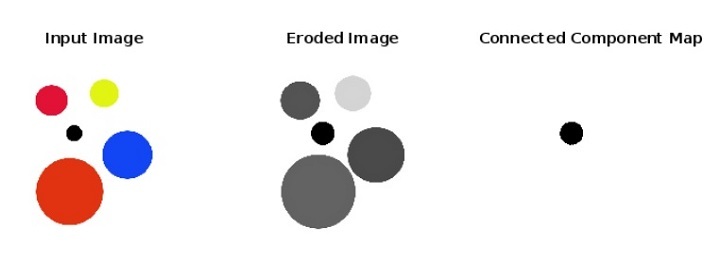
程式碼說明
此 MATLAB 程式展示了統計給定數字影像中圓圈數量的程式碼實現。在此程式碼中,我們首先使用“imread”函式讀取輸入影像並將其儲存在變數“in_img”中。然後,如果輸入影像不是灰度影像,則將其轉換為灰度影像並存儲在變數“gray_img”中。
接下來,我們定義一個特定半徑的圓形或圓盤形結構元素“structuring_element”來執行影像腐蝕。之後,我們使用“imerode”函式根據結構元素執行影像腐蝕並將結果儲存在變數“erd_img”中。然後,我們標記連通分量並找到唯一的元件標籤。接下來,我們統計影像中圓圈的數量。
最後,我們使用“disp”函式顯示圓圈的數量、原始影像、腐蝕後的影像和連通分量圖。
結論
因此,這就是使用 MATLAB 程式設計統計給定數字影像中圓圈數量的全部內容。MATLAB 提供了各種影像處理技術來統計影像中的圓圈數量。在本文中,我們解釋了使用影像腐蝕統計圓圈數量的最簡單技術。嘗試使用您自己的影像執行上述 MATLAB 程式碼。

211 次檢視
