
 資料結構
資料結構 網路
網路 關係型資料庫管理系統
 作業系統
作業系統 Java
Java MS Excel
 iOS
iOS HTML
HTML CSS
CSS Android
 Python
 C 程式設計
 C++
C++ C#
C# MongoDB
 MySQL
MySQL Javascript
 PHP
PHP 物理學
物理學 化學
化學 生物學
生物學 數學
數學 英語
英語 經濟學
經濟學 心理學
心理學 社會學
社會學 服裝設計
服裝設計 法律研究
法律研究如何在 iOS 中輸入文字時計算文字框中的字元數?
作為一名 iOS 開發人員,應該知道如何操作文字欄位及其操作,Apple 已經提供了 UITextFieldDelegate 協議。
要了解更多資訊,請訪問 https://developer.apple.com/documentation/uikit/uitextfielddelegate
您可能在許多包含表單的應用程式中看到過這種情況,當您輸入時,您會看到輸入的字元數量,尤其是在字元數量受限的表單中。
在這篇文章中,我們將看到如何在您在 TextField 中輸入時顯示字元計數。
步驟 1 - 開啟 Xcode → 新建專案 → 單檢視應用程式 → 我們將其命名為“TextFieldCount”
步驟 2 - 開啟 Main.storyboard 並新增 TextField 和標籤,如所示,為標籤和文字欄位建立 @IBOutlet 並分別將其命名為 lblCount 和 txtInputBox。
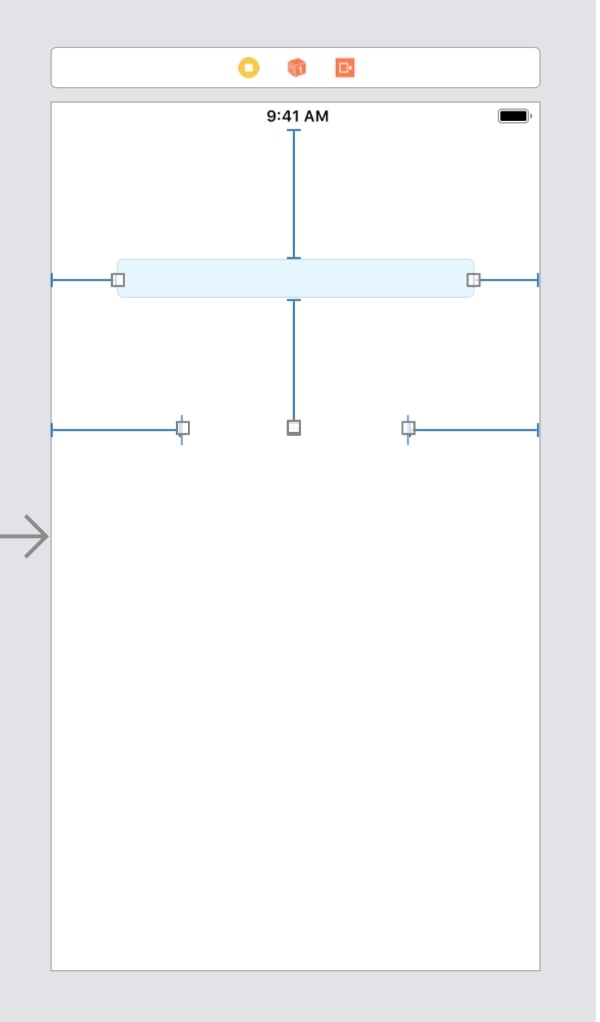
步驟 3 - 在 ViewController.swift 中確認 UITextFieldDelegate 協議並使用 textInputBox 將委託設定為 self。
class ViewController: UIViewController, UITextFieldDelegate {
txtInputBox.delegate = self
步驟 4 - 實現委託 shouldChangeCharactersIn 並將其中的程式碼寫如下。
func textField(_ textField: UITextField, shouldChangeCharactersIn range: NSRange, replacementString string: String) -> Bool {
   if(textField == txtInputBox){
      let strLength = textField.text?.count ?? 0
      let lngthToAdd = string.count
      let lengthCount = strLength + lngthToAdd
      self.lblCount.text = "\(lengthCount)"
   }
   return true
}
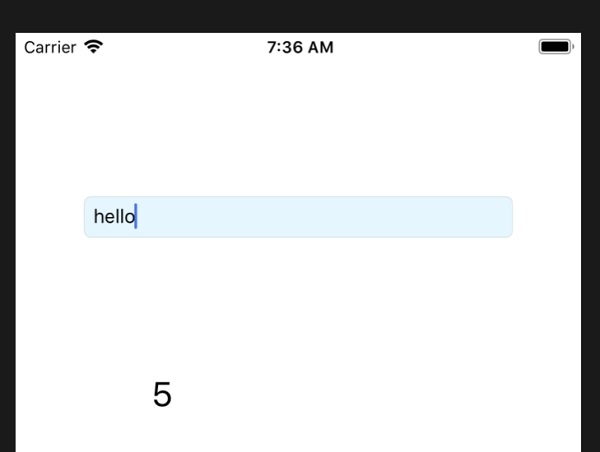
步驟 5 - 執行應用程式,獲取最終程式碼,
示例
import UIKit
class ViewController: UIViewController, UITextFieldDelegate {
   @IBOutlet var txtInputBox: UITextField!
   @IBOutlet var lblCount: UILabel!
   override func viewDidLoad() {
      super.viewDidLoad()
      txtInputBox.delegate = self
   }
   func textField(_ textField: UITextField, shouldChangeCharactersIn range: NSRange, replacementString string: String) -> Bool {
      if(textField == txtInputBox){
         let strLength = textField.text?.count ?? 0
         let lngthToAdd = string.count
         let lengthCount = strLength + lngthToAdd
         self.lblCount.text = "\(lengthCount)"
      }
      return true
   }
}
輸出

更新於: 2019-07-30
1K+ 次瀏覽

廣告