
 資料結構
資料結構 網路
網路 關係型資料庫管理系統
 作業系統
作業系統 Java
Java MS Excel
 iOS
iOS HTML
HTML CSS
CSS Android
 Python
 C語言程式設計
 C++
C++ C#
C# MongoDB
 MySQL
MySQL Javascript
 PHP
PHP 物理學
物理學 化學
化學 生物學
生物學 數學
數學 英語
英語 經濟學
經濟學 心理學
心理學 社會學
社會學 時尚研究
時尚研究 法律研究
法律研究如何在PHP中檢查表單提交?
如何在PHP中檢查表單提交?
要檢查PHP中的表單提交,您可以按照以下步驟操作
步驟 1
建立HTML表單:首先建立一個收集使用者輸入的HTML表單。該表單應該有一個action屬性,指向您將在其中處理表單資料的PHP檔案。
Index.html
<!DOCTYPE html>
<html>
<head>
   <title>Employee Information Form</title>
   <style>
   .error {
     color: red;
   }
  </style>
</head>
<body>
<h2>Employee Information</h2>
<form name="process_form" action="process_form.php"
method="POST" onsubmit="return validateForm()">
   <label for="fname">First Name:</label>
   <input type="text" id="fname" name="fname"
required>
   <br>
   <br><br>
   <label for="lname">Last Name:</label>
   <input type="text" id="lname" name="lname"
required>
   <br>
   <br><br>
   <label for="email">Email:</label>
   <input type="email" id="email" name="email"
required>
   <br>
   <br><br>
   <label for="phone">Phone:</label>
   <input type="text" id="phone" name="phone"
required>
   <br>
   <br><br>
   <label for="department">Department:</label>
   <select id="department" name="department" required>
      <option value="">Select Department<
/option>
      <option value="HR">Human Resources<
/option>
      <option value="IT">Information Technology
</option>
      <option value="Finance">Finance</option>
      <option value="Sales">Sales</option>
   </select>
   <br>
   <br><br>
   <label for="salary">Salary:</label>
   <input type="number" id="salary" name="salary" min="0" required>
   <br>
   <br><br>
   <button type="submit">Submit</button>
</form>
<script>
   function validateForm() {
     var fname = document.forms["employeeForm"]["fname"].value;
     var lname = document.forms["employeeForm"]["lname"].value;
     var email = document.forms["employeeForm"]["email"].value;
     var phone = document.forms["employeeForm"]["phone"].value;
     var department = document.forms["employeeForm"]["department"].value;
     var salary = document.forms["employeeForm"]["salary"].value;
     if (fname.trim() == "") {
      alert("First Name is required");
      return false;
     }
     if (lname.trim() == "") {
      alert("Last Name is required");
      return false;
     }
     if (email.trim() == "") {
      alert("Email is required");
      return false;
     }
     if (phone.trim() == "") {
      alert("Phone is required");
      return false;
     }
     if (department == "") {
      alert("Please select a Department");
      return false;
    }
     if (salary.trim() == "") {
      alert("Salary is required");
      return false;
     }
     return true;
   }
  </script>
</body>
</html>
輸出
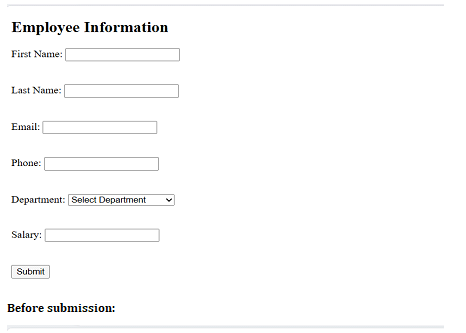
提交前
步驟 2
在PHP中處理表單資料:建立一個PHP檔案(例如,process_form.php),用於處理表單提交。在此檔案中,您可以使用if語句根據要檢查的表單欄位(例如,提交按鈕)的存在來檢查表單是否已提交。
Process_form.php
<?php
if ($_SERVER["REQUEST_METHOD"] == "POST") {
   // Retrieve form data
   $fname = $_POST["fname"];
   $lname = $_POST["lname"];
   $email = $_POST["email"];
   $phone = $_POST["phone"];
   $department = $_POST["department"];
   $salary = $_POST["salary"];
   // Perform further operations, such as validation, database interactions, etc.
   // ...
   // Example: Display submitted data
   echo "<h2>Employee Information</h2>";
   echo "First Name: " . $fname . "<br>";
   echo "Last Name: " . $lname . "<br>";
   echo "Email: " . $email . "<br>";
   echo "Phone: " . $phone . "<br>";
   echo "Department: " . $department . "<br>";
   echo "Salary: " . $salary . "<br>";
} else {
   // Handle the case when the form is not submitted
   echo "Form was not submitted.";
}
?>
注意:確保將HTML表單儲存在名為index.html的檔案中,並將PHP程式碼儲存在名為process_form.php的檔案中。將這兩個檔案放在伺服器上的同一目錄中。
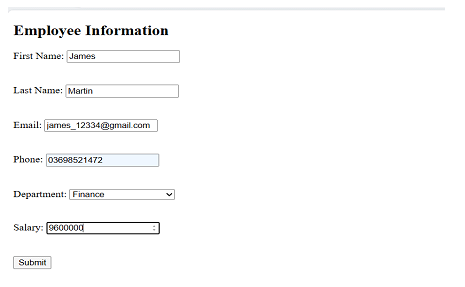
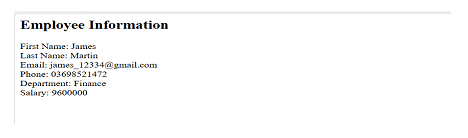
當用戶填寫表單並單擊“提交”按鈕時,表單資料將傳送到process_form.php進行處理。PHP程式碼將檢查表單是否已提交,並顯示已提交的資料。
表單提交後
如果表單未提交,它將顯示一條訊息,指示表單未提交。
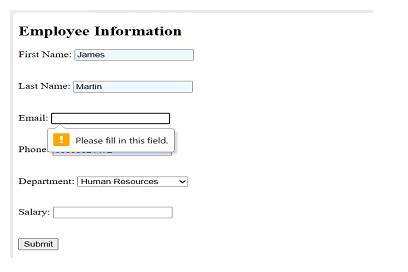
如果表單有任何驗證錯誤,則它將不允許表單提交。
結論
要檢查PHP中的表單提交,您可以使用isset()函式來確定表單的提交按鈕或任何特定表單欄位是否已設定。如果表單已提交,則可以使用$_POST超級全域性變數(用於POST方法)或$_GET(用於GET方法)訪問已提交的資料。然後,您可以根據需要執行驗證、清理資料並進一步處理它,例如將其儲存在資料庫中、傳送電子郵件或執行其他操作。務必確保實施適當的驗證和安全措施,以防止漏洞並確保已提交資料的完整性。

更新於: 2023年7月28日
2K+ 瀏覽量

廣告