
 資料結構
資料結構 網路
網路 關係型資料庫管理系統
 作業系統
作業系統 Java
Java MS Excel
 iOS
iOS HTML
HTML CSS
CSS Android
 Python
 C 程式設計
 C++
C++ C#
C# MongoDB
 MySQL
MySQL JavaScript
 PHP
PHP 物理
物理 化學
化學 生物
生物 數學
數學 英語
英語 經濟學
經濟學 心理學
心理學 社會研究
社會研究 時尚研究
時尚研究 法律研究
法律研究如何更改 Tkinter 的 OptionMenu 視窗小部件的選單背景顏色?
設想一種情況,我們需要一些用下拉列表形式顯示帶有某些選項的選單。為實現此特定功能,Tkinter 提供了一個 OptionMenu 視窗小部件,其中包含新增選項和其中專案列表的功能。我們可以透過配置 OptionMenu 視窗小部件的屬性(如背景色、寬度、高度、前景色等)來設定其預設行為。
示例
# Import the required libraries
from tkinter import *
from PIL import Image, ImageTk

# Create an instance of tkinter frame
win = Tk()

# Set the size of the tkinter window
win.geometry("700x350")

# Add a Label
Label(win, text="Select a Day from the Menu", font=('Aerial 13')).pack(pady=10)

# Create a Variable to store the selection
var = StringVar()

# Create an OptionMenu Widget and add choices to it
option = OptionMenu(win, var, "Sunday", "Monday", "Tuesday", "Wednesday", "Thursday", "Friday", "Saturday")
option.config(bg="gray81", fg="white")
option['menu'].config(bg="green3")
option.pack(padx=20, pady=30)

win.mainloop()
輸出
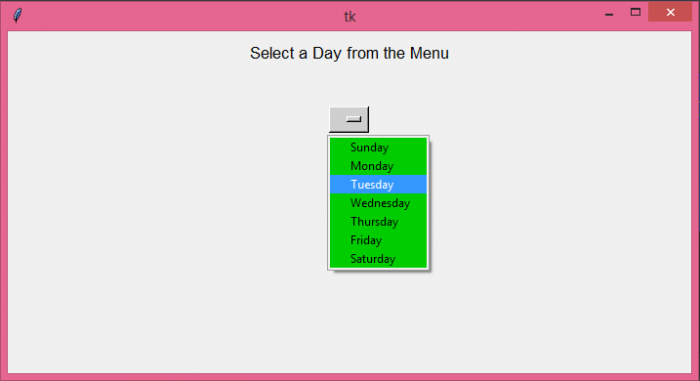
執行以上程式碼將顯示一個 OptionMenu,其中選項為“天”。選單具有可以用 configuration 方法更改的背景色和前景色。

更新於: 08-Jun-2021
1K+ 瀏覽量

廣告