
 資料結構
資料結構 網路
網路 關係型資料庫管理系統
 作業系統
作業系統 Java
Java MS Excel
 iOS
iOS HTML
HTML CSS
CSS Android
 Python
 C 程式設計
 C++
C++ C#
C# MongoDB
 MySQL
MySQL Javascript
 PHP
PHP 物理學
物理學 化學
化學 生物學
生物學 數學
數學 英語
英語 經濟學
經濟學 心理學
心理學 社會學
社會學 時尚研究
時尚研究 法律研究
法律研究如何在 Python Tkinter 的畫布中居中顯示影像
讓我們假設我們正在使用 Tkinter 建立一個基於 GUI 的應用程式,並且我們希望在 Tkinter 畫布中載入一個影像。
預設情況下,畫布會根據影像的寬度和高度載入影像。但是,我們可以透過在 anchor 引數中傳遞“方向”值來操作影像在任何方向(N、S、E、W、NS、EW 等)上的位置。anchor 是一個與 image 函式一起呼叫的引數;它定義了影像在畫布中的方向或位置。
透過使用 anchor 引數,我們可以將文字和影像對齊到任何方向。現在,我們將使用 **Label** 函式建立一個影像標籤,如下所示:
Label(root, text= " ", other Options(color, width,height,..))
使用上述函式建立影像標籤後,我們將使用“anchor”屬性調整其位置。由於我們必須將影像放置在中心,因此我們將 anchor 的值設定為“CENTER”。
示例
#import the tkinter library in the notebook

from tkinter import *
#creating an instance of the tkinter canvas
win= Tk()
#define the size of the window
win.geometry("700x150")

#define the image label having some properties

label_img= Label(win, text= "Hello World", font= "sans-serif",relief=
"solid",width= 20, height= 8, anchor= CENTER)
label_img.pack()
#displaying the canvas without closing the window
win.mainloop()
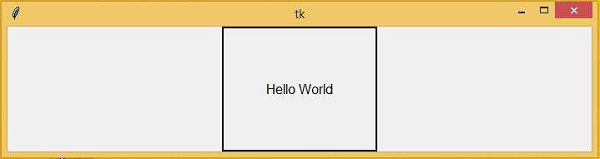
執行以上程式碼片段將生成輸出並將影像放置在畫布的中心。
輸出

更新於: 2021年3月4日
4K+ 次檢視

廣告