
 資料結構
資料結構 網路
網路 RDBMS
RDBMS 作業系統
作業系統 Java
Java MS Excel
 iOS
iOS HTML
HTML CSS
CSS Android
 Python
 C 程式設計
 C++
C++ C#
C# MongoDB
 MySQL
MySQL Javascript
 PHP
PHP 物理
物理 化學
化學 生物
生物 數學
數學 英語
英語 經濟學
經濟學 心理學
心理學 社會研究
社會研究 時尚研究
時尚研究 法律研究
法律研究如何使用 reactnative 為你的應用程式新增樣式或 css?
可以按照以下方式為你的應用程式應用樣式 −
- 使用樣式表元件
- 使用內聯樣式
使用樣式表元件
當你想對應用程式應用樣式時,React native 樣式表元件非常方便且簡潔。要使用樣式表元件,首先像下面展示的那樣匯入它 −
import { StyleSheet } from 'react-native';你可以使用樣式表元件建立樣式,如下所示 −
const styles = StyleSheet.create({
   container: {
      flex: 1,
      marginTop: StatusBar.currentHeight || 0,
   },
   item: {
      margin: 10,
      padding: 20,
      marginVertical: 8,
      marginHorizontal: 16,
   }
});
以上的樣式可以在你的程式碼中像下面這樣使用 −
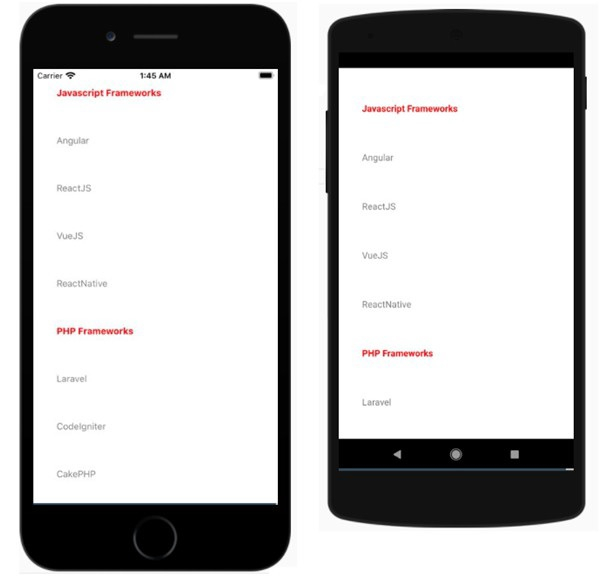
<View style={styles.container}></View>下面是一個使用樣式表顯示 FlatList 元件的示例 −
示例 1
import React from "react";
import { FlatList , Text, View, StyleSheet, StatusBar } from "react-native";
export default class App extends React.Component {
   constructor() {
      super();
      this.state = {
         data: [
            { name: "Javascript Frameworks", isTitle: true },
            { name: "Angular", isTitle: false },
            { name: "ReactJS", isTitle: false },
            { name: "VueJS", isTitle: false },
            { name: "ReactNative", isTitle: false },
            { name: "PHP Frameworks", isTitle: true },
            { name: "Laravel", isTitle: false },
            { name: "CodeIgniter", isTitle: false },
            { name: "CakePHP", isTitle: false },
            { name: "Symfony", isTitle: false }
         ],
         stickyHeaderIndices: []
      };
   }
   renderItem = ({ item }) => {
      return (
         <View style={styles.item}>
            <Text style={{ fontWeight: (item.isTitle) ? "bold" : "", color: (item.isTitle) ? "red" : "gray"}} >
               {item.name}
            </Text>
         </View>
      );
   };
   render() {
      return (
         <View style={styles.container}>
            <FlatList
               data={this.state.data}
               renderItem={this.renderItem}
               keyExtractor={item => item.name}
               stickyHeaderIndices={this.state.stickyHeaderIndices}
            />
         </View>
      );
   }
}
const styles = StyleSheet.create({
   container: {
      flex: 1,
      marginTop: StatusBar.currentHeight || 0,
   },
   item: {
      margin: 10,
      padding: 20,
      marginVertical: 8,
      marginHorizontal: 16,
   }
});
輸出
使用內聯樣式
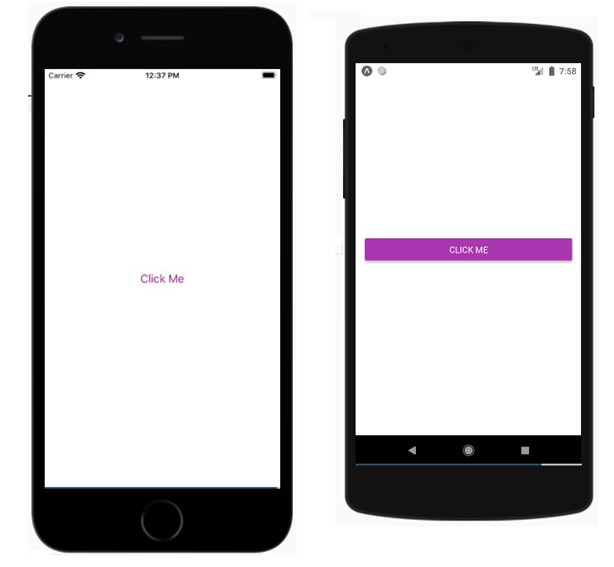
你可以使用樣式屬性內聯新增樣式。然而,這不是最佳實踐,因為它可能難以閱讀程式碼。下面是一個在 reactnative 元件中使用內聯樣式的工作示例
示例 2
export default App;
import React from 'react';
import { Button, View, Alert } from 'react-native';

const App = () => {
   return (
      <View style={{flex :1, justifyContent: 'center', margin: 15 }}>
         <Button
            title="Click Me"
            color="#9C27B0"
            onPress={() => Alert.alert('Testing Button for React Native ')}
         />
      </View>
   );
}
輸出

更新日期:01-Jul-2021
241 瀏覽

廣告