
 資料結構
資料結構 網路
網路 關係資料庫管理系統
 作業系統
作業系統 Java
Java MS Excel
 iOS
iOS HTML
HTML CSS
CSS Android
 Python
 C語言程式設計
 C++
C++ C#
C# MongoDB
 MySQL
MySQL Javascript
 PHP
PHP 物理
物理 化學
化學 生物
生物 數學
數學 英語
英語 經濟學
經濟學 心理學
心理學 社會研究
社會研究 時尚研究
時尚研究 法律研究
法律研究Test runner如何為Selenium中的執行對測試類進行優先順序排序?
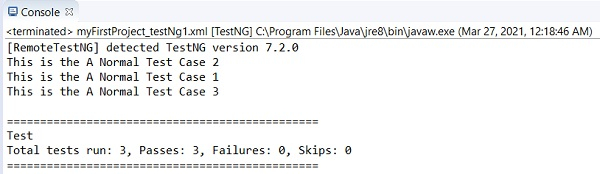
我們可以在執行期間在 TestNG 中對測試進行優先順序排序。需要注意的是,只能對帶有 @Test 註解的測試方法設定優先順序。為測試方法設定的優先順序數字越低,在執行期間其優先順序越高。
只能將整數(正數、零或負數)設定為優先順序。也可以將十進位制數設定為優先順序,但是需要透過型別轉換將其轉換為整數。
一個測試方法不能有多個優先順序號。此外,無法從 TestNG XML 檔案設定測試方法的優先順序。
語法
public class TestNG {
   @Test (priority = 2)
   public void tC1() {
      System.out.println("Test Case 1");
   }
示例
import org.testng.annotations.Test;
public class TestNGP {
   @Test (priority = 2)
   public void testCase1() {
      System.out.println("This is the A Normal Test Case 1");
   }
   @Test (priority = 1)
   public void testCase2() {
      System.out.println("This is the A Normal Test Case 2");
   }
   @Test (priority = 3)
   public void testCase3() {
      System.out.println("This is the A Normal Test Case 3");
   }
}
輸出

更新於:07-Apr-2021
640 次瀏覽

廣告