
 資料結構
資料結構 網路
網路 RDBMS
RDBMS 作業系統
作業系統 Java
Java MS Excel
 iOS
iOS HTML
HTML CSS
CSS Android
 Python
 C 程式設計
 C++
C++ C#
C# MongoDB
 MySQL
MySQL Javascript
 PHP
PHP 物理
物理 化學
化學 生物
生物 數學
數學 英語
英語 經濟學
經濟學 心理學
心理學 社會研究
社會研究 時尚研究
時尚研究 法律研究
法律研究如何在使用者在 Java 中的 JComboBox 上單擊右鍵時顯示彈出選單?
JComboBox 是 JComponent 類的子類,它顯示一個 下拉列表 ,並向用戶提供選項,我們一次只能選擇一項。JComboBox 可以是 可編輯的或只讀的。getSelectedItem() 方法 可用於從組合框中獲取所選或輸入的專案。當用戶右鍵單擊 JComboBox 時,我們可以透過實現 MouseListener 介面並需要重寫 mouseReleased() 方法,從中呼叫彈出選單。MouseEvent類的isPopupTrigger()方法可用於顯示彈出選單。
示例
import java.awt.*;
import java.awt.event.*;
import javax.swing.*;
public class JComboBoxPopupTest extends JFrame {
   private JComboBox jcb;
   private JPopupMenu jpm;
   private JMenuItem mItem1, mItem2;
   public JComboBoxPopupTest() {
      setTitle("JComboBoxPopup Test");
      setLayout(new FlowLayout());
      jcb = new JComboBox(new String[] {"Item 1", "Item 2", "Item 3"});
      jpm = new JPopupMenu();
      mItem1 = new JMenuItem("Popup Item 1");
      mItem2 = new JMenuItem("Popup Item 2");
      jpm.add(mItem1);
      jpm.add(mItem2);
      ((JButton)jcb.getComponent(0)).addMouseListener(new MouseAdapter() {
         public void mouseReleased(MouseEvent me) {
            if (me.isPopupTrigger()) {
               jpm.show(jcb, me.getX(), me.getY());
            }
         }
      });
      add(jcb);
      setSize(400, 300);
      setDefaultCloseOperation(JFrame.EXIT_ON_CLOSE);
      setLocationRelativeTo(null);
      setVisible(true);
   }
   public static void main(String[] args) throws Exception {
      new JComboBoxPopupTest();
   }
}
輸出
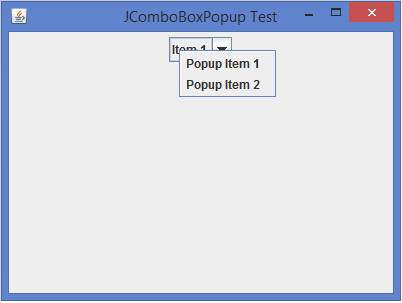

更新時間: 2020 年 2 月 10 日
387 次瀏覽

廣告