
 資料結構
資料結構 網路
網路 關係型資料庫管理系統(RDBMS)
 作業系統
作業系統 Java
Java MS Excel
 iOS
iOS HTML
HTML CSS
CSS Android
 Python
 C語言程式設計
 C++
C++ C#
C# MongoDB
 MySQL
MySQL Javascript
 PHP
PHP 物理學
物理學 化學
化學 生物學
生物學 數學
數學 英語
英語 經濟學
經濟學 心理學
心理學 社會學
社會學 服裝設計
服裝設計 法學
法學如何檢查Android手機是橫向還是縱向模式?
簡介
在啟動Android應用程式的特定螢幕時,我們經常需要檢查裝置的方向,判斷裝置是處於縱向模式還是橫向模式。本文將介紹如何檢查Android手機是處於橫向模式還是縱向模式。
實現
我們將建立一個簡單的應用程式,其中顯示兩個TextView。第一個TextView用於顯示應用程式的標題。第二個TextView用於顯示裝置當前的方向模式,即裝置是處於縱向模式還是橫向模式。
步驟1:在Android Studio中建立一個新專案
導航到Android Studio,如下面的螢幕所示。在下面的螢幕中,點選“新建專案”以建立一個新的Android Studio專案。
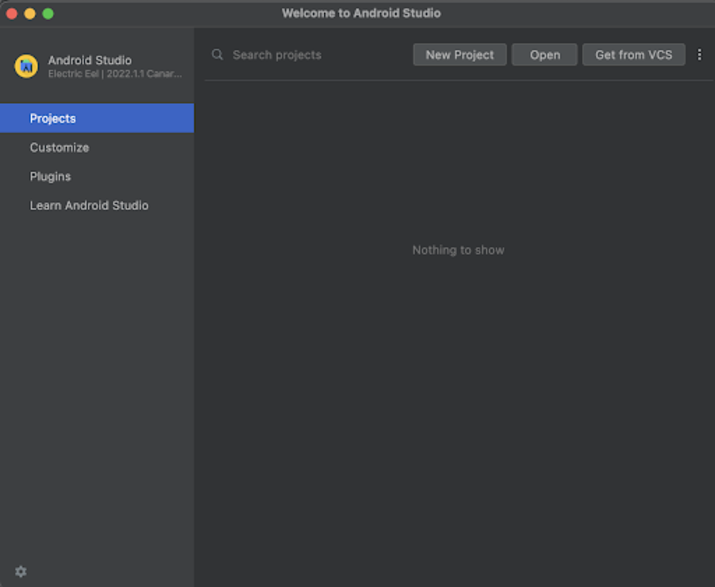
點選“新建專案”後,您將看到下面的螢幕。
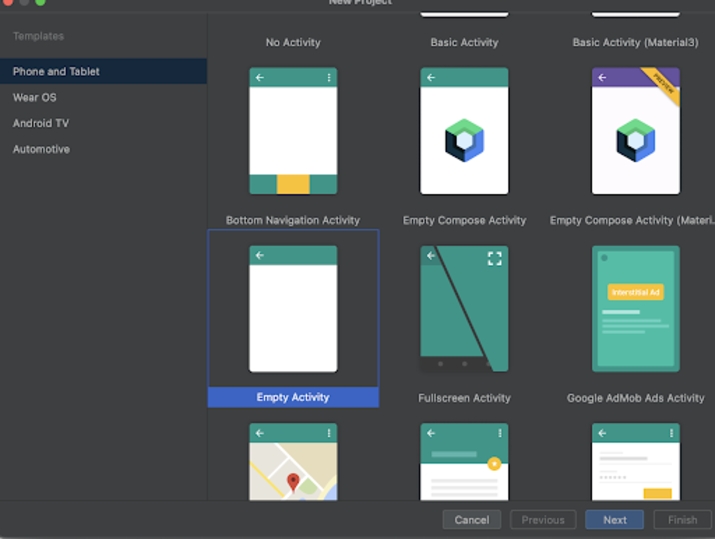
在這個螢幕中,我們只需選擇“空活動”,然後點選“下一步”。點選“下一步”後,您將看到下面的螢幕。
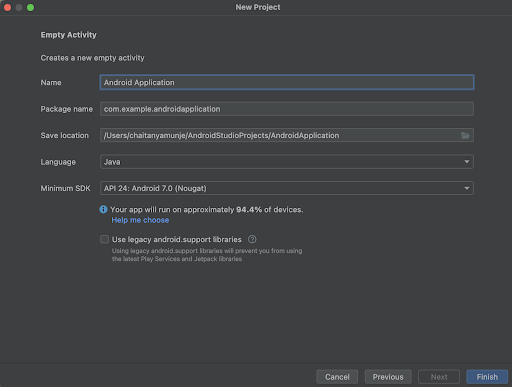
在這個螢幕中,我們只需指定專案名稱。然後包名將自動生成。
注意 - 確保選擇Java作為語言。
指定所有詳細資訊後,點選“完成”以建立一個新的Android Studio專案。
專案建立完成後,我們將看到開啟的兩個檔案:activity_main.xml和MainActivity.java檔案。
步驟2:使用activity_main.xml
導航到activity_main.xml。如果此檔案不可見,則要開啟此檔案,在左側面板中導航到app>res>layout>activity_main.xml以開啟此檔案。開啟此檔案後,向其中新增以下程式碼。程式碼中添加了註釋,以便詳細瞭解。
<?xml version="1.0" encoding="utf-8"?>
<RelativeLayout xmlns:android="http://schemas.android.com/apk/res/android"
   xmlns:app="http://schemas.android.com/apk/res-auto"
   xmlns:tools="http://schemas.android.com/tools"
   android:layout_width="match_parent"
   android:layout_height="match_parent"
   tools:context=".MainActivity">
   <!-- creating a text view on below line-->
   <TextView
       android:id="@+id/idTVHeading"
       android:layout_width="match_parent"
       android:layout_height="wrap_content"
       android:layout_centerInParent="true"
       android:layout_marginStart="20dp"
       android:layout_marginTop="20dp"
       android:layout_marginEnd="20dp"
       android:layout_marginBottom="20dp"
       android:padding="4dp"
       android:text="Implementing Services in Android"
       android:textAlignment="center"
       android:textColor="@color/black"
       android:textSize="20sp"
       android:textStyle="bold" />
   <!-- creating a text view to display current mode -->
   <TextView
       android:id="@+id/idTVMode"
       android:layout_width="match_parent"
       android:layout_height="wrap_content"
       android:layout_below="@id/idTVHeading"
       android:layout_margin="4dp"
       android:padding="4dp"
       android:text="Mode"
       android:textAlignment="center"
       android:textAllCaps="false"
       android:textColor="@color/black"
       android:textSize="20sp"
       android:textStyle="bold" />
</RelativeLayout>
說明:在上面的程式碼中,我們建立一個根佈局作為相對佈局。在這個佈局內,我們建立一個TextView,用於顯示應用程式的標題。之後,我們再建立一個TextView,在這個TextView中,我們將顯示裝置的當前模式,即裝置是處於橫向模式還是縱向模式。
步驟3:使用MainActivity.java檔案
導航到MainActivity.java。如果此檔案不可見,則要開啟此檔案,在左側面板中導航到app>res>layout>MainActivity.java以開啟此檔案。開啟此檔案後,向其中新增以下程式碼。程式碼中添加了註釋,以便詳細瞭解。
package com.example.java_test_application;

import android.content.Intent;
import android.content.res.Configuration;
import android.os.Bundle;
import android.view.View;
import android.widget.Button;
import android.widget.TextView;
import android.widget.Toast;
import androidx.appcompat.app.AppCompatActivity;

public class MainActivity extends AppCompatActivity {
   // creating variables on below line for text view.
   private TextView modeTV;

   @Override
   protected void onCreate(Bundle savedInstanceState) {
       super.onCreate(savedInstanceState);
       setContentView(R.layout.activity_main);
       // initializing variables on below line.
       modeTV = findViewById(R.id.idTVMode);
       // on below line checking for the mode of the device
       if (getResources().getConfiguration().orientation == Configuration.ORIENTATION_LANDSCAPE) {
           // on below line setting text message according to the device mode
           modeTV.setText("Landscape Mode Activated..");
       } else {
           // on below line setting text message according to the device mode
           modeTV.setText("Potrait Mode Activated..");
       }
   }
}
說明:在上面的程式碼中,首先我們為TextView建立變數。現在我們將看到onCreate方法。這是每個Android應用程式的預設方法。當應用程式檢視建立時,將呼叫此方法。在此方法中,我們設定內容檢視,即名為activity_main.xml的佈局檔案,以設定該檔案中的UI。在onCreate方法中,我們使用我們在activity_main.xml檔案中指定的ID初始化TextView變數。之後,我們檢查裝置的方向,判斷是縱向還是橫向。如果方向是橫向的,我們將文字訊息設定到我們的TextView。同樣,我們也為縱向模式更新TextView。
新增上述程式碼後,我們只需點選頂部欄中的綠色圖示即可在移動裝置上執行我們的應用程式。
注意 - 確保您已連線到您的真實裝置或模擬器。
輸出
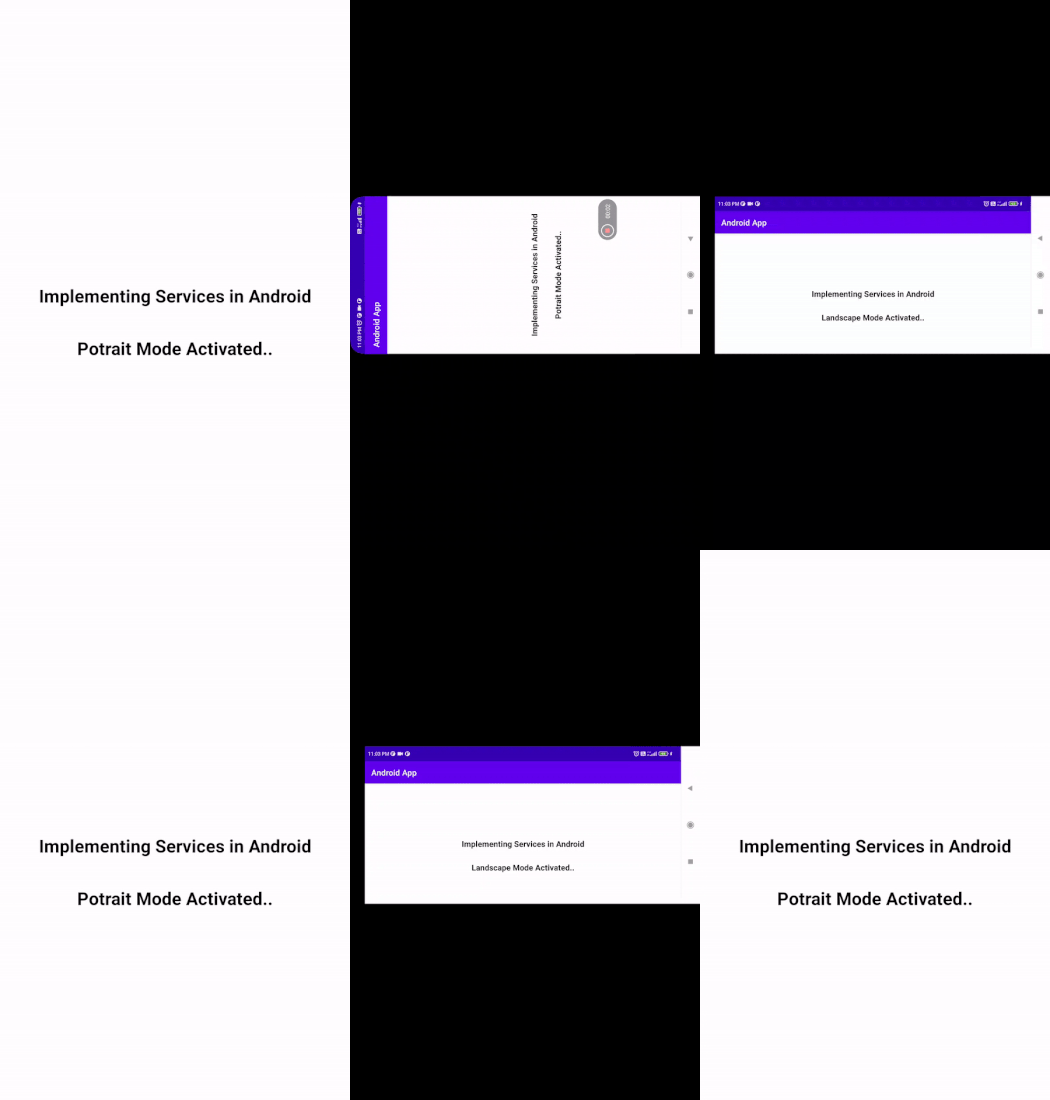
結論
在本文中,我們瞭解瞭如何檢查Android手機是處於橫向模式還是縱向模式。

1K+ 次瀏覽
