
 資料結構
資料結構 網路
網路 關係資料庫管理系統 (RDBMS)
 作業系統
作業系統 Java
Java MS Excel
 iOS
iOS HTML
HTML CSS
CSS Android
 Python
 C語言程式設計
 C++
C++ C#
C# MongoDB
 MySQL
MySQL Javascript
 PHP
PHP 物理學
物理學 化學
化學 生物學
生物學 數學
數學 英語
英語 經濟學
經濟學 心理學
心理學 社會學
社會學 服裝學
服裝學 法學
法學在Python中處理PostgreSQL BLOB資料
PostgreSQL是一個開源的物件關係資料庫管理系統,它提供多種資料型別來儲存資料。BLOB(二進位制大物件)資料型別就是一個例子。它用於儲存大型二進位制資料,例如音訊、影片和影像檔案。
為了在Python中使用PostgreSQL,我們首先需要安裝psycopg2包,它提供了PostgreSQL的Python介面。可以使用pip包管理器進行安裝。
語法
pip install psycopg2-binary
安裝psycopg2庫後,我們需要使用Python連線到我們的PostgreSQL資料庫。
處理PostgreSQL中的BLOB資料需要執行以下操作:
建立一個帶有BLOB列的表
在PostgreSQL中,應該使用`bytea`資料型別來建立具有BLOB列的表。我們將使用`bytea`資料型別儲存最多1GB的二進位制資料。
將BLOB資料插入表中
為了將BLOB資料插入表中,我們需要從檔案中讀取二進位制資料並將其插入“image”列。可以使用SQL語句`INSERT`將資料插入到具有BLOB列的表中。
從表中讀取BLOB資料
為了讀取表中的BLOB資料,我們需要使用`SELECT`語句從“image”列檢索二進位制資料。
示例
以下是一個示例程式碼,演示瞭如何使用psycopg2庫在Python中處理PostgreSQL BLOB(二進位制大物件)資料。
“id”列的型別為SERIAL,它會自動為每一行生成一個唯一的整數值。“image”列的型別為BYTEA,用於儲存BLOB資料。
演算法
匯入所需的庫:psycopg2和io。
使用psycopg2庫建立與PostgreSQL資料庫的連線。
從連線中建立一個遊標物件。
執行一個SELECT語句,從資料庫中檢索BLOB資料。
使用fetchone()方法檢索結果集的第一行。
從結果集中獲取BLOB資料並將其儲存在一個變數中。
使用io庫建立一個BytesIO物件,並將BLOB資料傳遞給它。
使用BytesIO物件讀取資料。
將資料儲存在記憶體中後,您可以對其執行任何必要的處理。
import psycopg2

conn = None
try:
	# connect to the PostgreSQL server
'''Establishing Database connection. Fill up your local Database’s user and password.'''

	conn = psycopg2.connect(
		host='localhost',
		dbname='mydb',
		user='postgres',
		password='user',
		port=5432
	)

	cur = conn.cursor()

# Creating a table with a BLOB column
	cur.execute(
		"CREATE TABLE blob_datastore (s_no serial, file_name VARCHAR ( 50 ), blob_data bytea)")

	# SQL query to insert data into the database.
	insert_script = '''
		INSERT INTO blob_datastore(s_no,file_name,blob_data) VALUES (%s,%s,%s);
	'''

	# psycopg2.Binary(File_in_Bytes) is used to convert the binary data.
	BLOB_1 = psycopg2.Binary(
		open(f"files\toast_flip.mp4", 'rb').read())
	BLOB_2 = psycopg2.Binary(
		open(f'files\ex.jpg', 'rb').read())
	BLOB_3 = psycopg2.Binary(open(f'files\a-gif.gif', 'rb').read())
	BLOB_4 = psycopg2.Binary(open(f'files\UNIT IV.pdf'', 'rb').read())

	insert_values = [(1, 'toast_flip.mp4', BLOB_1),
           (2, 'ex.jpg', BLOB_2),
			   (3, 'a-gif.gif', BLOB_3),
           (4, 'UNIT UV.pdf', BLOB_4)]

	for insert_value in insert_values:
		cur.execute(insert_script, insert_value)
		print(insert_value[0], insert_value[1],
			"[Binary Data]", "row Inserted Successfully")

	# SQL query to fetch data.
	cur.execute('SELECT * FROM BLOB_DataStore')

	for row in cur.fetchall():
		BLOB = row[2]
		open("new"+row[1], 'wb').write(BLOB)
		print(row[0], row[1], "BLOB Data is saved")

	cur.close()

except(Exception, psycopg2.DatabaseError) as error:
	print(error)
finally:
	if conn is not None:

		conn.commit()
輸出
1 toast_flip.mp4 [Binary Data] row Inserted Successfully
2 ex.jpg [Binary Data] row Inserted Successfully
3 a-gif.gif [Binary Data] row Inserted Successfully
4 UNIT IV.pdf [Binary Data] row Inserted Successfully
1 toast_flip.mp4 BLOB Data is saved in Current Directory
2 ex.jpg BLOB Data is saved in Current Directory
3 a-gif.gif BLOB Data is saved in Current Directory
4 UNIT UV.pdf BLOB Data is saved in Current Directory
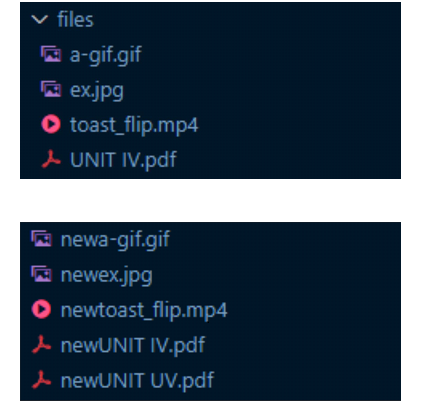
結論
藉助psycopg2庫,開發者可以使用Python輕鬆地處理PostgreSQL中的BLOB資料。 使用它,使用者可以建立帶有BLOB列的表,將二進位制資料插入到建立的表中,並使用psycop2庫從表中檢索二進位制資料。

427 次瀏覽
