
 資料結構
資料結構 網路
網路 關係型資料庫管理系統
 作業系統
作業系統 Java
Java MS Excel
 iOS
iOS HTML
HTML CSS
CSS Android
 Python
 C語言程式設計
 C++
C++ C#
C# MongoDB
 MySQL
MySQL Javascript
 PHP
PHP 物理
物理 化學
化學 生物
生物 數學
數學 英語
英語 經濟學
經濟學 心理學
心理學 社會學
社會學 時尚研究
時尚研究 法律研究
法律研究Go語言程式計算立方體的體積
在本教程中,我們將討論在 Golang 程式設計中使用立方體邊長來求立方體體積的方法。
但在編寫程式碼之前,讓我們簡要討論一下立方體及其體積。
立方體
立方體是一個三維圖形,具有六個正方形面。立方體的六個面都是正方形。它的長、寬、高都相等。骰子是立方體的一個常見例子。
立方體的體積
立方體佔據的三維空間總量稱為立方體的體積。在需要了解立方體物體的容量時,計算立方體的體積可能會有所幫助。
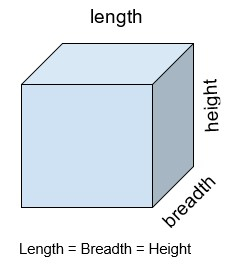
$$\mathrm{長\, = \, 寬 \, =\, 高}$$
公式
立方體的體積可以透過將邊長乘以自身三次來計算。因此,公式可以寫成
$$\mathrm{體積 \, =\, 邊長 * 邊長 * 邊長}$$
示例
邊長 = 6
立方體體積 = 6 * 6 * 6 = 216
由於體積是透過將邊長乘以自身三次來計算的,因此我們將邊長“6”乘以自身三次,即 6 * 6 * 6,結果為 216,即立方體的體積。
邊長 = 12.5
立方體體積 = 12.5 * 12.5 * 12.5 = 1953.125
將邊長“12.5”乘以自身三次,即 12.5 * 12.5 * 12.5,結果為 1953.125,即立方體的體積。
在函式中求立方體的體積
演算法
步驟 1 − 宣告一個變數用於儲存立方體的邊長 - ‘side’。
步驟 2 − 宣告一個變數用於儲存立方體的體積 - ‘volume’ 並將其初始化為 0。
步驟 3 − 在主函式中,透過將邊長乘以自身三次來計算體積,並將結果儲存在 ‘volume’ 變數中。
步驟 4 − 列印計算出的體積,即儲存在變數 ‘volume’ 中的值。
示例
package main

// fmt package allows us to print formatted strings
import "fmt"

func main() {
   fmt.Println("Program to find the volume of a cube \n")

   // declaring variable ‘side’ for storing length of cube
   var side float64 = 6

   // declaring variable ‘volume’ for storing the volume of cube
   var volume float64 = 0

   // calculating the volume of the cube
   volume = side * side * side

   // printing the results
   fmt.Println("Dimension of the side : ", side)
   fmt.Println("Therefore, Volume of cube : ", volume)
}
輸出
Program to find the volume of a cube

Dimension of the side :  6
Therefore, Volume of cube :  216
程式碼描述
var side float64 = 5, var volume float64 = 0 − 在這一行中,我們聲明瞭變數 side 和 volume。由於 side 和 volume 的資料型別為浮點數,因此我們使用 float64 資料型別。
volume = side * side * side − 我們使用公式 volume = side * side * side 來計算立方體的體積。
fmt.Println("邊的尺寸:", side) − 列印立方體的邊長。
fmt.Println("因此,立方體的體積:", volume) − 列印計算出的立方體的體積。
因此,體積 = 6 * 6 * 6
體積 = 216
使用不同函式求立方體的體積
演算法
步驟 1 − 宣告一個變數用於儲存立方體的邊長 - ‘side’。
步驟 2 − 宣告一個變數用於儲存立方體的體積 - ‘volume’ 並將其初始化為 0。
步驟 3 − 在函式 calculateVolumeOfCube() 中,透過將邊長乘以自身三次來計算體積,並將結果儲存在 ‘volume’ 變數中。
步驟 4 − 透過從 main() 函式中呼叫 calculateVolumeOfCube() 函式來列印計算出的體積,即儲存在變數 ‘volume’ 中的值。
示例
package main

// fmt package allows us to print formatted strings
import "fmt"
func calculateVolumeOfCube(side float64) float64 {
   // declaring variable ‘volume’ for storing the volume of cube
   var volume float64 = 0

   // calculating the volume of the cube
   volume = side * side * side
   return volume

}
func main() {
   // declaring variable ‘side’ for storing length of cube
   var side float64 = 15
   var volume float64
   fmt.Println("Program to find the volume of a cube \n")

   // calling function calculateVolumeOfCube() for calculating
   // the volume of the cube
   volume = calculateVolumeOfCube(side)

   // printing the results
   fmt.Println("Dimension of the side : ", side)
   fmt.Println("Therefore, Volume of cube : ", volume)
}
輸出
Program to find the volume of a cube

Dimension of the side :  15
Therefore, Volume of cube :  3375
程式碼描述
var side float64 = 5, var volume float64 − 在這一行中,我們聲明瞭變數 side 和 volume。由於 side 和 volume 的資料型別為浮點數,因此我們使用 float64 資料型別。
calculateVolumeOfCube(side float64) float64 − 這是我們計算立方體體積的函式。該函式以資料型別為 float64 的變數 ‘side’ 作為引數,並且返回型別也為 float64。
volume = side * side * side − 我們使用此公式 side * side * side 來計算立方體的體積。
return volume − 用於返回計算出的立方體體積。
volume = calculateVolumeOfCube(side) − 我們呼叫函式 calculateVolumeOfCube() 並將計算出的值儲存在 ‘volume’ 變數中。
fmt.Println("邊的尺寸:", side) − 列印立方體的邊長。
fmt.Println("因此,立方體的體積:", volume) − 列印計算出的立方體的體積。
因此,體積 = 15 * 15 * 15
體積 = 3375
結論
以上是使用兩種方法計算立方體體積的全部內容。從程式碼的可重用性和模組化方面來看,第二種方法要好得多,因為我們可以透過傳遞不同的值從任何地方、任何次數呼叫該函式。您可以使用這些教程探索更多關於 Golang 程式設計的資訊。

256 次瀏覽
