
 資料結構
資料結構 網路
網路 關係型資料庫管理系統
 作業系統
作業系統 Java
Java MS Excel
 iOS
iOS HTML
HTML CSS
CSS Android
 Python
 C 語言程式設計
 C++
C++ C#
C# MongoDB
 MySQL
MySQL Javascript
 PHP
PHP 物理學
物理學 化學
化學 生物學
生物學 數學
數學 英語
英語 經濟學
經濟學 心理學
心理學 社會學
社會學 時尚研究
時尚研究 法律研究
法律研究Selenium WebDriver 中 getText() 和 getAttribute() 的區別
Selenium WebDriver 是一種自動化工具,用於自動化 Web 應用程式的測試,並確保它們按預期工作。自動化意味著程式設計師不必編寫測試指令碼;Selenium 可以無需任何指令碼即可編寫測試用例。
Selenium 支援各種程式語言,例如 Java、Python、PHP、Ruby、C#、Perl、Scala 等,這意味著 Selenium 可以使用任何這些語言提供測試用例。它支援所有流行的瀏覽器,例如 Chrome、Firefox、Safari 和 Internet Explorer。Selenium 是一款開源工具,這使得它在開發人員中更加流行。
在本文中,我們將特別介紹 Selenium WebDriver 中 **getText()** 和 **getAttribute()** 方法之間的區別。但在那之前,讓我們快速瞭解一下 HTML 標籤和屬性。HTML 標籤標記 HTML 元素的開始和結束,HTML 屬性用於定義 HTML 元素的特性,並放置在元素的開始標籤內。所有屬性都由兩部分組成 - **名稱** 和 **值**。例如,
<p align = "left">This is left aligned
這裡,**<p>** 是包含元素的標籤,**align="left"** 是其屬性。
讓我們從一個關於 getText() 和 getAttribute() 方法將返回什麼的簡短示例開始,然後我們將詳細討論這些方法。
請檢視以下 HTML 程式碼 -
<h2 style="font-size: 17px; text-transform:
uppercase;">Enjoy Premium Content at Affordable
Price
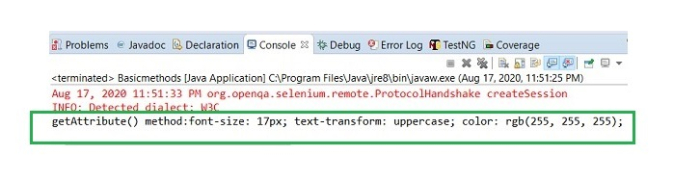
這裡,**style** 是一個屬性,其值可以透過使用 getAttribute() 方法獲得。如果我們對該元素應用 getText() 方法,我們將獲得文字。
getText() 方法
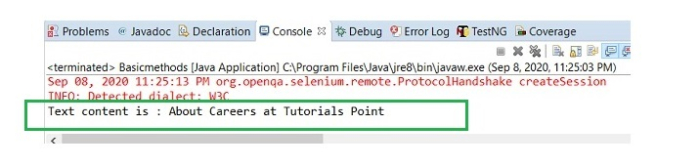
getText() 方法返回元素的 innerText,即頁面上可見的文字及其子元素。內部文字是在開始和結束標籤之間的文字。getText() 忽略所有前導和尾隨空格。
示例
讓我們舉個例子來理解它是如何工作的。首先,我們需要使用任何定位器(如 id、class、name、xpath 或 CSS)來識別元素,然後對其應用 getText() 方法以獲取元素的文字內容。讓我們獲取頁面上元素 **關於 Tutorials 的職業生涯** 的文字 -

使用 **getText()** 的程式碼實現 -
import org.openqa.selenium.By;
import org.openqa.selenium.WebDriver;
import org.openqa.selenium.WebElement;
import org.openqa.selenium.chrome.ChromeDriver;
import java.util.concurrent.TimeUnit;
public class GetElementText{
   public static void main(String[] args) {
      System.setProperty("webdriver.chrome.driver","C:\Users
      \ghs6kor\Desktop\Java\chromedriver.exe");
      WebDriver driver = new ChromeDriver();
      driver.manage().timeouts().implicitlyWait(5,TimeUnit.SECONDS);
      driver.get("https://tutorialspoint.tw/about/about_careers.htm");

      // identify element
      WebElement p=driver.findElement(By.xpath("//h1"));

      //getText() to obtain text
      String s= p.getText();
      System.out.println("Text content is : " + s);
      driver.close();
   }
}
它將產生以下 **輸出** -
getAttribute() 方法
getAttribute() 方法獲取 HTML 文件中屬性包含的文字。它將 HTML 元素屬性的值作為字串返回。
如果未為屬性設定值,它將返回 NULL 值。對於具有布林值的屬性,getAttribute() 將返回“True”或 NULL。屬性作為引數傳遞給方法。
示例
使用 getAttribute() 的程式碼實現。
import org.openqa.selenium.By;
import org.openqa.selenium.WebDriver;
import org.openqa.selenium.WebElement;
import org.openqa.selenium.chrome.ChromeDriver;
import java.util.concurrent.TimeUnit;
public class GetAttributeMethd{
   public static void main(String[] args) {
      System.setProperty("webdriver.chrome.driver", "C:\Users\ghs6kor\Desktop\Java\chromedriver.exe");
      WebDriver driver = new ChromeDriver();
      String url ="https://tutorialspoint.tw/videotutorials/subscription.php";
      driver.get(url);
      driver.manage().timeouts().implicitlyWait(5,
      TimeUnit.SECONDS);

      // identify element
      WebElement l = driver.findElements(By.cssSelector("h2"));

      // get style attribute with getAttribute()
      System.out.println("getAttribute() method:" + l.getAttribute("style"));
      driver.quit();
   }
}
它將產生以下 **輸出** -
結論
總之,getText() 和 getAttribute() 這兩種方法都用於從 HTML 元素中檢索資料。getText() 方法僅返回 **開始** 和 **結束** 標籤之間存在的可見文字(未被 CSS 隱藏)。另一方面,getAttribute() 方法識別並獲取 HTML 標籤內屬性的鍵值對。

9K+ 瀏覽量
