
 資料結構
資料結構 網路
網路 關係型資料庫管理系統
 作業系統
作業系統 Java
Java MS Excel
 iOS
iOS HTML
HTML CSS
CSS Android
 Python
 C 語言程式設計
 C++
C++ C#
C# MongoDB
 MySQL
MySQL Javascript
 PHP
PHP 物理學
物理學 化學
化學 生物學
生物學 數學
數學 英語
英語 經濟學
經濟學 心理學
心理學 社會學
社會學 服裝設計
服裝設計 法律研究
法律研究使用 HTML 和 CSS 設計響應式餐廳網站
響應式餐廳網站不僅專注於推廣各種選單和服務,還可以幫助您提供高效的點餐和預訂系統解決方案。如果您的餐廳網站設計到位,它將成為顧客預訂您餐廳的主要原因之一。
在這裡,您將學習如何使用 HTML 和 CSS 從頭開始建立一個響應式餐廳網站。
建立餐廳網站的理由
- 提高知名度 - 它也使潛在客戶更容易從網際網路上找到您的餐廳。
- 便利性 - 任何人都可以輕鬆地檢視您的選單,訂購食物或直接從您的網站預訂餐桌。
- 品牌推廣 - 網站是一個方便的地方來宣告和展示您獨特的餐飲風格和氛圍。
- 客戶互動 - 網站允許您與受眾分享新聞、優惠和變化。
- 經濟高效 - 網站可能比傳統廣告更便宜,同時還提供網際網路推廣的額外優勢。
構建餐廳網站的先決條件
要構建一個簡單的餐廳網站,您需要 -
- HTML(超文字標記語言) - 您網站將要建立的框架以及您計劃如何安排內容。
- CSS(層疊樣式表) - 用於設定 HTML 元素的樣式,以匹配您餐廳的設計。
- 圖片 - 您準備好的食物照片、餐廳和您的徽標,需要釋出。
- 文字內容 - 基本內容包括您的食物清單、聯絡方式和有關您餐廳的資訊。
- 程式碼編輯器 - 程式碼可以在 Visual Studio Code、Sublime Text 等軟體中編寫。您可以從 HTML 編輯器 列表中選擇任何程式碼編輯器。您還可以使用我們的 線上 HTML 編譯器 來執行和除錯您的程式碼。
建立餐廳網站的方法
- 規劃網站佈局 - 確定您需要的部分/頁面,例如:首頁、關於我們、我們的選單、預訂、線上訂購和聯絡我們。
- 使用 HTML 建立結構 - 要構建每個部分和頁面,請使用 HTML 程式碼建立其表單。放置可以點選的連結,以在需要的地方從頁面調出網站的其他部分。
- 使用 CSS 設計佈局 - 在設計時,請使用 CSS 來裝飾 HTML 元素。確保使用與餐廳一致的合適的字型型別、配色方案和格式。
- 首頁設定 - 突出您餐廳的優勢,新增圖片、標語和有限的號召性用語,例如“立即線上獲取您的食物”或“預訂餐桌”。
- 關於我們頁面 - 講述您餐廳的故事。有關您業務的基本資訊應在您的網站上,包括您的業務成立時間、為什麼您的業務有某種型別的食物和飲料選單以及您餐廳的其他獨特功能。
- 選單頁面 - 例如,這就是為什麼您應該建立一個專門用於選單的單獨頁面。它可以按類別進行劃分,例如開胃菜、晚餐、夜宵和甜點選單、非酒精飲料和酒精飲料。
- 預訂頁面 - 根據此想法,公司應允許客戶進行餐桌預訂。新增一個頁面,客戶可以在其中填寫他們想要的日期、時間以及他們計劃邀請的客人人數。
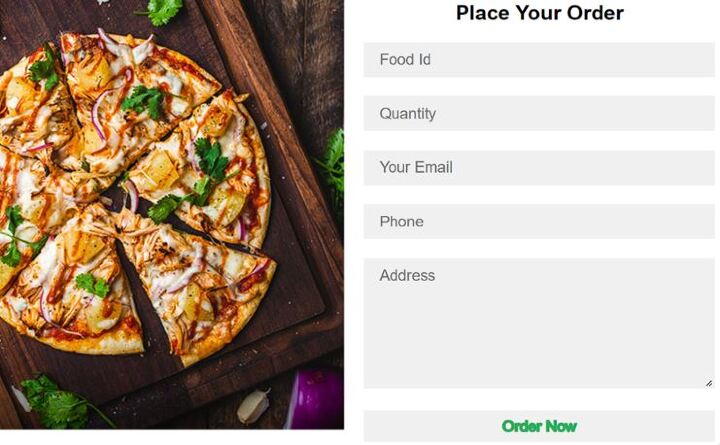
- 立即訂購頁面 - 網站應包含一個訂單表單,客戶可以透過該表單選擇他們的訂單,輸入送貨資訊並繼續進行訂單下單。
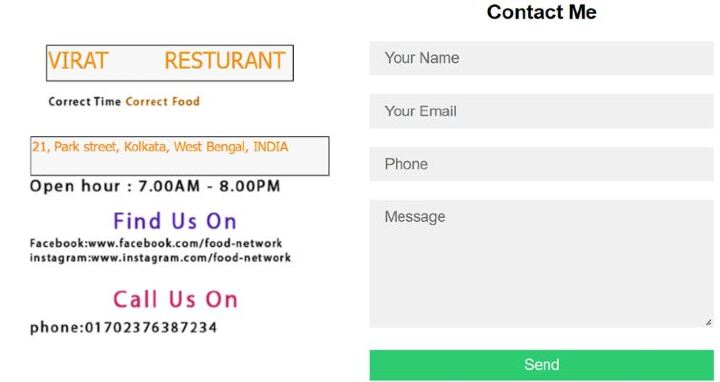
- 聯絡我們頁面 - 包括您餐廳的具體資訊,例如餐廳的街道地址、電話號碼和營業時間。您還可以包含一個聯絡頁面,在該頁面上可以有一個聯絡表單,用於任何型別的請求。
- 測試和最佳化 - 設計完網站後,建議您開發的網站應在不同的網路瀏覽器和不同的裝置上進行測試。
網站佈局:餐廳網站的不同頁面
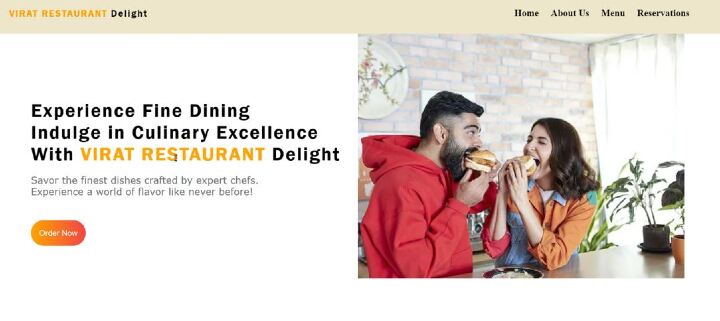
首頁
首頁應包含吸引人的高質量圖片、有關餐廳的簡短描述以及引導使用者線上訂購食物或預訂餐桌的 CTA 按鈕。
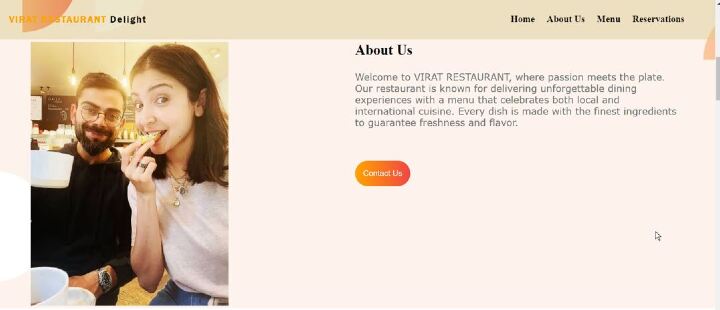
關於我們頁面
一個簡單且資訊豐富的頁面,描述餐廳、其目的以及可能在任何其他類似餐廳中找不到的東西。
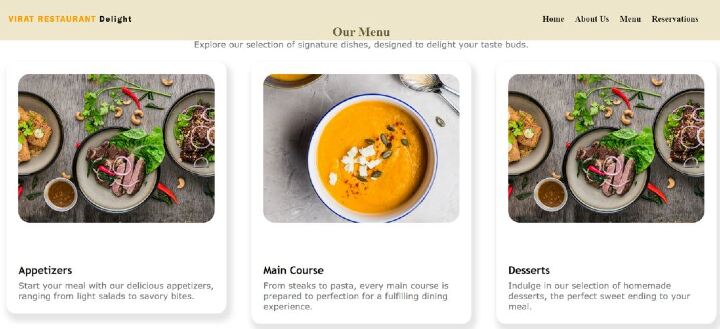
選單
在向您的客戶展示您的選單時,請確保您有清晰的選單項描述、價格和圖片。此頁面是您宣傳您的飯菜和菜餚最重要的頁面之一。
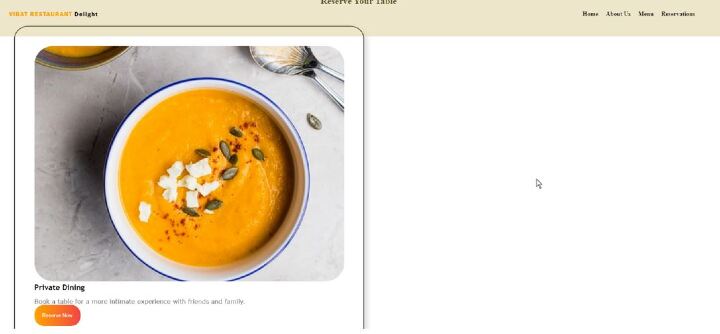
預訂頁面
一個引人入勝且易於填寫的表單,客戶可以透過該表單預訂餐桌。建立後,它應要求提供諸如日期、時間、客人人數、聯絡資訊等資訊。
立即訂購選項
一個訂單表單,使用者在其中輸入食物選擇、其聯絡方式和送貨資訊,並在網站上提交訂單。
聯絡我們頁面
始終新增一個包含電話號碼、電子郵件地址和餐廳地址的聯絡表單。客戶在聯絡工作人員詢問他們可能想到的任何問題時不應遇到任何挑戰。
設計響應式餐廳網站的 HTML 和 CSS 程式碼
以下是設計餐廳網站的原始碼(HTML 和 CSS)。
檔案:index.html
<!DOCTYPE html>
<html lang="en">
<head>
<meta charset="UTF-8">
<meta http-equiv="X-UA-Compatible" content="IE=edge">
<meta name="viewport" content="width=device-width, initial-scale=1.0">
<title>VIRAT RESTAURANT</title>
<link rel="stylesheet" href="./CSS/style.css">
</head>
<body>

<!-- Nav Section Start -->
<section class="navBar">
   <div class="topNav">
      <div class="logo">
         <a href="#welcome"><span>VIRAT RESTAURANT</span> Delight</a>
      </div>

      <div class="navItems">
         <a href="#welcome">Home</a>
         <a href="#about">About Us</a>
         <a href="#menu">Menu</a>
         <a href="#reservations">Reservations</a>
      </div>
   </div>
</section>

<!-- Nav Section End -->

<!-- Welcome Section Start -->

<section class="welcome" id="welcome">
   <div class="welcomeMain">
      <div class="welcomeLeft">
         <h1>Experience Fine Dining<br>Indulge in Culinary Excellence<br>With <span>VIRAT RESTAURANT</span> Delight</h1>

         <p>Savor the finest dishes crafted by expert chefs.<br>Experience a world of flavor like never before!</p>
         <button><a href="order.html">Order Now</a></button>
      </div>

      <div class="welcomeRight">
         <img src="./img/Group 8425.png" alt="Delicious Food">
      </div>
   </div>
</section>

<!-- Welcome Section End -->

<!-- About Section Start -->

<section class="about" id="about">

   <div class="aboutMain">
      <div class="aboutLeft">
         <img class="img-responsive" src="./img/Person Image.png" alt="Restaurant Owner">
      </div>

      <div class="aboutRight">
         <h1>About Us</h1>
         <p>Welcome to VIRAT RESTAURANT, where passion meets the plate. Our restaurant is known for delivering unforgettable dining experiences with a menu that celebrates both local and international cuisine. Every dish is made with the finest ingredients to guarantee freshness and flavor.</p>
         <button><a href="contact.html">Contact Us</a></button>
      </div>
   </div>

</section>

<!-- About Section End -->

<!-- Menu Section Start -->

<section class="recipies" id="menu">
   <div class="recipiesMain">
      <div class="recipiesHead">
         <h1 class="text-center">Our Menu</h1>
         <p class="text-center">Explore our selection of signature dishes, designed to delight your taste buds.</p>
      </div>

      <div class="recipieControl">
         <div class="recipiesBox">
            <div class="recBox">
               <img class="img-responsive" src="./img/Project Cover1.jpg" alt="Appetizers">

               <div class="imgDesc">
                  <h2>Appetizers</h2>
                  <p>Start your meal with our delicious appetizers, ranging from light salads to savory bites.</p>
               </div>
            </div>
         </div>

         <div class="recipiesBox">
            <div class="recBox">
               <img class="img-responsive" src="./img/Project Cover.png" alt="Main Course">

               <div class="imgDesc">
                  <h2>Main Course</h2>
                  <p>From steaks to pasta, every main course is prepared to perfection for a fulfilling dining experience.</p>
               </div>
            </div>
         </div>

         <div class="recipiesBox">
            <div class="recBox">
               <img class="img-responsive" src="./img/Project Cover1.jpg" alt="Desserts">

               <div class="imgDesc">
                  <h2>Desserts</h2>
                  <p>Indulge in our selection of homemade desserts, the perfect sweet ending to your meal.</p>
               </div>
            </div>
         </div>
      </div>
   </div>
</section>

<!-- Menu Section End -->

<!-- Status Bar Section Start -->

<section class="statusBar">
   <div class="statusMain">
      <div class="status1">
         <h1>5k+</h1>
         <p>Positive Reviews</p>
      </div>
      <div class="status2">
         <h1>1m</h1>
         <p>Happy Customers</p>
      </div>
      <div class="status3">
         <h1>100+</h1>
         <p>Signature Dishes</p>
      </div>
   </div>
</section>

<!-- Status Bar Section End -->

<!-- Food Section Start -->

<section class="foods" id="reservations">
   <div class="foodsMain">
      <div class="foodsHead">
         <h1 class="text-center">Reserve Your Table</h1>
      </div>

      <div class="foodArea">
         <div class="foodsControl">
            <div class="foodBox">
               <div class="foodContainerBox">
                  <img class="img-responsive" src="./img/Project Cover.png" alt="Pizza">
                  <div class="imgDesc">
                     <h2>Private Dining</h2>
                     <p>Book a table for a more intimate experience with friends and family.</p>
                     <button><a href="https://example.com/reserve.html">Reserve Now</a></button>
                  </div>
               </div>
            </div>

            <div class="foodsControl">
               <div class="foodBox">
                  <div class="foodContainerBox">
                     <img class="img-responsive" src="./img/Project Cover1.jpg" alt="Burger">
                     <div class="imgDesc">
                        <h2>Special Events</h2>
                        <p>Host your next event at Gourmet Delight and make it memorable.</p>
                        <button><a href="https://example.com/reserve.html">Reserve Now</a></button>
                     </div>
                  </div>
               </div>
            </div>
         </div>
      </div>
   </div>
</section>

<!-- Food Section End -->

<!-- Footer Section Start -->

<section class="footer">
   <h1 class="text-center"><span>VIRAT RESTAURANT</span> Delight</h1>
   <h3 class="text-center">@CopyRight 2024 | All Rights Reserved</h3>
</section>

<!-- Footer Section End -->

</body>
</html>
檔案:orders.htm
<!DOCTYPE html>
<html lang="en">
<head>
<meta charset="UTF-8">
<meta http-equiv="X-UA-Compatible" content="IE=edge">
<meta name="viewport" content="width=device-width, initial-scale=1.0">
<title>Order Food</title>
<style>
*{
   padding: 0;
   margin: 0;
   box-sizing: border-box;
   font-family: 'Quicksand', sans-serif;
}

body{
   height: 100vh;
   width: 100%;
}

.container{
   position: relative;
   width: 100%;
   height: 100%;
   display: flex;
   justify-content: center;
   align-items: center;
   padding: 20px 10px;

}

.contact-box{
   max-width: 850px;
   display: grid;
   grid-template-columns: repeat(2, 1fr);
   justify-content: center;
   align-items: center;
   text-align: center;
   background-color: #fff;
   box-shadow: 0px 0px 19px 5px rgba(0,0,0,0.19);
   border-radius: 2%;
}

.left{
   background:  no-repeat center;
   background-size: cover;
   height: 100%;
}

.right{
   padding: 5px 10px;
}

h2{
   position: relative;
   padding: 0 0 10px;
   margin-bottom: 10px;
}


.field{
   width: 100%;
   border: 2px solid rgba(0, 0, 0, 0);
   outline: none;
   background-color: rgba(230, 230, 230, 0.6);
   padding: 0.5rem 1rem;
   font-size: 1.1rem;
   margin-bottom: 22px;
   transition: .3s;
}

.field:hover{
   background-color: rgba(0, 0, 0, 0.1);
}

textarea{
   min-height: 150px;
}

.btn{
   width: 100%;
   padding: 0.5rem 1rem;
   /* background-color: #2ecc71; */
   color: #fff;
   font-size: 1.1rem;
   border: none;
   outline: green;
   cursor: pointer;
   transition: .3s;
   -webkit-text-stroke: #27ae60 2px;
}

.btn:hover{
   /* border: 2px solid green; */
   background-color: aliceblue;
}

.field:focus{
   border: 2px solid rgba(30,85,250,0.47);
   background-color: #fff;
}
</style>
</head>
<body>
<body>
   <div class="container">
      <div class="contact-box">
         <div class="left"><img src="./img/pizza.jpg" alt="" srcset=""></div>
         <div class="right">
            <h2>Place Your Order</h2>
            <input type="text" class="field" placeholder="Food Id">
            <input type="number" name="" class="field"placeholder="Quantity" id="">
            <input type="text" class="field" placeholder="Your Email">
            <input type="text" class="field" placeholder="Phone">
            <textarea placeholder="Address" class="field"></textarea>
            <button class="btn">Order Now</button>
         </div>
      </div>
   </div>
</body>
</body>
</html>
檔案:contact.html
<!DOCTYPE html>
<html lang="en">
<head>
<meta charset="UTF-8">
<meta http-equiv="X-UA-Compatible" content="IE=edge">
<meta name="viewport" content="width=device-width, initial-scale=1.0">
<title>Contact Me</title>
<style>
*{
   padding: 0;
   margin: 0;
   box-sizing: border-box;
   font-family: 'Quicksand', sans-serif;
}

body{
   height: 100vh;
   width: 100%;
   background-color: #f4f4f4;
}

.container{
   position: relative;
   width: 100%;
   height: 100%;
   display: flex;
   justify-content: center;
   align-items: center;
   padding: 20px 10px;
}

.contact-box{
   max-width: 850px;
   display: grid;
   grid-template-columns: repeat(2, 1fr);
   justify-content: center;
   align-items: center;
   text-align: center;
   background-color: #fff;
   box-shadow: 0px 0px 19px 5px rgba(0,0,0,0.19);
   border-radius: 2%;
}

.left{
   background: url('./img/contact.png') no-repeat center;
   background-size: cover;
   height: 100%;
}

.right{
   padding: 5px 10px;
}

h2{
   position: relative;
   padding: 0 0 10px;
   margin-bottom: 10px;
}

.field{
   width: 100%;
   border: 2px solid rgba(0, 0, 0, 0);
   outline: none;
   background-color: rgba(230, 230, 230, 0.6);
   padding: 0.5rem 1rem;
   font-size: 1.1rem;
   margin-bottom: 22px;
   transition: .3s;
}

.field:hover{
   background-color: rgba(0, 0, 0, 0.1);
}

textarea{
   min-height: 150px;
}

.btn{
   width: 100%;
   padding: 0.5rem 1rem;
   background-color: #2ecc71;
   color: #fff;
   font-size: 1.1rem;
   border: none;
   cursor: pointer;
   transition: .3s;
}

.btn:hover{
   background-color: #27ae60;
}

.field:focus{
   border: 2px solid rgba(30,85,250,0.47);
   background-color: #fff;
}
</style>
</head>
<body>
   <div class="container">
       <div class="contact-box">
          <div class="left"></div>
          <div class="right">
             <h2>Contact Me</h2>
             <form action="mailto:your-email@example.com" method="POST">
                <input type="text" class="field" placeholder="Your Name" name="name" required>
                <input type="email" class="field" placeholder="Your Email" name="email" required>
                <input type="tel" class="field" placeholder="Phone" name="phone" required>
                <textarea placeholder="Message" class="field" name="message" required></textarea>
                <button class="btn" type="submit">Send</button>
             </form>
          </div>
       </div>
   </div>
</body>
</html>
CSS 檔案(style.css)
/* Universal Start */

*{
   margin: 0;
   padding: 0;
   box-sizing: border-box;
   scroll-behavior: smooth;
}

.text-center{
   text-align: center;
}

.secondary{
   color: orange;
}

img-responsive{
   width: 100%;
}

h2{
   font-family:'Trebuchet MS', 'Lucida Sans Unicode', 'Lucida Grande', 'Lucida Sans', Arial, sans-serif;
}

p{
   font-family: Verdana, Geneva, Tahoma, sans-serif;
   color: gray;
}

button{
   color: #fff;
   padding: 2.5%;
   background-image: linear-gradient(to right, orange ,rgb(243, 70, 70));
   border-radius: 25px;
   cursor: pointer;
   border: transparent;
}

button:hover{
   background-image: linear-gradient(to left, orange ,rgb(243, 70, 70));
}

button a{
   text-decoration: none;
   color: #fff;
}

/* Universal End*/
/* <!-- --
----
------
--------
----------- --> */
/* <!-- Nav Section Start --> */

.navBar{
   position: sticky;
   top: 0;
   background-color: rgba(221, 205, 150, 0.5);
   padding-bottom: 1%;
 }

.topNav{
   display: flex;
   justify-content: space-between;
   padding: 2%;
   height: 10vh;
}

.navBar a{
   text-decoration: none;
   font-weight: 800;
}

.topNav .logo a{
   color: #111;
   font-weight: 900;
   letter-spacing: 0.1em;
   font-family: 'Franklin Gothic Medium', 'Arial Narrow', Arial, sans-serif;
}

.topNav .logo a span{
   color: orange;
}

.topNav .navItems{
   margin-right: 1%;
}

.topNav .navItems a{
   margin-right: 1em;
   color: #111;
}

.topNav .navItems a:hover{
   color: orange;
}

/* <!-- Nav Section End --> */
/* <!-- --
----
------
--------
----------- -- !> */
/* Welcome Section Start */

.welcomeMain{
   display: flex;
   /* border: 2px solid; */
   margin: 0 5%;
}

.welcomeMain .welcomeLeft{
   padding-top: 10%;
   width: 50%;
}

.welcomeMain .welcomeRight{
   width: 50%;
}

.welcomeMain .welcomeRight img{
   max-width: 100%;
   max-height: 80vh;
}

.welcomeLeft h1{
   font-size: 2em;
   padding-bottom: 3%;
   letter-spacing: 2px;
   font-weight: 800;
   font-family: 'Franklin Gothic Medium', 'Arial Narrow', Arial, sans-serif;
}

.welcomeLeft h1 span{
   color: orange;
}

.welcomeLeft p{
   color: gray;
   padding-bottom: 7%;
}

/* Welcome Section End */
/* <!-- --
----
------
--------
----------- -- !> */
/* About Section Start */

section.about{
   background-image: url('../img/7.png');
   background-repeat: no-repeat;
   /* background-position: center; */
   /* width: 100vw; */
   /* border: 2px solid; */
   background-size: cover;
}

.aboutMain{
   display: flex;
   /* border: 2px solid; */
   margin: 0 5%;
   margin-top: 10%;
}

.aboutMain .aboutLeft{
   width: 50%;
   margin-top: 10%;
}

.aboutMain .aboutRight{
   width: 50%;
   margin-top: 10%;
}

.aboutMain .aboutRight h1{
   padding-bottom: 4%;
}

.aboutMain .aboutRight p{
   padding-bottom: 10%;
}

.aboutMain .aboutLeft img {
   max-width: 100%;
   max-height: 80vh;
   /* width: 100px; */
}

/* About Section End */
/* <!-- --
----
------
--------
----------- -- !> */
/* Recipies Section Start */

.recipies{
   margin-top: 5%;
}

.recipieControl{
   display: flex;
}

.recBox{
   /* border: 2px solid; */
   padding: 5%;
   margin: 5%;
   box-shadow:5px 10px 10px 5px rgba(0, 0, 0, 0.1) ;
   border-radius: 4%;
}

.recBox img{
   max-width: 100%;
   margin-bottom: 20%;
}

/* Recipies Section End */
/* <!-- --
----
------
--------
----------- -- !> */
/* Status Bar Start */

.statusBar{
   /* border: 2px solid; */
   margin: 4% 2%;
   padding: 3%;
   box-shadow:10px 10px 10px 10px  rgba(0, 0, 0, 0.2) ;
   border-radius: 20px;
}

.statusMain{
   display: flex;
   justify-content: space-between;
}

/* Status Bar End */
/* <!-- --
----
------
--------
----------- -- !> */
/* Food Setcion Start */

.foods{
   margin-top: 5%;
}

.foodArea{
   display: flex;
}

.foodBox{
   /* border: 2px solid; */
   padding: 5%;
   margin: 5%;
   box-shadow:5px 10px 10px 5px rgba(0, 0, 0, 0.1) ;
   border-radius: 4%;
   border: 2px solid;
}

.foodBox img{
   max-width: 100%;
}

.imgDesc h2 {
   width: 100%;
   font-size: 20px;
   font-weight: 900;
   padding-bottom: 2%;
}


/* Food Setcion End */
/* footer Start */
section.footer{
   background-color: #111;
   margin-top: 5%;
}

.footer h1 span{
   color: orange;
}

.footer h1{
   color: gray;
   padding-top: 3%;
}

.footer h3{
   color: #fff;
   padding: 2% 0;
}

/* footer end */
輸出


更新於: 2024年10月3日
263 次檢視

廣告