
 資料結構
資料結構 網路
網路 關係型資料庫管理系統
 作業系統
作業系統 Java
Java MS Excel
 iOS
iOS HTML
HTML CSS
CSS Android
 Python
 C 程式設計
 C++
C++ C#
C# MongoDB
 MySQL
MySQL Javascript
 PHP
PHP 物理學
物理學 化學
化學 生物學
生物學 數學
數學 英語
英語 經濟學
經濟學 心理學
心理學 社會學
社會學 時尚研究
時尚研究 法律研究
法律研究CSS 中影像標記的跨瀏覽器解決方案
為了在所有瀏覽器中正確顯示影像標記,需要一個跨瀏覽器解決方案。在影像標記後面對齊文字時,有時會產生失真。為了實現統一的輸出,我們將用作標記的影像指定為背景影像並相應地對其進行對齊。
示例
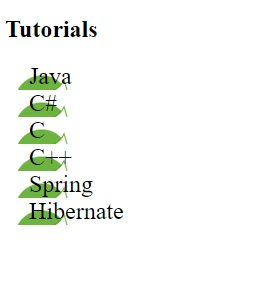
以下示例演示了對列表的樣式設定 -
<!DOCTYPE html>
<html>
<head>
<style>
ul{
   list-style-type: none;
   padding: 0px;
   margin: 0px;
   font-size: 1.5em;
}
ul li{
   background-image: url("https://tutorialspoint.tw/images/spring.png");
   background-repeat: no-repeat;
   background-position: 0px 5px;
   padding-left: 24px;
}
</style>
</head>
<body>
<h2>Tutorials</h2>
<ul>
<li>Java</li>
<li>C#</li>
<li>C</li>
<li>C++</li>
<li>Spring</li>
<li>Hibernate</li>
</ul>
</body>
</html>
輸出
這將產生以下輸出 -
示例
<!DOCTYPE html>
<html>
<head>
<style>
ul{
   box-shadow: inset 0 0 8px orange;
   list-style-type: none;
   padding: 12px;
   padding-left: 20px;
   margin: 2px;
   font-size: 1.35em;
}
ul li{
   background-image: url("https://tutorialspoint.tw/images/css.png");
   background-repeat: no-repeat;
   background-position: 0px 5px;
   padding-left: 40px;
   font-style: italic;
}
</style>
</head>
<body>
<p>Requirements:</p>
<ul>
<li>Tutorials</li>
<li>Interview QA</li>
<li>Quiz</li>
</ul>
</body>
</html>
輸出
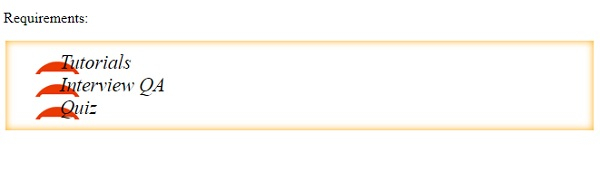
這將產生以下輸出 -

更新時間: 06-01-2020
133 次檢視

廣告