
 資料結構
資料結構 網路
網路 關係型資料庫管理系統
 作業系統
作業系統 Java
Java MS Excel
 iOS
iOS HTML
HTML CSS
CSS Android
 Python
 C 程式設計
 C++
C++ C#
C# MongoDB
 MySQL
MySQL Javascript
 PHP
PHP 物理學
物理學 化學
化學 生物學
生物學 數學
數學 英語
英語 經濟學
經濟學 心理學
心理學 社會學
社會學 時尚研究
時尚研究 法律研究
法律研究Arduino 中的 Cron 作業
Arduino 中的 **CronAlarms** 庫幫助您在 Arduino 中設定 **cron 作業**。如果您不知道 **cron 作業**,它們是計劃在固定時間間隔執行的任務。例如,每天午夜向伺服器傳送健康資料包。
要安裝此庫,請在庫管理器中搜索 **CronAlarms**,並安裝 Martin Laclaustra 的庫。
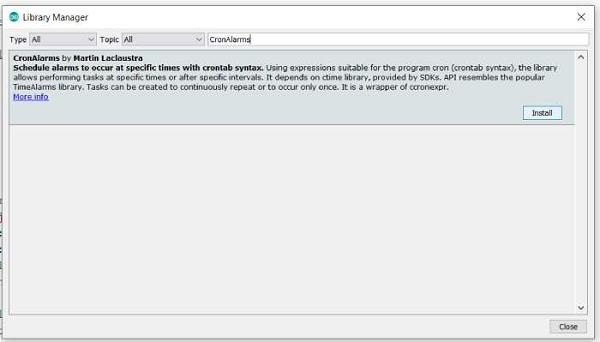
安裝完成後,轉到 - **檔案 → 示例 → CronAlarms**。
開啟 **CronAlarms_example**。如果您檢視示例,您會發現它們正在執行以下操作 -
使用 tm 結構(時間庫)將時間設定為 2011 年 1 月 1 日星期六上午 8:29:00。
設定 6 個 Cron 警報,包括每日、每週、幾秒鐘間隔,甚至一次性觸發的不重複警報。
實際上,一次性觸發的不重複警報會停用 2 秒的 cron。
在迴圈中,每秒列印當前時間。
**cron 建立語法** 為 -
CronID_t create(const char * cronstring, OnTick_t onTickHandler, bool isOneShot);
其中
**cronstring** 提供 cron 間隔,
**onTickHandler** 是在警報觸發時將呼叫的函式,
**isOneShot** 確定警報是重複還是一次性間隔。
此函式返回一個 **cron ID**,該 ID 可用於在程式碼的其他地方引用警報,如 10 秒警報中所做的那樣,使用 **Cron.free()** 停用 2 秒警報。
//creating the 2-second repeating alarm and 10-second single-shot alarm

// timer for every 2 seconds
id = Cron.create("*/2 * * * * *", Repeats2, false);

// called once after 10 seconds
Cron.create("*/10 * * * * *", OnceOnly, true);

// 2-second alarm function
void Repeats2() {
   Serial.println("2 second timer");
}

//disabling 2-second alarm within the 10-second alarm
void OnceOnly() {
   Serial.println("This timer only triggers once, stop the 2 second timer");
   // use Cron.free(id) to disable a timer and recycle its memory.
   Cron.free(id);
   // optional, but safest to "forget" the ID after memory recycled
   id = dtINVALID_ALARM_ID;
   // you can also use Cron.disable() to turn the timer off, but keep
   // it in memory, to turn back on later with Alarm.enable().
}
建立 CronAlarm 最重要的部分是 cron 字串。其語法為 -
"seconds minutes hours days_of_month month days_of_week"
對於這些中的任何一個,* 表示“所有值”。因此,
"0 30 8 * * *" → 表示每天 8:30:00 觸發。
"30 30 8 * * 6" → 表示每個星期六(day_of_week = 6)8:30:30 觸發。
表示式中的 / 表示間隔。
"*/15 * * * * *" → 表示每 15 秒。
如果在您的 Arduino 上執行此示例,序列監視器輸出將為 -
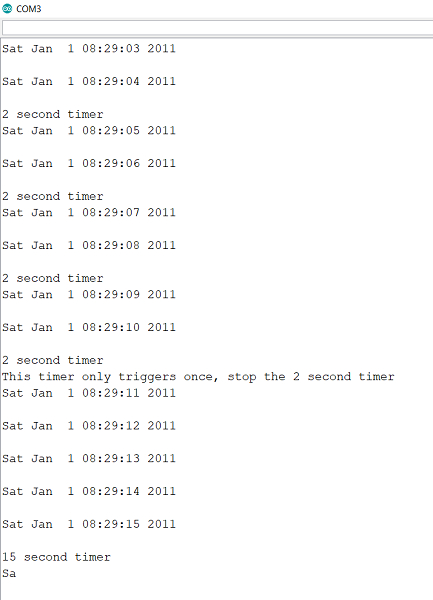
如您所見,警報按預期觸發。

2K+ 次檢視
