
 資料結構
資料結構 網路
網路 RDBMS
RDBMS 作業系統
作業系統 Java
Java MS Excel
 iOS
iOS HTML
HTML CSS
CSS Android
 Python
 C 程式設計
 C++
C++ C#
C# MongoDB
 MySQL
MySQL Javascript
 PHP
PHP 物理學
物理學 化學
化學 生物
生物 數學
數學 英語
英語 經濟學
經濟學 心理學
心理學 社會學
社會學 時裝研究
時裝研究 法律研究
法律研究在 Tkinter 中使用“不同”命令函式建立多個按鈕
可以使用**for **迴圈在 Tkinter 應用程式中初始化按鈕。假設我們要建立多個按鈕,每個按鈕都定義了不同的命令或操作。我們必須首先在 **for ** 迴圈內初始化按鈕。迭代器將返回將為其建立多個按鈕例項的物件。
範例
在此示例中,我們將定義一些按鈕,這些按鈕將具有不同的命令或功能。
#Import the required Libraries
from tkinter import *
from tkinter import ttk
#Create an instance of Tkinter frame
win = Tk()
#Set the geometry of the Tkinter frame
win.geometry("750x250")

#Define a function to update the entry widget
def entry_update(text):
   entry.delete(0,END)
   entry.insert(0,text)

#Create an Entry Widget
entry= Entry(win, width= 30, bg= "white")
entry.pack(pady=10)

#Create Multiple Buttons with different commands
button_dict={}
option= ["Python", "Java", "Go", "C++"]

for i in option:
   def func(x=i):
      return entry_update(x)

   button_dict[i]=ttk.Button(win, text=i, command= func)
   button_dict[i].pack()

win.mainloop()
輸出
執行以上程式碼將顯示包含一些按鈕的視窗。當我們單擊某個特定按鈕時,它將更新條目小元件中的訊息。
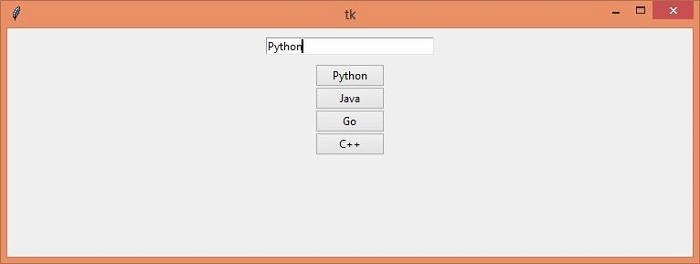
現在,單擊每個按鈕以檢視最終輸出。

更新日期:03-May-2021
7K+ 瀏覽

廣告